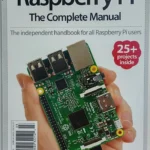
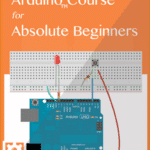
Electronics Cookbook: Practical Electronic Recipes with Arduino and Raspberry Pi – A Complete Hands-On Engineering Guide for Beginners and Professionals
Introduction
⚡ Electronics has become one of the most exciting engineering fields in the modern world. Whether you’re building a smart home, designing robots, creating IoT devices, or developing industrial automation systems, practical electronics knowledge is essential.
Unlike traditional theory-heavy textbooks, an Electronics Cookbook provides ready-to-use electronic “recipes” that engineers can immediately apply to real projects. By combining Arduino and Raspberry Pi, learners can quickly move from understanding electronic concepts to building working prototypes.
📚 This guide explains the fundamentals, compares the platforms, presents practical examples, highlights common mistakes, and demonstrates how engineers use these tools in professional environments.
Whether you’re:
🎓 Engineering Student
👨💻 Software Developer entering hardware
🔧 Electronics Hobbyist
🤖 Robotics Engineer
🌍 IoT Developer
🏭 Industrial Automation Engineer
this guide will help you develop practical electronics skills.


Background Theory
Evolution of Modern Electronics
Electronics has evolved through several generations.
| Generation | Main Technology | Example |
|---|---|---|
| Vacuum Tubes | Analog circuits | Radios |
| Transistors | Digital logic | Computers |
| Integrated Circuits | Microprocessors | PCs |
| Embedded Systems | Microcontrollers | Arduino |
| IoT Era | Connected Devices | Raspberry Pi + Cloud |
Today’s engineers rarely build circuits from individual transistors. Instead, they use programmable development boards that dramatically reduce development time.
Why Arduino and Raspberry Pi Changed Engineering
Before these platforms existed:
❌ Electronics required expensive laboratory equipment.
⚡ Programming embedded systems was difficult.
❌ Learning hardware required professional experience.
Today:
✅ Affordable hardware
✅ Open-source software
⚡ Thousands of tutorials
✅ Massive online community
✅ Rapid prototyping
Definition
An Electronics Cookbook is a practical engineering reference containing ready-to-use electronic circuit designs, programming examples, wiring instructions, troubleshooting methods, and tested engineering solutions.
Rather than teaching only theory, cookbook-style learning focuses on:
- 🛠 Building
- 🔬 Experimenting
- 💡 Solving problems
- 🚀 Creating real products
What is Arduino?
Arduino is an open-source microcontroller platform designed to control sensors, motors, displays, LEDs, relays, and many electronic components.
Characteristics include:
- Simple programming
- Low power consumption
- Real-time control
- Hundreds of expansion shields
- Excellent for embedded systems
What is Raspberry Pi?
Raspberry Pi is a small single-board computer capable of running Linux.
Unlike Arduino, it can:
- Run desktop applications
- Process images
- Connect to Wi-Fi
- Host websites
- Execute AI applications
- Support multiple programming languages
Understanding the Electronics Development Workflow



Step 1 — Define the Engineering Problem
Examples include:
- Temperature monitoring
- Home automation
- Robot navigation
- Plant watering
- Energy monitoring
Good engineering starts with identifying the problem.
Step 2 — Select the Right Hardware
Questions engineers ask:
- Does the project require Wi-Fi?
- Is battery operation needed?
- Is high processing power required?
- How many sensors will be connected?
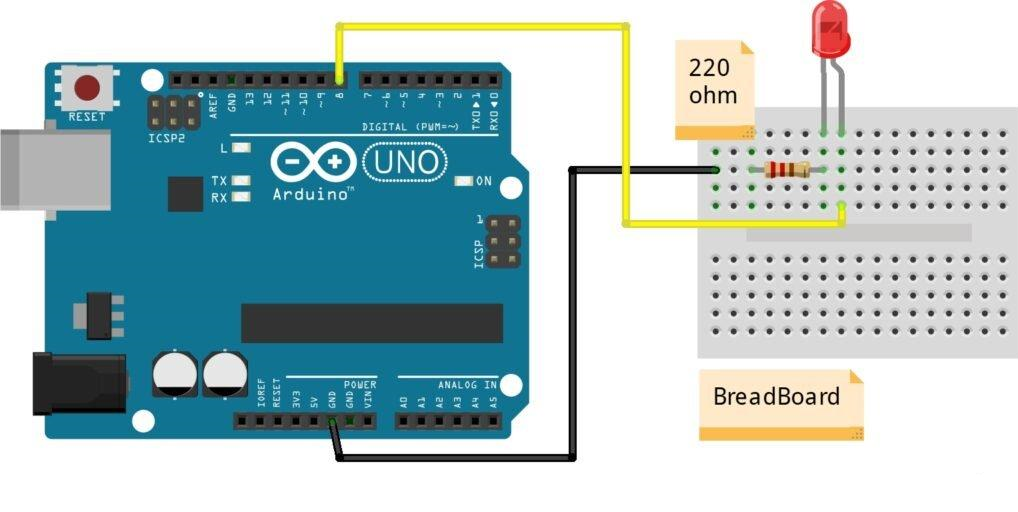
Step 3 — Build the Circuit
Typical components include:
- Breadboard
- Resistors
- LEDs
- Sensors
- Capacitors
- Power supply
- Jumper wires
Always double-check wiring before powering the circuit.
Step 4 — Write the Software
Arduino uses sketches written in C/C++.
Typical workflow:
- Create code
- Compile
- Upload
- Test
- Debug
- Improve
Step 5 — Test Every Component
Instead of testing the entire system immediately:
✔ Test LED
✔ Test sensor
⚡ Test communication
✔ Test power
✔ Test output
This modular approach reduces debugging time.
Step 6 — Optimize
Professional engineers improve:
- Power consumption
- Processing speed
- Memory usage
- Reliability
- Safety
Arduino vs Raspberry Pi Comparison
| Feature | Arduino | Raspberry Pi |
|---|---|---|
| Type | Microcontroller | Single-board computer |
| Operating System | None | Linux |
| Startup Time | Instant | Around 20–40 seconds |
| Programming | C/C++ | Python, C++, Java, Go, Rust |
| GPIO | Excellent | Excellent |
| AI Applications | Limited | Excellent |
| Power Usage | Very Low | Higher |
| Real-Time Control | Excellent | Moderate |
| Multimedia | No | Yes |
| Best Use | Embedded control | Smart computing |
Electronic System Architecture


Basic Embedded System Diagram
| Block | Purpose |
|---|---|
| Sensor | Collects data |
| Arduino | Processes signals |
| Output Device | Displays result |
| Communication | Wi-Fi/Bluetooth |
| Power Supply | Provides energy |
Typical Arduino Project Components
| Component | Function |
|---|---|
| Arduino Uno | Main controller |
| Breadboard | Prototype circuit |
| LED | Indicator |
| Resistor | Current limiting |
| Sensor | Input |
| Push Button | User interaction |
| Jumper Wires | Connections |
Raspberry Pi Smart System
| Module | Purpose |
|---|---|
| Raspberry Pi | Computing |
| Camera | Vision |
| Display | User Interface |
| GPIO | Hardware control |
| Wi-Fi | Networking |
| Linux | Operating System |
Practical Electronics Recipes
Recipe 1 — Automatic Night Light
Components:
- Arduino
- LDR Sensor
- LED
- Resistor
Operation:
The sensor measures ambient light. When darkness is detected, Arduino switches on the LED automatically.
Applications:
- Street lighting
- Garden lights
- Smart homes
Recipe 2 — Temperature Monitoring
Components:
- Raspberry Pi
- Temperature Sensor
- LCD Display
The Raspberry Pi continuously reads temperature values and displays them on screen while storing historical data.
Applications:
- Greenhouses
- Weather stations
- Laboratories
Recipe 3 — Motion Detection Alarm
Components:
- PIR Sensor
- Arduino
- Buzzer
- LED
When movement is detected:
- Sensor activates
- Arduino processes signal
- Alarm sounds
- LED flashes
Recipe 4 — Smart Irrigation
Uses:
- Soil Moisture Sensor
- Relay
- Water Pump
- Arduino
The system waters plants only when soil moisture falls below a preset level.
Benefits:
💧 Saves water
🌱 Improves crop growth
⚡ Reduces manual labor
Examples
Example 1
Automatic room lighting.
Inputs:
- Motion Sensor
Outputs:
- LED Lamp
Example 2
Smart parking counter.
Sensors count vehicles entering and leaving a parking area.
Example 3
Digital weather station.
Measures:
- Temperature
- Humidity
- Atmospheric pressure
Example 4
Industrial conveyor monitoring.
Arduino tracks motor speed and detects faults before equipment failure.
Real-World Applications
Modern engineers use Arduino and Raspberry Pi in nearly every engineering discipline.
Industrial Automation
🏭 Factory monitoring
⚡ Conveyor systems
🏭 Quality inspection
Internet of Things (IoT)
🌍 Smart agriculture
⚡ Smart buildings
🌍 Environmental monitoring
Robotics
🤖 Autonomous robots
⚡ Robot arms
🤖 Mobile robots
Healthcare
❤️ Patient monitoring
⚡ Medical sensors
❤️ Wearable devices
Renewable Energy
☀ Solar tracking
🌬 Wind turbine monitoring
🔋 Battery management
Smart Homes
🏠 Lighting automation
⚡ Smart locks
🏠 Security cameras
🏠 Voice assistants
Common Mistakes
❌ Forgetting current-limiting resistors.
LEDs can burn instantly.
❌ Incorrect GPIO wiring.
Wrong connections may damage boards.
❌ Poor power supplies.
Voltage instability causes random resets.
❌ Ignoring grounding.
A missing common ground prevents proper communication.
❌ Uploading incorrect code versions.
Always verify firmware before deployment.
❌ Not backing up working programs.
Version control saves valuable development time.
Challenges & Solutions
| Challenge | Solution |
|---|---|
| Circuit not working | Verify wiring |
| Sensor unstable | Add filtering |
| Random resets | Improve power supply |
| Slow performance | Optimize code |
| Noise | Shield cables |
| Communication failure | Check protocols |
Case Study
Smart Greenhouse Automation
An agricultural engineering team designed a greenhouse automation system.
Hardware:
- Raspberry Pi
- Arduino
- Soil moisture sensors
- Humidity sensors
- Temperature sensors
- Water pumps
- Wi-Fi
Workflow:
- Sensors collect environmental data.
- Arduino performs real-time control.
- Raspberry Pi stores and analyzes information.
- Mobile dashboard displays live conditions.
- Pumps activate automatically when required.
Results:
✅ 35% lower water consumption
⚡ Increased crop yield
✅ Reduced labor costs
✅ Continuous remote monitoring
This project demonstrates how combining Arduino’s real-time capabilities with Raspberry Pi’s computing power creates efficient, scalable automation solutions.
Essential Tips
💡 Start with simple LED projects before tackling complex systems.
💡 Learn to use a multimeter for voltage, current, and continuity testing.
⚡ Build one module at a time to simplify troubleshooting.
💡 Label wires and connectors to avoid confusion.
💡 Keep circuit diagrams updated as designs evolve.
⚡ Use libraries from trusted sources to reduce software errors.
💡 Document every project with notes, photos, and versioned code.
💡 Practice soldering only after mastering breadboard prototyping.
⚡ Always disconnect power before modifying hardware connections.
💡 Combine Arduino and Raspberry Pi when projects require both real-time control and advanced computing.
Frequently Asked Questions
Is Arduino better than Raspberry Pi?
Neither is universally better. Arduino excels at deterministic, real-time hardware control, while Raspberry Pi is better for applications requiring an operating system, networking, multimedia, or AI.
Can Arduino and Raspberry Pi work together?
Yes. They are often connected via USB, UART, I²C, or SPI, allowing Arduino to handle hardware timing while Raspberry Pi manages data processing and user interfaces.
Which programming language should beginners learn first?
For Arduino, start with C/C++. For Raspberry Pi, Python is an excellent choice due to its readability and extensive ecosystem.
Is electronics difficult for beginners?
No. With structured practice, starting from simple circuits like blinking LEDs and gradually progressing to sensors and communication modules, most learners build confidence quickly.
What tools should every electronics beginner own?
A basic toolkit should include:
- Breadboard
- Jumper wires
- Digital multimeter
- Soldering iron
- Wire cutter
- Power supply
- Assorted resistors and LEDs
Can these platforms be used in commercial products?
Yes. While development boards are ideal for prototyping, many commercial products are based on Arduino-compatible microcontrollers or Raspberry Pi Compute Modules after proper engineering validation.
Which platform is better for IoT?
Both are valuable. Arduino is ideal for low-power sensing and control, while Raspberry Pi is better for gateways, cloud communication, edge computing, and local data processing.
Conclusion
🚀 An Electronics Cookbook centered on Arduino and Raspberry Pi transforms electronics education from abstract theory into practical engineering experience. By following proven “recipes,” learners can rapidly design, prototype, test, and deploy real electronic systems across robotics, IoT, industrial automation, healthcare, renewable energy, and smart homes.
Mastering both platforms provides a powerful combination: Arduino delivers reliable real-time control of sensors and actuators, while Raspberry Pi offers the computing power needed for networking, data analysis, artificial intelligence, and user interfaces. Together, they form one of the most versatile toolsets available to today’s engineers.
Whether you’re a student building your first circuit, a researcher developing innovative prototypes, or a professional engineer creating commercial solutions, continuous experimentation, careful testing, and thorough documentation will help you turn ideas into dependable electronic systems. With curiosity, practice, and the right engineering mindset, every project becomes another step toward mastering modern embedded electronics. ⚡🔧🤖