Think Python 3rd Edition: How to Think Like a Computer Scientist — A Practical Guide to Python Programming and Computational Thinking
Introduction 🚀🐍
Learning Python is not only about memorizing commands, functions, or programming syntax. The deeper goal is learning how to think computationally—how to break a complex problem into manageable parts, recognize patterns, design algorithms, test ideas, and improve solutions.
Think Python: How to Think Like a Computer Scientist is widely associated with this approach to programming education. Rather than treating programming as a collection of isolated commands, the learning philosophy focuses on developing a systematic way to reason about problems.
For engineering students and professionals, this approach is especially valuable. Python can be used for data analysis, automation, simulation, scientific computing, artificial intelligence, testing, and many other technical applications. However, powerful software begins with clear thinking.
This article explores the core ideas behind Think Python, explains computational thinking from beginner to advanced levels, and demonstrates how Python concepts can be applied to engineering and professional problems.


Python provides a relatively readable environment in which learners can concentrate on logic and problem solving instead of becoming overwhelmed by complicated syntax. 🧠💻
The central question is simple:
How can a human problem be transformed into instructions that a computer can execute reliably?
That question connects programming, engineering, mathematics, science, and modern artificial intelligence.
Background Theory 🧠
From Programming Syntax to Computational Thinking
Traditional programming education can sometimes begin with statements such as variables, loops, and functions. These concepts are important, but knowing their syntax does not automatically make someone an effective programmer.
Computational thinking goes deeper.
It involves:
- Breaking large problems into smaller tasks
- Identifying important information
- Ignoring unnecessary complexity
- Recognizing repeated patterns
- Designing procedures
- Testing assumptions
- Finding and correcting errors
- Improving solutions
For example, an engineer might receive thousands of sensor readings from a machine. A beginner may immediately ask, “Which Python command should I use?”
A computational thinker asks:
What information do I need? What constitutes an abnormal reading? How should the data be organized? What process should identify the abnormal conditions? How should the result be validated?
That change in thinking is one of the most important lessons associated with learning Python effectively.
Why Python Works Well for Learning
Python has a relatively clean syntax and supports multiple programming styles. This makes it suitable for beginners while remaining powerful enough for professional applications.
A learner can progress from:
variables → conditions → loops → functions → data structures → modules → object-oriented programming → data analysis → automation → scientific computing
Each concept builds upon earlier ideas.
The Engineering Perspective ⚙️
Engineering is fundamentally about transforming requirements into reliable solutions.
Programming follows a similar pattern:
Problem → Analysis → Design → Implementation → Testing → Improvement
This makes computational thinking highly relevant to mechanical, electrical, civil, software, biomedical, aerospace, and industrial engineering.
Definition 📘
What Is Think Python?
Think Python can be understood as a programming-learning approach centered on developing the reasoning skills needed to become an effective computer scientist or programmer.
Instead of simply asking learners to remember Python commands, the approach emphasizes concepts such as:
- Variables
- Expressions
- Functions
- Conditional execution
- Iteration
- Data structures
- File processing
- Object-oriented concepts
- Debugging
- Program design
- Algorithmic thinking
The important distinction is that Python becomes the tool for expressing ideas, rather than the final objective itself.
What Does “Think Like a Computer Scientist” Mean?
It does not mean thinking exactly like a machine.
It means developing habits that help you construct precise solutions.
A computer needs instructions that are sufficiently clear to execute. Humans frequently rely on assumptions and context, while programs cannot safely depend on vague instructions.
Therefore, programming teaches precision.
For example:
Human instruction:
“Process the engineering data and find unusual values.”
Computational instruction:
“Load the measurements, validate missing values, apply the defined condition for abnormal readings, record the detected events, and produce a report.”
The second version is closer to an algorithm.
Step-by-Step Learning Process 🛠️🐍
Step 1: Understand the Problem
Before writing Python code, identify exactly what needs to be solved.
Ask:
- What is the input?
- What should the output contain?
- What constraints exist?
- What assumptions are being made?
- What can go wrong?
This stage prevents a common programming mistake: writing code before understanding the problem.
Step 2: Break the Problem Apart
Large problems become easier when divided into smaller components.
For example, an engineering monitoring system might contain:
- Data collection
- Data validation
- Data cleaning
- Analysis
- Detection
- Reporting
- Visualization
Each component can then be developed and tested independently.


Step 3: Identify the Data
Python programs work with information.
You need to determine whether your data should be represented as:
- Numbers
- Text
- Lists
- Dictionaries
- Tuples
- Sets
- Objects
- Files
- Database records
Choosing an appropriate representation makes later operations easier.
Step 4: Design the Logic
Now determine what the program should do.
A useful strategy is to describe the process in ordinary language before writing code.
For example:
Receive data → check validity → categorize readings → analyze results → generate report
This can then be translated into Python structures.
Step 5: Build Small Components
Functions are particularly useful because they allow a large problem to be separated into reusable pieces.
Instead of creating one huge program, you might have functions responsible for:
- Loading information
- Cleaning information
- Processing information
- Generating results
This makes programs easier to understand and maintain.
Step 6: Test Continuously 🔍
Do not wait until the entire program is finished.
Test individual components as you develop them.
Try:
- Normal data
- Empty data
- Unexpected data
- Missing information
- Extremely large values
- Incorrect input
Good testing exposes weaknesses early.
Step 7: Debug Systematically
When a program fails, avoid randomly changing lines.
Instead:
Observe → Reproduce → Isolate → Understand → Fix → Test
This turns debugging into an engineering process.
Step 8: Improve the Design
A program that works is not necessarily a good program.
Ask:
- Is it readable?
- Can another engineer understand it?
- Can it be reused?
- Is it efficient enough?
- Is the input validated?
- Are errors handled?
- Can it be tested easily?
This is where beginner programming starts becoming professional software engineering.
Comparison: Memorizing Python vs Thinking Computationally ⚖️
| Learning Approach | Main Focus | Typical Result |
|---|---|---|
| Syntax memorization | Commands and keywords | Can reproduce examples |
| Copying examples | Existing solutions | Limited adaptability |
| Trial and error | Random experimentation | Unstable solutions |
| Computational thinking | Problem decomposition | Flexible problem solving |
| Algorithmic thinking | Procedures and logic | More predictable programs |
| Engineering approach | Reliability and validation | Professional-quality solutions |
Beginner Approach
A beginner might think:
“I need to find a Python command that solves this.”
Intermediate Approach
An intermediate programmer might think:
“Which data structure and programming technique are appropriate?”
Advanced Approach
An advanced programmer asks:
“What architecture, algorithm, validation strategy, testing approach, and maintenance model will produce the most reliable solution?”
That progression represents intellectual growth, not merely increasing knowledge of Python syntax.
Diagrams, Concepts, and Practical Structure 📊
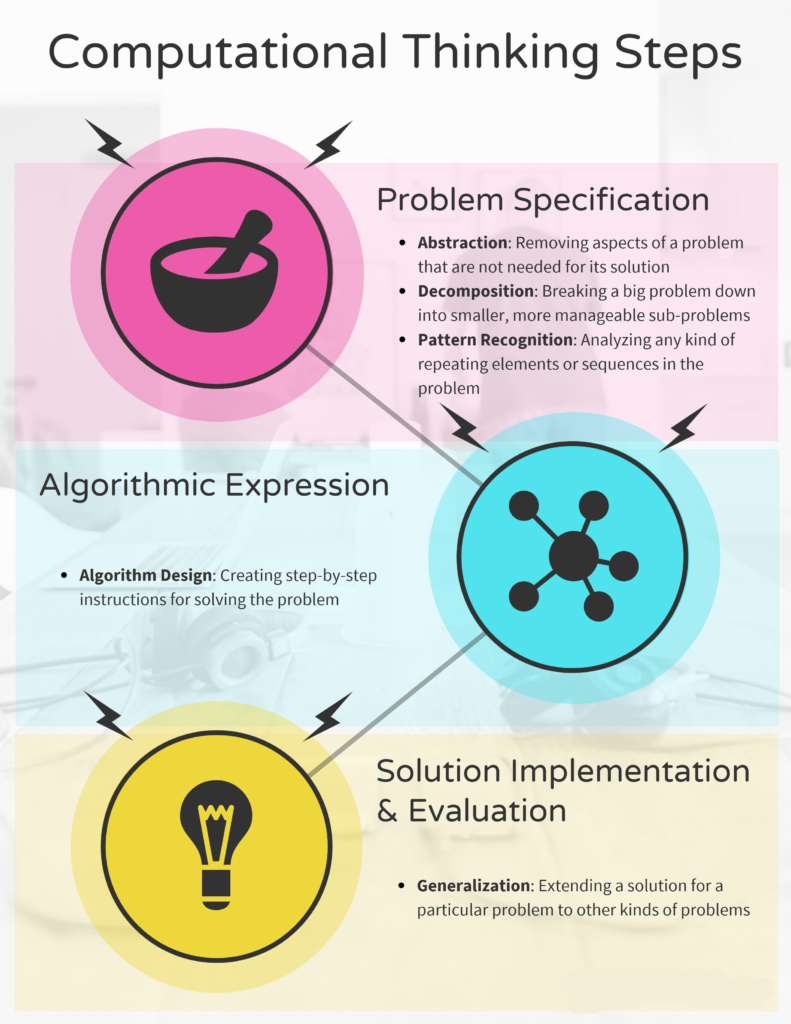
The Computational Thinking Cycle


A useful conceptual cycle is:
Problem
⬇️
Decomposition
⬇️
Pattern Recognition
⬇️
Abstraction
⬇️
Algorithm Design
⬇️
Python Implementation
⬇️
Testing
⬇️
Improvement
⬇️
Solution
This cycle can be repeated whenever the problem becomes more complicated.
Core Python Concepts
| Concept | Purpose | Engineering Relevance |
|---|---|---|
| Variable | Stores information | Measurements and parameters |
| Conditional | Makes decisions | Safety and classification logic |
| Loop | Repeats operations | Processing sensor records |
| Function | Organizes reusable logic | Engineering calculations and workflows |
| List | Stores ordered data | Measurement collections |
| Dictionary | Associates keys with values | Configuration and structured records |
| File handling | Reads and writes information | Reports and datasets |
| Module | Organizes reusable code | Large engineering applications |
| Class | Represents structured entities | Equipment, components, systems |
Abstraction as a Powerful Tool
Abstraction means focusing on what matters while hiding unnecessary implementation details.
For example, an engineer using a Python function for data filtering does not always need to know every internal operation of that function.
The function becomes an interface:
Input → Processing → Output
This idea is fundamental to large software systems.
Examples💡
Example 1: Temperature Monitoring
Imagine a manufacturing facility with temperature sensors.
A Python system could:
- Read sensor measurements.
- Check whether readings are valid.
- Identify unusually high temperatures.
- Record the affected equipment.
- Generate an alert.
- Create a daily report.
The important lesson is not the Python syntax.
The important lesson is how a real-world monitoring problem becomes a sequence of computational operations.
Example 2: Engineering File Processing
An engineering team may receive hundreds of CSV files.
A Python workflow could automatically:
- Locate files
- Read their contents
- Validate columns
- Remove invalid records
- Combine datasets
- Generate summary reports
- Save processed files
Automation reduces repetitive manual work and improves consistency.
Example 3: Laboratory Data
A researcher may collect experimental measurements.
Python can help organize the workflow:
Raw data → validation → cleaning → analysis → visualization → report
The same computational structure can be adapted to many scientific disciplines.
Real-World Applications 🌍⚙️
Mechanical Engineering
Python can support:
- Machine monitoring
- Experimental data processing
- Predictive maintenance
- CAD-related automation
- Manufacturing analytics
- Quality control
Electrical Engineering
Applications include:
- Signal processing
- Power-system analysis
- Circuit-data processing
- Embedded-system workflows
- Energy monitoring
- Automated testing
Civil Engineering
Python can assist with:
- Structural data analysis
- Construction project data
- Geographic information processing
- Traffic analysis
- Environmental monitoring
- Infrastructure inspection
Data Science and Artificial Intelligence 🤖
Computational thinking is even more important in AI.
Before selecting a machine-learning model, professionals need to understand:
What is the problem? → What data is available? → Is the data reliable? → What outcome is required? → How will the system be evaluated?
Python then provides an ecosystem for implementing the solution.
Common Mistakes ⚠️
Starting With Code Too Early
Writing code immediately can lead to confusion.
Better approach: define the problem first.
Creating Extremely Long Programs
Large blocks of code are difficult to test and maintain.
Better approach: divide the program into meaningful functions and modules.
Ignoring Input Validation
Real-world data is rarely perfect.
Files may contain missing fields, unexpected values, duplicates, or incorrect formats.
Better approach: validate data before processing it.
Treating Errors as Failures
Errors are valuable information during development.
A good programmer learns to interpret error messages and investigate the underlying cause.
Overcomplicating Simple Problems
Advanced techniques are not always better.
A simple, readable solution is often preferable to an unnecessarily sophisticated design.
Depending Too Heavily on Copy-Paste
Copying code can produce short-term results but weakens understanding.
Better approach: understand why each component exists.
Challenges and Solutions 🔧
| Challenge | Why It Happens | Practical Solution |
|---|---|---|
| Programming anxiety | Too many new concepts | Learn incrementally |
| Syntax errors | Small formatting mistakes | Read error messages carefully |
| Logic errors | Program runs incorrectly | Test expected behavior |
| Large projects | Poor organization | Use functions and modules |
| Messy datasets | Real-world data is imperfect | Build validation and cleaning |
| Difficult debugging | Too many possible causes | Reproduce and isolate the issue |
| Slow programs | Inefficient processing | Profile and optimize important sections |
| Poor maintainability | Unclear design | Use meaningful names and documentation |
Handling Complexity
When a project becomes difficult, don’t immediately add more code.
Step backward.
Ask:
Can the problem be divided further?
Often, complexity becomes manageable after decomposition.
Case Study: Python for Predictive Equipment Monitoring 🏭
The Problem
Consider an industrial facility with multiple machines.
Each machine produces operational information such as temperature, vibration, operating status, and maintenance events.
The engineering team wants to identify equipment that may require inspection.
The Computational Design
The project can be divided into several stages:
Stage 1 — Collection
Gather machine records from available sources.
Stage 2 — Validation
Check whether measurements and records are complete and reasonable.
Stage 3 — Organization
Group information by machine and time period.
Stage 4 — Analysis
Look for patterns associated with abnormal operation.
Stage 5 — Alerting
Identify equipment requiring engineering attention.
Stage 6 — Reporting
Produce understandable reports for maintenance personnel.
Why Computational Thinking Matters
Python is useful here, but Python itself is not the main achievement.
The real achievement is converting a complicated industrial problem into manageable computational components.
The same reasoning could later be applied to:
- Building monitoring
- Aircraft systems
- Renewable-energy equipment
- Laboratory instruments
- Manufacturing lines
- Transportation infrastructure
This illustrates why computational thinking remains useful even when programming languages or software platforms change.
Essential Tips for Learning Think Python Effectively 🎯
Build Small Projects
Do not learn programming exclusively through theory.
Create small applications such as:
- Unit converters
- File organizers
- Data validators
- Simple monitoring tools
- Engineering report generators
- Basic simulations
Explain Your Code
If you cannot explain what a section does, you may not fully understand it.
Try describing every major component in plain English.
Practice Debugging
Do not avoid errors.
Use them as learning opportunities.
Learn Concepts Before Libraries
Libraries are extremely powerful, but understanding programming fundamentals makes them much easier to use correctly.
Read Other People’s Code
Reading well-structured programs exposes you to different ways of thinking.
Refactor Your Old Projects
Return to an older project after several weeks.
Ask how you would design it differently today.
This is an excellent way to measure improvement.
Think Before Searching
Online resources are valuable, but try to reason about the problem before looking for a ready-made solution.
The objective is not simply to obtain code.
The objective is to develop problem-solving ability. 🧠
FAQs ❓
Is Think Python suitable for beginners?
Yes. Its conceptual approach can be especially useful for beginners because it encourages learners to understand programming ideas rather than simply memorize syntax.
Do I need advanced mathematics to learn Python?
No. Basic mathematical reasoning can be useful for engineering and scientific applications, but learning fundamental Python programming does not require advanced mathematics.
Is Think Python useful for engineering students?
Absolutely. Engineers frequently work with data, automation, modeling, testing, and repetitive computational tasks. Computational thinking provides a foundation for solving these problems systematically.
Can Think Python help with artificial intelligence?
Yes. AI development requires much more than knowing a machine-learning library. Understanding data, algorithms, functions, debugging, abstraction, and program structure provides an important foundation for AI work.
Should I memorize Python syntax?
You should become familiar with common syntax, but memorizing every command is unnecessary. Professional programmers regularly use documentation and references.
The more important skill is knowing what you want the program to accomplish and how to structure the solution.
How long does it take to learn Python?
There is no universal timeline. Basic programming concepts can be learned relatively quickly, while professional proficiency requires continuous practice through increasingly complex projects.
What should I learn after Python fundamentals?
Depending on your goals, you could move toward:
- Data analysis
- Scientific computing
- Web development
- Automation
- Machine learning
- Artificial intelligence
- Computer vision
- Engineering simulation
- Software development
Is computational thinking useful outside programming?
Yes. Computational thinking can improve problem solving in engineering, research, business, science, project management, and many other fields.
Conclusion 🚀
Think Python: How to Think Like a Computer Scientist represents a valuable programming philosophy: learning to program is fundamentally an exercise in learning how to solve problems systematically.
Python provides the language, but computational thinking provides the mindset.
The most important skills are not simply remembering keywords or reproducing code examples. They include the ability to:
Understand → Decompose → Abstract → Design → Implement → Test → Debug → Improve
For beginners, this approach creates a stronger foundation than syntax memorization alone. For experienced engineers, it provides a disciplined way to transform complicated technical requirements into reliable software solutions.
As Python continues to support data science, automation, artificial intelligence, scientific computing, and engineering applications, the ability to think computationally becomes increasingly valuable.
🐍 Learn Python.
🧠 Develop computational thinking.
⚙️ Solve engineering problems systematically.
🚀 Turn ideas into reliable computational solutions.