SQL: The Practical Guide to Master Relational Databases, SQL Syntax, and Sublanguages for Effective Database Management
Introduction
Modern engineering systems generate enormous amounts of information every second. Websites store customer accounts, industrial systems record sensor readings, financial applications process transactions, and engineering organizations maintain thousands of technical records. Behind many of these systems is a relational database, and one of the most important languages used to communicate with it is SQL (Structured Query Language). 🗄️⚙️
SQL provides a practical way to create databases, organize information, retrieve records, update data, control access, and manage transactions. Although SQL is approachable for beginners, it also contains advanced capabilities that make it valuable to professional software engineers, data analysts, database administrators, researchers, and engineering teams.


The real strength of SQL comes from its relationship with the relational database model. Instead of treating information as an unstructured collection of files, relational databases organize information into tables and connect those tables through logical relationships.
For students, learning SQL develops an important foundation for data management. For professionals, strong SQL skills can improve reporting, application performance, troubleshooting, analytics, and database reliability. 🚀


This practical guide explores the theory behind relational databases, SQL syntax, SQL sublanguages, database design, common mistakes, optimization strategies, and real-world engineering applications.
Background Theory
The relational database concept
A relational database stores information using tables. Each table contains rows and columns.
A table can represent an entity such as:
- Customers
- Employees
- Products
- Orders
- Engineering projects
- Machines
- Sensors
- Materials
- Inventory items
A row normally represents one record, while a column represents a particular attribute.
For example, an engineering database could contain a Projects table with information such as project identification, project name, location, engineer, status, and completion date.
Relationships between tables
The key feature of relational databases is that tables can be connected.
A customer may have multiple orders. A project may contain multiple inspections. A machine may produce thousands of sensor records.
Relationships reduce unnecessary duplication and allow information to be organized into logical structures.
Keys and integrity
Relational databases commonly use primary keys to uniquely identify records.
A foreign key connects a record in one table to a related record in another table.
These concepts help maintain referential integrity, ensuring that relationships between records remain logically valid.
Definition
What is SQL?
SQL, or Structured Query Language, is a standardized language used to interact with relational database management systems (RDBMSs).
SQL can be used to:
- Create databases and tables
- Insert information
- Retrieve information
- Modify existing records
- Delete records
- Define relationships
- Control permissions
- Manage transactions
- Aggregate and analyze data
- Create views
- Develop stored procedures in supported systems
Popular relational database systems include:
- PostgreSQL
- MySQL
- Microsoft SQL Server
- Oracle Database
- SQLite
- MariaDB
Although these platforms use SQL, their implementations are not always identical. ⚠️
SQL versus a database management system
SQL is the language.
An RDBMS is the software system that stores and manages the database.
Think of SQL as the communication language between an application or user and the database engine.
SQL Sublanguages
Data Definition Language — DDL
DDL describes the structure of database objects.
Common commands include:
CREATEALTERDROPTRUNCATE
DDL is mainly concerned with defining or changing database structures.
For example, an engineer might create a table for equipment inspections and later modify the table when additional information becomes necessary.
Data Manipulation Language — DML
DML works with the data stored inside tables.
Important commands include:
INSERTUPDATEDELETE
DML allows applications and users to change database contents.
Data Query Language — DQL
DQL is commonly associated with retrieving information through SELECT.
A query can retrieve:
- Individual records
- Selected columns
- Filtered records
- Sorted results
- Aggregated information
- Data from multiple tables
Data Control Language — DCL
DCL manages database permissions.
Common commands include:
GRANTREVOKE
Security administrators can use these mechanisms to control which users or applications can access specific database resources.
Transaction Control Language — TCL
TCL manages database transactions.
Commands commonly associated with transaction management include:
COMMITROLLBACKSAVEPOINT
Transaction management is especially important when several database operations must succeed together.
Step-by-Step SQL Workflow
Step 1: Identify the information requirement
Before writing SQL, understand the problem.
Ask:
What information do I need?
For example, an engineering manager may want to identify equipment that has failed inspection during the previous reporting period.
Do not immediately write a complicated query. First define the required information.
Step 2: Identify the relevant tables
Determine where the required information exists.
The data might be distributed across:
- Equipment
- Inspections
- Engineers
- Projects
- Locations
Understanding the database schema is essential.
Step 3: Select the required columns
Retrieve only the information that is actually needed.
Instead of requesting every column from a large table, select the relevant attributes.
This can make queries easier to understand and potentially reduce unnecessary data transfer.
Step 4: Filter the records
Filtering allows SQL to focus on records satisfying specific conditions.
Typical filters include:
- Project status
- Equipment type
- Geographic location
- Inspection result
- Date range
- Customer category
Step 5: Combine related tables
When information is distributed across multiple tables, SQL joins can combine related records.
Common join types include:
INNER JOINLEFT JOINRIGHT JOINFULL OUTER JOIN
The correct join depends on the business question.
Step 6: Group and summarize
SQL can transform large collections of records into useful summaries.
For example, an engineering organization might summarize:
- Inspections by project
- Failures by machine type
- Orders by customer
- Maintenance events by facility
- Measurements by month
Step 7: Sort and present results
Sorting makes results easier to interpret.
A report might organize projects by completion date, equipment by failure frequency, or customers by activity.
Step 8: Validate the output
Never assume that a successful query automatically produces a correct result.
Check:
- Record counts
- Duplicate records
- Missing values
- Unexpected relationships
- Date boundaries
- Filtering conditions
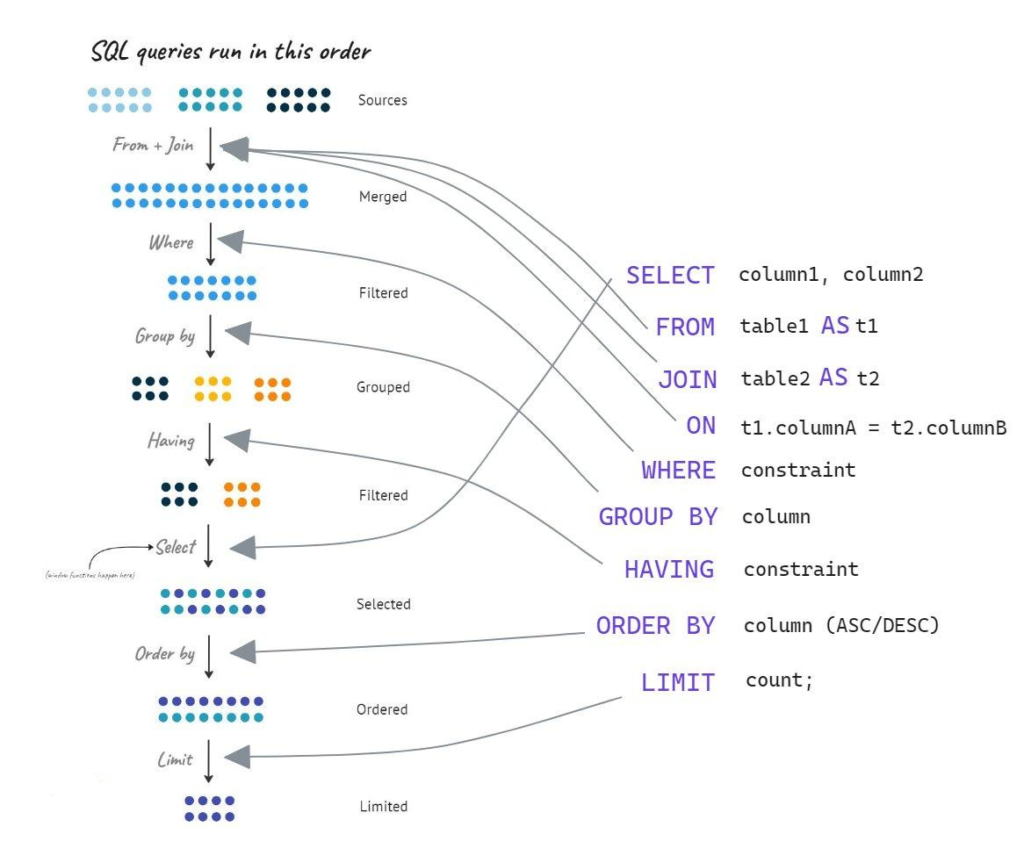


Comparison of SQL Concepts
SQL sublanguages comparison
| Sublanguage | Main Purpose | Typical Commands | Primary User |
|---|---|---|---|
| DDL | Define database structure | CREATE, ALTER, DROP | Developers, DBAs |
| DML | Modify stored data | INSERT, UPDATE, DELETE | Developers, applications |
| DQL | Retrieve data | SELECT | Analysts, developers |
| DCL | Control permissions | GRANT, REVOKE | DBAs, security teams |
| TCL | Manage transactions | COMMIT, ROLLBACK | Developers, DBAs |
Relational database versus spreadsheet
| Feature | Relational Database | Spreadsheet |
|---|---|---|
| Large datasets | Excellent | Limited |
| Relationships | Native | Manual or indirect |
| Concurrent users | Strong support | More limited |
| Access control | Advanced | Basic to moderate |
| Automation | Extensive | Possible |
| Transaction management | Supported | Generally limited |
| Data integrity | Strong mechanisms | More dependent on user practices |
Spreadsheets remain useful for analysis and small datasets, but relational databases become increasingly valuable as information volume, complexity, concurrency, and reliability requirements increase.
Diagrams and Database Structure
Basic relational structure
A simplified relational system can be visualized like this:
                 ┌──────────────────┐
                 │     PROJECTS     │
                 ├──────────────────┤
                 │ Project ID       │
                 │ Project Name     │
                 │ Location         │
                 │ Status           │
                 └────────┬─────────┘
                          │
                          │
                 ┌────────▼─────────┐
                 │    EQUIPMENT     │
                 ├──────────────────┤
                 │ Equipment ID     │
                 │ Project ID       │
                 │ Equipment Type   │
                 │ Status           │
                 └────────┬─────────┘
                          │
                          │
                 ┌────────▼─────────┐
                 │   INSPECTIONS    │
                 ├──────────────────┤
                 │ Inspection ID    │
                 │ Equipment ID     │
                 │ Date             │
                 │ Result           │
                 └──────────────────┘
This structure demonstrates how related information can be separated into logical tables.


Normalization
Normalization is a database design technique used to organize information efficiently and reduce unnecessary duplication.
A normalized design generally separates independent concepts into appropriate tables.
For example, instead of repeating complete project information for every inspection, a database can store project information once and connect inspection records through an appropriate key.
However, excessive normalization can sometimes make analytical queries more complicated. Professional database design therefore requires balancing integrity, maintainability, performance, and reporting requirements.
Practical Examples
Example: Engineering maintenance system
Imagine a manufacturing company operating hundreds of machines.
The database contains:
- Machine records
- Maintenance records
- Technician records
- Factory locations
- Spare-part inventory
A maintenance engineer could use SQL to find machines requiring service, identify recurring failures, and analyze which components are frequently replaced.
Example: Student management
A university database might contain:
- Students
- Courses
- Instructors
- Departments
- Enrollments
- Grades
SQL can connect these tables to generate academic reports without storing the same student or course information repeatedly.
Example: E-commerce platform
An online store may use relational tables for:
- Customers
- Products
- Orders
- Payments
- Shipments
When a customer places an order, several database operations can occur within a controlled transaction.
Real-World Applications
Engineering and manufacturing
SQL is widely applicable to industrial information systems.
Engineers can use databases for:
- Preventive maintenance
- Quality control
- Asset management
- Production tracking
- Inspection records
- Inventory management
- Failure analysis
Software engineering
Applications frequently rely on relational databases for user accounts, permissions, configuration information, transactions, and application data.
Backend developers often combine SQL with programming languages such as Python, Java, C#, JavaScript, or Go.
Data analytics
SQL is one of the most important tools for data analysts.
Analysts can use it to transform raw operational information into business intelligence.
Typical tasks include:
📊 Trend analysis
📈 Performance reporting
🔎 Data filtering
🧩 Data integration
📋 Dashboard preparation
Finance
Financial systems require reliable transaction processing, strong access controls, auditability, and data consistency.
Relational databases are well suited to these requirements when appropriately designed and managed.
Common Mistakes
Writing queries without understanding the schema
A technically valid query can still produce incorrect information if relationships are misunderstood.
Solution: Study table relationships before creating complex queries.
Selecting unnecessary columns
Requesting every column can increase data transfer and make results difficult to interpret.
Solution: Retrieve only the information required.
Using joins incorrectly
An incorrect join can create duplicated or missing records.
Solution: Understand the relationship between the tables before joining them.
Ignoring NULL values
NULL does not simply mean zero or an empty string. It represents the absence or unknown nature of a value.
Solution: Explicitly consider NULL behavior when filtering and analyzing data.
Forgetting transaction control
Applications performing multiple related changes can create inconsistent states if transaction boundaries are poorly designed.
Solution: Understand when operations should be committed together or rolled back.
Ignoring security
Building SQL statements directly from untrusted user input can create serious security vulnerabilities.
Solution: Use parameterized queries or prepared statements and follow secure database-access practices.
Challenges and Solutions
Performance problems
Large databases can make poorly designed queries slow.
Solutions:
- Analyze query execution plans
- Create appropriate indexes
- Reduce unnecessary data retrieval
- Improve table design
- Review expensive joins
- Avoid inefficient filtering patterns
Growing data volume
A database that works well with thousands of records may behave differently with millions or billions.
Solution: Design with scalability in mind from the beginning.
Complex schemas
Enterprise databases can contain hundreds or thousands of tables.
Solution: Maintain clear documentation and understand entity relationships.
Security requirements
Sensitive information requires strong protection.
Solution: Apply least-privilege access, authentication, authorization, encryption where appropriate, auditing, and secure application development practices.
Vendor differences
SQL implementations vary between database platforms.
Solution: Learn standard SQL first, then study the specific features of the chosen database platform.
Case Study: SQL in an Industrial Maintenance System
Consider a large manufacturing facility with several production lines.
Each machine generates maintenance information. Technicians record inspections, replacement parts, failure events, and repair activities.
Initially, the organization stores information across disconnected spreadsheets.
This creates several problems:
- Duplicate machine records
- Inconsistent equipment names
- Difficult historical searches
- Manual reporting
- Limited access control
- Higher risk of data-entry errors
The engineering team designs a relational database.
Database organization
The new system separates information into logical areas:
Machines → identifies equipment.
Locations → identifies where equipment operates.
Maintenance → records service activities.
Technicians → stores technician information.
Parts → manages replacement components.
The relationships allow engineers to investigate maintenance history without duplicating the same machine information in every record.
Operational improvement
After implementing a centralized relational system, the organization can generate reports more consistently.
Managers can identify machines with repeated failures, technicians can review historical maintenance activity, and inventory teams can monitor frequently used replacement parts.
The important lesson is that SQL is not simply about writing commands. Effective SQL begins with good information architecture. 🏭💡
Essential Tips for Learning SQL
Start with fundamentals
Learn these concepts first:
- Tables
- Rows and columns
- Primary keys
- Foreign keys
SELECT- Filtering
- Sorting
- Aggregation
- Joins
- Transactions
Practice with realistic datasets
Simple examples are useful initially, but realistic datasets provide better training.
Try projects involving:
- Customers
- Sales
- Engineering assets
- Weather records
- Transportation
- Manufacturing
- Scientific observations
Learn to read execution plans
Advanced SQL development requires understanding how a database executes queries.
Execution plans can reveal:
- Table scans
- Index usage
- Join strategies
- Expensive operations
- Potential bottlenecks
Think about data before syntax
Do not memorize SQL commands without understanding the data model.
Ask:
What does each table represent?
How are the tables related?
What should one row represent?
Which records should appear in the result?
This mindset dramatically improves SQL accuracy.
Build progressively
A useful learning path is:
Beginner → SELECT → filtering → sorting → aggregation → joins
Intermediate → subqueries → views → constraints → transactions
Advanced → indexes → execution plans → optimization → procedures → security → database architecture
FAQs
What is SQL mainly used for?
SQL is primarily used to communicate with relational databases. It can create database structures, retrieve information, modify records, manage transactions, and control access depending on the database system.
Is SQL difficult for beginners?
SQL is generally accessible to beginners because its basic commands are relatively readable. Advanced SQL becomes more challenging because it requires knowledge of data modeling, optimization, transactions, security, and database architecture.
What is the difference between SQL and MySQL?
SQL is a database query language, while MySQL is a relational database management system that implements SQL along with its own platform-specific features.
Is SQL useful for engineers?
Absolutely. Engineers can use SQL for asset management, laboratory data, manufacturing records, project information, sensor data, maintenance systems, quality control, and technical reporting.
What is a primary key?
A primary key is a column or combination of columns used to uniquely identify records within a table.
What is a foreign key?
A foreign key is a database field that references a key in another table, allowing related records to be connected.
Should I learn SQL before Python?
You do not have to. However, learning SQL alongside Python can be extremely valuable because Python is useful for application development and analysis, while SQL provides direct access to structured relational data.
What should I learn after basic SQL?
After mastering basic queries, focus on joins, subqueries, database design, indexes, transactions, query optimization, security, and database-specific features.
Conclusion
SQL remains one of the most valuable technologies for working with structured information. 🗄️🚀 Its importance comes from more than simple data retrieval: SQL connects application development, engineering operations, analytics, database architecture, and business intelligence.
The most effective way to learn SQL is to understand the relational model first, then progressively develop practical query skills. Beginners should concentrate on tables, keys, filtering, sorting, aggregation, and joins. More advanced learners should move toward transactions, indexes, execution plans, security, normalization, and performance optimization.
For engineering students and professionals, SQL provides a bridge between raw information and useful engineering knowledge. Whether the task involves manufacturing equipment, scientific measurements, financial transactions, software applications, or large-scale analytics, a well-designed relational database can turn fragmented information into a reliable and searchable system.
The ultimate goal is not simply to memorize SQL syntax. The real skill is learning how to think about data, relationships, integrity, performance, and the questions that the data needs to answer. ⚙️📊
Once that mindset is developed, SQL becomes more than a database language—it becomes a practical engineering tool for designing reliable information systems and making better decisions from structured data.