
SQL For Dummies 9th Edition: A Complete Beginner-to-Professional Guide to SQL Databases
Introduction
Data is everywhere—from online stores and banking platforms to university systems, hospitals, engineering applications, and business dashboards. Behind many of these systems is a database, and one of the most important languages used to communicate with relational databases is SQL (Structured Query Language).
The phrase SQL for Dummies does not mean SQL is difficult or that learners need to be experts in mathematics. Instead, it represents a beginner-friendly approach: start with simple ideas, understand how data is organized, practice small queries, and gradually move toward advanced database operations. 🚀
SQL allows users to retrieve information, add new records, modify existing data, remove unnecessary records, combine information from multiple tables, and produce reports for decision-making.
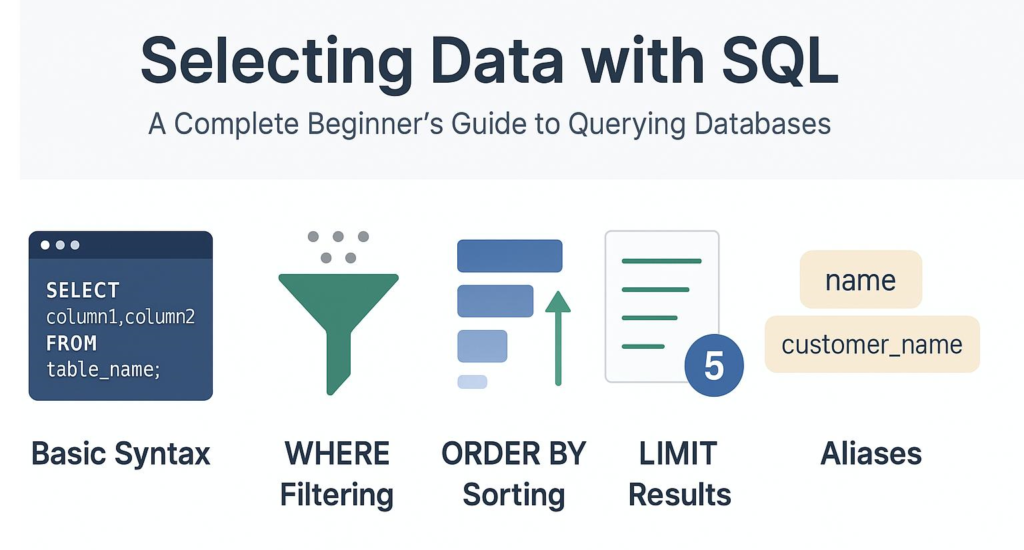


A major advantage of SQL is that it is declarative. Instead of describing every computational step required to find data, you generally describe what information you want, while the database management system determines an efficient way to retrieve it. SQL databases organize information into tables containing rows and columns, with relationships connecting related data.
For students, SQL is an excellent foundation for data analytics and software development. For professionals, it is a practical skill used in application development, reporting, business intelligence, cloud systems, data engineering, and database administration.
Background Theory
Understanding Databases
A database is an organized collection of information that can be stored, searched, updated, and managed efficiently.
Imagine an engineering company maintaining information about:
- Employees
- Projects
- Customers
- Equipment
- Suppliers
- Invoices
Putting all of this information into one giant spreadsheet could quickly become difficult to maintain. A relational database separates information into logical tables and connects those tables through relationships.
A table normally consists of:
| Component | Meaning |
|---|---|
| Row | One record |
| Column | One attribute or field |
| Primary Key | Unique identifier for a record |
| Foreign Key | Reference connecting related tables |
| Data Type | Defines what kind of value a column stores |
What Is a DBMS?
A Database Management System (DBMS) is software that manages databases.
Popular relational database systems include:
- PostgreSQL
- MySQL
- MariaDB
- Microsoft SQL Server
- Oracle Database
- SQLite
The SQL language has common concepts across these platforms, although each database system can provide its own extensions and syntax.


Why Relational Databases Matter
Relational databases are particularly useful when information has meaningful relationships.
For example:
Customers → Orders → Products
A customer can have multiple orders, and an order can contain multiple products.
Instead of repeatedly storing customer information inside every order, the database can maintain separate tables and connect them through keys.
Definition
What Is SQL?
SQL, or Structured Query Language, is a standardized language used to interact with relational databases.
SQL can be used to:
- Retrieve information
- Insert records
- Update records
- Delete records
- Create tables
- Modify database structures
- Filter information
- Sort results
- Group records
- Combine tables
- Create views
- Manage database permissions
A simple SQL query looks like this:
SELECT name, email
FROM customers;
This asks the database to return the name and email columns from the customers table.
The important point for beginners is that SQL statements are generally readable like instructions.
Main Categories of SQL
SQL functionality is commonly discussed through several categories.
| Category | Purpose | Examples |
|---|---|---|
| DQL | Retrieve data | SELECT |
| DML | Manipulate data | INSERT, UPDATE, DELETE |
| DDL | Define structures | CREATE, ALTER, DROP |
| DCL | Control permissions | GRANT, REVOKE |
| TCL | Manage transactions | COMMIT, ROLLBACK |
The exact classification can vary between educational resources and database platforms, but the underlying concepts remain useful.
Step-by-Step Explanation
Step 1: Identify the Data You Need
Before writing SQL, determine the business question.
For example:
Which products are currently available?
This is much better than immediately writing a complicated query.
Step 2: Identify the Relevant Table
Suppose the database contains a table named products.
You first need to understand its columns.
| product_id | product_name | category | stock |
|---|---|---|---|
| 101 | Laptop Stand | Office | 25 |
| 102 | Monitor | Electronics | 12 |
| 103 | Keyboard | Electronics | 0 |
Step 3: Select Required Columns
You could request only the information needed:
SELECT product_name, stock
FROM products;
This produces a focused result rather than returning every column.
Step 4: Filter the Data
Suppose you only want products that are in stock:
SELECT product_name, stock
FROM products
WHERE stock > 0;
The WHERE clause restricts which rows are returned.
Step 5: Sort the Results
You can organize the result:
SELECT product_name, stock
FROM products
WHERE stock > 0
ORDER BY stock DESC;
Now products with larger stock quantities appear first.
Step 6: Combine Tables
Real databases rarely keep everything in one table.
For example:
Customers
| customer_id | name |
|---|---|
| 1 | Emma |
| 2 | James |
Orders
| order_id | customer_id | total |
|---|---|---|
| 5001 | 1 | 250 |
| 5002 | 2 | 480 |
A join can connect these tables:
SELECT customers.name, orders.total
FROM customers
JOIN orders
ON customers.customer_id = orders.customer_id;


Step 7: Group Information
SQL can summarize data using functions such as:
COUNT()SUM()AVG()MIN()MAX()
For example:
SELECT category, COUNT(*)
FROM products
GROUP BY category;
This can show how many products belong to each category.
Step 8: Test Before Changing Data
Retrieving data is generally safer than modifying it.
Before executing an UPDATE or DELETE, first test the corresponding condition with a SELECT.
For example, instead of immediately changing records, inspect them first:
SELECT *
FROM customers
WHERE country = 'Canada';
This habit can prevent expensive mistakes. ⚠️
Comparison
SQL vs NoSQL
SQL and NoSQL databases are not simply “better” and “worse.” They are designed around different data-management approaches.
| Feature | SQL Databases | NoSQL Databases |
|---|---|---|
| Typical structure | Tables | Documents, key-value, graphs, columns |
| Schema | Often structured | Often more flexible |
| Relationships | Strong relational support | Depends on database type |
| Query language | SQL or SQL-like | Varies |
| Transactions | Strong support in major systems | Varies |
| Typical use | Structured business data | Large-scale or flexible data models |
| Examples | PostgreSQL, MySQL, SQL Server | MongoDB, Redis, Cassandra |
SQL vs Spreadsheet
A spreadsheet is excellent for small-scale analysis and manual work. SQL databases become increasingly valuable as data volume, users, relationships, security requirements, and automation needs increase.
Think of a spreadsheet as a powerful worksheet and SQL as a systematic language for working with structured data at database scale.
Diagrams & Tables
The Basic SQL Data Flow
A useful mental model is:
        👤 User / Application
                 │
                 ▼
            SQL Query
                 │
                 ▼
              DBMS
                 │
        ┌────────┴────────┐
        ▼                 ▼
     Table A            Table B
        │                 │
        └────────┬────────┘
                 ▼
           Query Result
                 │
                 ▼
          Application/User
The application sends a query to the DBMS. The DBMS processes the request against the relevant database structures and returns a result.
SQL Query Building Blocks
| SQL Element | Question It Answers |
|---|---|
SELECT | What do I want? |
FROM | Where is it stored? |
WHERE | Which records qualify? |
JOIN | How are tables connected? |
GROUP BY | How should records be grouped? |
HAVING | Which groups qualify? |
ORDER BY | How should results be sorted? |
LIMIT | How many results should I return? |
Common Join Types


| Join | Basic Idea |
|---|---|
| INNER JOIN | Returns matching records from both sides |
| LEFT JOIN | Keeps all records from the left table |
| RIGHT JOIN | Keeps all records from the right table |
| FULL OUTER JOIN | Keeps records from both sides where supported |
| CROSS JOIN | Produces combinations between two sets |
Joins are one of the most important concepts for professional SQL users because real-world databases frequently distribute related information across multiple tables.
Examples
Example 1: Student Database 🎓
A university may store:
- Students
- Courses
- Instructors
- Enrollments
- Departments
A SQL query can retrieve students enrolled in a particular course.
The database does not require the student’s department information to be duplicated in every enrollment record. Relationships allow the information to be connected when needed.
Example 2: Online Store 🛒
An e-commerce company may have:
- Customers
- Products
- Orders
- Payments
- Shipping
SQL can answer questions such as:
- Which customers placed orders?
- Which products are popular?
- Which orders remain unshipped?
- Which customers have multiple purchases?
- Which products have low inventory?
Example 3: Engineering Company ⚙️
An engineering organization could maintain:
- Engineers
- Projects
- Machines
- Maintenance records
- Materials
- Suppliers
SQL can help managers locate equipment requiring maintenance, identify project assignments, and produce operational reports.
Real-World Application
Business Intelligence
SQL is a fundamental skill for business intelligence because analysts often need to transform raw database records into useful reports.
A dashboard might display:
📊 Revenue trends
📦 Inventory levels
👥 Customer activity
🚚 Delivery performance
🏭 Production status
SQL frequently acts as the bridge between operational databases and analytics tools.
Software Development
Web applications commonly use databases to store:
- User accounts
- Orders
- Comments
- Settings
- Transactions
- Application records
A developer may use SQL directly or through an Object-Relational Mapping framework.
Data Analytics
Data analysts use SQL to explore datasets, filter records, group information, detect patterns, and prepare datasets for visualization or statistical analysis.
Data Engineering
Data engineers use SQL in data pipelines, warehouses, transformation workflows, quality checks, and analytical systems.
Cloud Computing ☁️
Modern cloud platforms provide managed relational databases and data warehouses. SQL remains an important interface for interacting with many of these systems.
Common Mistakes
Using SELECT * Everywhere
This is convenient:
SELECT *
FROM customers;
But professional queries often specify the columns actually required.
Selecting unnecessary columns can make queries harder to understand and potentially increase data transfer.
Forgetting the WHERE Clause
This is especially dangerous with modifications.
UPDATE customers
SET status = 'inactive';
Without a condition, this may affect every row.
A safer workflow is to identify the intended records first.
Confusing WHERE and HAVING
WHERE filters rows before grouping, while HAVING filters groups after aggregation.
Understanding this distinction is essential when working with reports.
Creating Accidental Duplicate Rows
Incorrect joins can multiply records unexpectedly.
Whenever a join produces more rows than expected, check:
- Primary keys
- Foreign keys
- Relationship cardinality
- Join conditions
- Duplicate source records
Ignoring NULL
NULL does not simply mean zero or an empty string.
It represents missing or unknown information, and SQL has special rules for working with it.
Writing Extremely Long Queries
A query can technically work while still being difficult to maintain.
Use:
- Clear aliases
- Consistent formatting
- Meaningful names
- CTEs when appropriate
- Comments for complicated logic
Challenges & Solutions
Challenge: Large Tables
Large tables can make poorly designed queries slow.
Solution: Examine execution plans, use suitable indexes, select only required data, and avoid unnecessary operations.
Challenge: Complex Joins
Joining many tables can become difficult to understand.
Solution: Build the query incrementally. Start with one table, add one join, inspect the results, and continue.
Challenge: Different SQL Dialects
SQL Server, PostgreSQL, MySQL, Oracle, and other systems share many fundamentals but differ in details.
Solution: Learn standard SQL concepts first, then study the dialect used by your workplace or project.
Challenge: Data Quality
Duplicate, missing, inconsistent, or incorrectly formatted data can produce misleading results.
Solution: Validate data, establish constraints where appropriate, and include data-quality checks in workflows.
Challenge: Performance
A query that works on a small development database may perform poorly with millions of records.
Solution: Study indexing, query plans, filtering, joins, partitioning strategies, and database-specific optimization techniques.
Case Study
Online Engineering Equipment Store
Consider an engineering equipment supplier operating an online store.
The company has four major tables:
Customers
   │
   └── Orders
          │
          └── Order_Items
                    │
                    └── Products
Management wants to understand customer purchasing behavior.
A beginner might initially search each table separately. A professional SQL approach recognizes that the tables are related and can be combined.
The analyst could progressively build a query:
- Start with customers.
- Connect customers to orders.
- Connect orders to order items.
- Connect items to products.
- Filter completed orders.
- Group the information by product or customer.
- Sort the final report.
- Validate the result against known business records.
The result could help management identify:
- Frequently ordered equipment
- High-value customer segments
- Products requiring additional inventory
- Slow-moving products
- Seasonal purchasing patterns
The important lesson is not a particular query. It is the problem-solving workflow.
Start with the business question → understand the schema → build a small query → validate → add complexity → optimize.
Essential Tips
Build Queries Gradually 🧩
Do not attempt to write a huge query immediately.
Start with:
SELECT ...
FROM ...
Then add:
WHERE
↓
JOIN
↓
GROUP BY
↓
HAVING
↓
ORDER BY
This makes debugging significantly easier.
Learn the Database Schema
Professional SQL is not just about memorizing syntax.
Learn:
- Table names
- Column names
- Primary keys
- Foreign keys
- Relationships
- Data types
- Constraints
- Indexes
Read Queries Written by Professionals
Reading existing SQL is one of the fastest ways to understand how experienced developers structure database logic.
Practice With Realistic Projects
Instead of practicing only isolated commands, create small projects such as:
🏪 Store database
🎓 University database
🏥 Hospital management database
🏭 Manufacturing database
📚 Library database
🚗 Vehicle maintenance database
Think About Performance Early
Beginners often ask:
“Does my query work?”
Professionals eventually ask:
“Does my query work correctly, remain maintainable, and perform well as the database grows?”
That change in mindset is an important step toward advanced SQL.
FAQs
What does SQL stand for?
SQL stands for Structured Query Language. It is widely used for interacting with relational databases.
Is SQL difficult for beginners?
SQL is generally approachable because many statements resemble natural-language instructions. The basic concepts can be learned relatively quickly, while advanced database optimization and architecture require deeper study.
Do I need programming experience to learn SQL?
No. Beginners can learn SQL without prior programming experience. Programming knowledge becomes useful later, particularly when SQL is combined with Python, Java, JavaScript, C#, or other languages.
What should I learn first in SQL?
Start with databases, tables, rows, columns, SELECT, FROM, WHERE, ORDER BY, filtering, basic functions, and then move into joins and grouping.
Which SQL database should beginners learn?
PostgreSQL, MySQL, SQLite, and SQL Server are all useful learning choices. The best option often depends on your educational program, workplace, or career direction.
Are SQL and MySQL the same thing?
No. SQL is a language, while MySQL is a database management system that uses SQL.
Is SQL useful for data science?
Absolutely. SQL is valuable for retrieving and preparing data before analysis, visualization, machine learning, or statistical processing.
Can SQL be used for large databases?
Yes. SQL is widely used with large-scale relational systems. However, performance depends on database architecture, indexing, query design, hardware, workload, and other factors.
Conclusion
SQL does not need to be intimidating. The most effective way to learn it is to treat database work as a structured problem-solving process rather than a collection of commands to memorize. 🧠💻
Start by understanding tables, rows, columns, keys, and relationships. Then master the essential query building blocks: SELECT, FROM, WHERE, ORDER BY, GROUP BY, and JOIN.
From there, progress toward transactions, indexes, views, subqueries, common table expressions, window functions, optimization, database security, and advanced data engineering.
The real power of SQL appears when syntax is combined with good reasoning. A strong SQL practitioner does not simply know how to write a query—they understand what the data represents, how tables relate, why a result is correct, and how the query can remain reliable as the system grows.
Whether you are a student preparing for your first database course, a developer building applications, an engineer analyzing operational data, or a professional moving toward data analytics, SQL is one of the most practical technical skills you can develop. 🚀
Learn it step by step, practice it with realistic datasets, question your results, and gradually move from simple queries to sophisticated data solutions.




