SQL Essentials for Dummies: A Complete Beginner-to-Professional Guide to SQL Fundamentals
Introduction
SQL, or Structured Query Language, is one of the most important technologies for working with structured data. Whether you are a software engineer, data analyst, database administrator, business intelligence professional, or engineering student, understanding SQL gives you a direct way to communicate with databases.
The concepts covered in SQL Essentials For Dummies are especially useful for beginners because SQL can initially look intimidating. Statements such as SELECT, JOIN, GROUP BY, and WHERE may seem complicated, but they are based on a relatively logical process: identify the data you need, specify where it exists, filter it, and determine how it should be presented.


For engineering students and professionals, SQL becomes even more valuable when large quantities of technical data must be stored and analyzed. Manufacturing systems, IoT platforms, laboratory databases, inventory systems, transportation applications, and engineering management software can all depend on relational databases.
This guide presents SQL from the ground up and gradually moves toward practical engineering applications. 🚀


Background Theory
What Is a Database?
A database is an organized collection of information that allows applications and users to store, retrieve, modify, and analyze data efficiently.
A traditional relational database organizes information into tables. Each table contains:
- Rows → individual records
- Columns → attributes or properties
- Primary keys → unique identifiers
- Foreign keys → relationships between tables
For example, an engineering company might maintain an Equipment table:
| Equipment_ID | Equipment_Name | Type | Location | Status |
|---|---|---|---|---|
| 101 | Pump A | Hydraulic | Plant 1 | Active |
| 102 | Motor B | Electrical | Plant 2 | Maintenance |
| 103 | Compressor C | Mechanical | Plant 1 | Active |
SQL provides the language used to interact with this information.
Relational Database Concepts
The relational model is based on relationships between tables.
For example:
Equipment
   |
   | Equipment_ID
   ↓
Maintenance
   |
   | Maintenance_ID
   ↓
Technicians
Instead of storing every piece of information in one enormous table, a database can divide information into logical entities.
This approach reduces unnecessary duplication and improves consistency.
SQL and Engineering
Engineers frequently encounter databases when working with:
- Manufacturing systems
- Building management systems
- Energy monitoring
- IoT platforms
- CAD/PDM systems
- Supply-chain systems
- Laboratory information systems
- Asset management
- Predictive maintenance
- Construction management
- Transportation systems
SQL therefore isn’t merely a programming skill—it can be a practical engineering data-analysis tool.
Definition
What Does SQL Mean?
SQL stands for Structured Query Language.
It is a standardized language used to communicate with relational database management systems (RDBMS).
Popular SQL database systems include:
- PostgreSQL
- MySQL
- Microsoft SQL Server
- Oracle Database
- SQLite
- MariaDB
Although these platforms implement SQL somewhat differently, the fundamental concepts are broadly transferable.
Major SQL Categories
SQL commands can be grouped into several categories.
| Category | Purpose | Examples |
|---|---|---|
| DQL | Retrieve data | SELECT |
| DDL | Define database structures | CREATE, ALTER, DROP |
| DML | Modify data | INSERT, UPDATE, DELETE |
| DCL | Control permissions | GRANT, REVOKE |
| TCL | Manage transactions | COMMIT, ROLLBACK |
Understanding these categories helps beginners organize the language mentally. 🧠
Step-by-Step Explanation
Step 1: Create a Table
A basic table can be created using CREATE TABLE.
CREATE TABLE Equipment (
    Equipment_ID INT PRIMARY KEY,
    Equipment_Name VARCHAR(100),
    Type VARCHAR(50),
    Status VARCHAR(30)
);
Here:
Equipment_IDidentifies the equipment.INTspecifies an integer.VARCHARstores text.PRIMARY KEYensures unique identification.
Step 2: Insert Data
Once the table exists, records can be added.
INSERT INTO Equipment
(Equipment_ID, Equipment_Name, Type, Status)
VALUES
(101, 'Pump A', 'Hydraulic', 'Active');
Multiple records can also be inserted.
INSERT INTO Equipment
VALUES
(102, 'Motor B', 'Electrical', 'Maintenance'),
(103, 'Compressor C', 'Mechanical', 'Active');
Step 3: Retrieve Data
The most fundamental SQL command is SELECT.
SELECT *
FROM Equipment;
The * means that all columns should be returned.
You can instead request specific columns:
SELECT Equipment_Name, Status
FROM Equipment;
This is usually preferable when you only need particular information.
Step 4: Filter Results
The WHERE clause limits the records returned.
SELECT *
FROM Equipment
WHERE Status = 'Active';
You can combine conditions:
SELECT *
FROM Equipment
WHERE Type = 'Mechanical'
AND Status = 'Active';
Other useful operators include:
=       Equal
<>      Not equal
>       Greater than
<       Less than
>=      Greater than or equal
<=      Less than or equal
Step 5: Sort Information
Use ORDER BY to organize query results.
SELECT *
FROM Equipment
ORDER BY Equipment_Name ASC;
Descending order can be specified using DESC.
Step 6: Calculate Results
SQL can perform mathematical calculations and statistical operations.
SELECT AVG(Temperature) AS Average_Temperature
FROM Sensor_Data;
Common aggregate functions include:
COUNT()SUM()AVG()MIN()MAX()
Step 7: Group Data
Suppose an engineering facility has thousands of measurements from multiple machines.
SELECT Machine_ID, AVG(Temperature)
FROM Sensor_Data
GROUP BY Machine_ID;
This calculates an average temperature for each machine.
Step 8: Connect Tables Using JOIN
One of SQL’s most powerful capabilities is combining related tables.
SELECT Equipment.Equipment_Name,
       Maintenance.Maintenance_Date
FROM Equipment
JOIN Maintenance
ON Equipment.Equipment_ID = Maintenance.Equipment_ID;
The JOIN operation allows information distributed across multiple tables to be analyzed together.


Comparison
SQL vs Spreadsheet Analysis
SQL and spreadsheets can both analyze data, but they are designed for different scales and workflows.
| Feature | SQL Database | Spreadsheet |
|---|---|---|
| Large datasets | Excellent | Limited |
| Multi-user access | Excellent | Moderate |
| Relationships | Excellent | Limited |
| Automation | Excellent | Moderate |
| Complex joins | Excellent | Difficult |
| Visualization | Limited | Excellent |
| Data integrity | Strong | Variable |
| Reproducible queries | Excellent | Moderate |
For a few hundred records, a spreadsheet may be perfectly adequate. For millions of engineering measurements, however, a database is usually much more appropriate.
SQL vs NoSQL
SQL databases generally organize information into structured relational tables.
NoSQL systems can use models such as:
- Documents
- Key-value pairs
- Graphs
- Wide-column storage
A relational database is often a strong choice when data relationships and transactional consistency are important.
Diagrams & Tables
Basic SQL Data Flow
A simplified SQL workflow looks like this:
User / Application
        │
        ▼
    SQL Query
        │
        ▼
 Database Engine
        │
 ┌──────┴──────┐
 ▼             ▼
Tables      Indexes
 │             │
 └──────┬──────┘
        ▼
 Query Result
        │
        ▼
User / Application
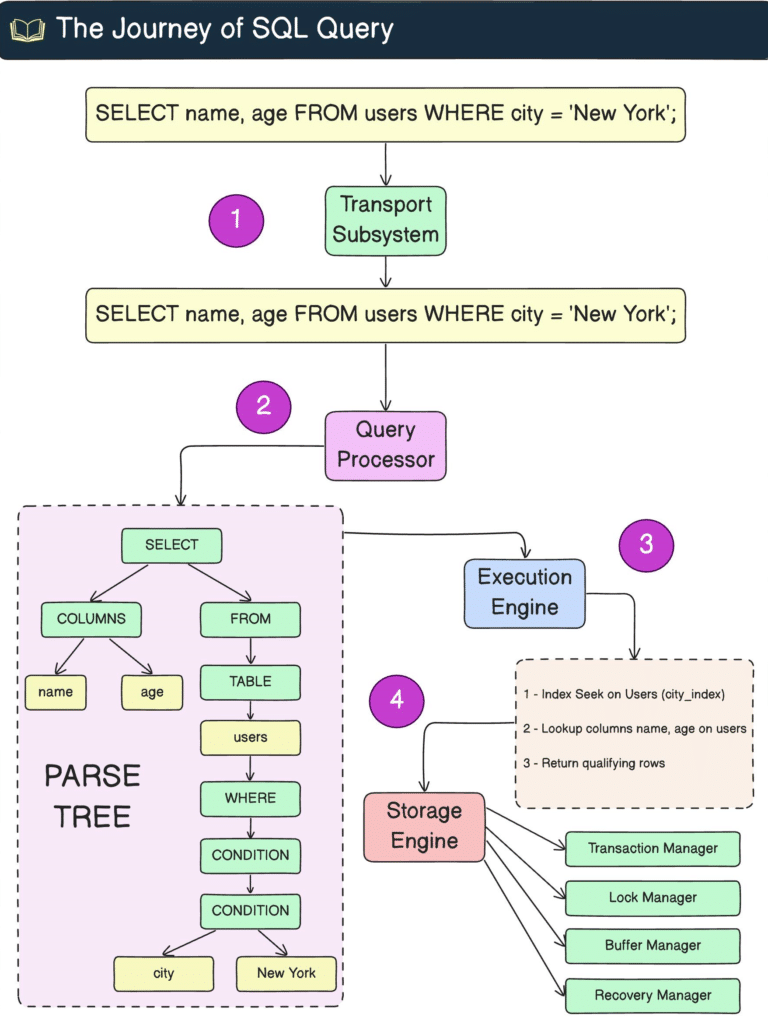
The database engine interprets the query, determines how to access the required information, executes the operation, and returns the result.


Common SQL Clauses
| Clause | Function |
|---|---|
SELECT | Chooses columns |
FROM | Specifies the table |
WHERE | Filters records |
GROUP BY | Creates groups |
HAVING | Filters groups |
ORDER BY | Sorts results |
JOIN | Combines tables |
LIMIT | Restricts returned rows |
A typical query might therefore look like:
SELECT Machine_ID, AVG(Temperature) AS Avg_Temp
FROM Sensor_Data
WHERE Temperature > 50
GROUP BY Machine_ID
HAVING AVG(Temperature) > 60
ORDER BY Avg_Temp DESC;
Examples
Example 1: Finding Failed Equipment
Suppose a maintenance database contains equipment statuses.
SELECT Equipment_Name, Type
FROM Equipment
WHERE Status = 'Failed';
This immediately identifies equipment requiring attention.
Example 2: Finding High Temperatures
SELECT Machine_ID, Temperature
FROM Sensor_Data
WHERE Temperature > 80
ORDER BY Temperature DESC;
This could help engineers identify abnormal operating conditions.
Example 3: Calculating Energy Consumption
SELECT Machine_ID,
       SUM(Energy_kWh) AS Total_Energy
FROM Energy_Readings
GROUP BY Machine_ID;
Engineers can use this type of query to compare energy consumption across machines.
Example 4: Joining Maintenance Records
SELECT e.Equipment_Name,
       m.Maintenance_Date,
       m.Description
FROM Equipment e
JOIN Maintenance m
ON e.Equipment_ID = m.Equipment_ID;
This creates a combined view of equipment and maintenance history.
Real World Application
Predictive Maintenance
SQL can be used to organize historical machine measurements such as:
- Temperature
- Vibration
- Pressure
- Current
- RPM
- Operating hours
- Failure events
A predictive-maintenance system might query historical measurements before feeding them into a machine-learning model.
For example:
SELECT Machine_ID,
       AVG(Vibration) AS Avg_Vibration,
       MAX(Temperature) AS Max_Temperature
FROM Sensor_Data
GROUP BY Machine_ID;
The resulting features could then be analyzed to identify machines showing unusual behavior.
Manufacturing
Manufacturing facilities can use SQL databases to monitor:
Production → Quality → Maintenance → Inventory
An engineer might query production defects by machine, shift, or product.
Energy Engineering
Energy-management systems can store electricity, gas, solar, and equipment consumption data.
SQL makes it possible to calculate:
- Daily consumption
- Monthly consumption
- Peak demand
- Average load
- Equipment efficiency
Civil and Construction Engineering
Project databases may contain:
- Material records
- Inspection results
- Contractor information
- Work orders
- Equipment utilization
- Project costs
SQL can connect these datasets and produce engineering reports.
Common Mistakes
Using SELECT *
Although this is convenient:
SELECT *
FROM Equipment;
it may return unnecessary columns.
A better approach is:
SELECT Equipment_Name, Status
FROM Equipment;
This can improve clarity and sometimes performance.
Forgetting WHERE in UPDATE
This command is dangerous:
UPDATE Equipment
SET Status = 'Maintenance';
Without a WHERE condition, every record may be modified.
A safer query is:
UPDATE Equipment
SET Status = 'Maintenance'
WHERE Equipment_ID = 102;
Confusing WHERE and HAVING
WHERE filters individual rows before grouping.
HAVING filters grouped results.
WHERE Temperature > 50
is different from:
HAVING AVG(Temperature) > 50
Ignoring NULL Values
NULL does not mean zero.
For example:
SELECT *
FROM Equipment
WHERE Status IS NULL;
Use IS NULL rather than:
WHERE Status = NULL;
Creating Poor Relationships
A poorly designed database can create duplicated data, inconsistent records, and difficult queries.
Database design should therefore be considered before large-scale data entry begins.
Challenges & Solutions
Challenge: Complex Queries
Large queries containing several joins, filters, and calculations can become difficult to understand.
Solution: Build the query gradually.
Start with:
SELECT *
FROM Equipment;
Then add:
WHERE
JOIN
GROUP BY
HAVING
ORDER BY
one step at a time.
Challenge: Slow Performance
Large databases may become slow when queries scan millions of rows.
Solution: Consider appropriate indexing.
For example:
CREATE INDEX idx_equipment_status
ON Equipment(Status);
Indexes can accelerate searches, although excessive indexing can increase storage and modification overhead.
Challenge: Data Quality
Incorrect or inconsistent data can produce incorrect engineering conclusions.
Solution: Apply:
- Primary keys
- Foreign keys
- Constraints
- Validation rules
- Appropriate data types
- Regular data-quality checks
Case Study
Industrial Pump Monitoring
Consider a hypothetical water-treatment facility with 500 industrial pumps.
Each pump produces measurements every minute:
Pump ID
Temperature
Pressure
Vibration
Flow Rate
Power Consumption
Timestamp
This produces hundreds of thousands of records each month.
An engineer wants to identify pumps with unusually high vibration.
A SQL query might be:
SELECT Pump_ID,
       AVG(Vibration) AS Average_Vibration,
       MAX(Vibration) AS Maximum_Vibration
FROM Pump_Readings
GROUP BY Pump_ID
HAVING AVG(Vibration) > 7;
The database produces a shortlist of potentially problematic pumps.
Engineers can then investigate those pumps physically.
The important lesson is that SQL does not replace engineering judgment. Instead, it transforms large quantities of raw measurements into actionable information. ⚙️📊
Essential Tips
Build Strong SQL Fundamentals
Do not rush immediately into advanced queries.
Master these concepts first:
SELECTFROMWHEREORDER BYGROUP BY- Aggregate functions
JOIN- Subqueries
- Common Table Expressions
- Window functions
Practice With Engineering Data
Instead of practicing only with generic employee databases, create datasets related to your discipline.
For mechanical engineering, use:
Machine_ID
Temperature
Pressure
RPM
Vibration
For electrical engineering:
Device_ID
Voltage
Current
Power
Frequency
For civil engineering:
Project_ID
Material
Strength
Inspection_Date
Cost
This makes SQL easier to understand because the data has practical meaning.
Learn Database Design
Writing SQL is only one part of database engineering.
Also learn:
- Normalization
- Keys
- Relationships
- Constraints
- Indexing
- Transactions
- Security
- Backup strategies
Always Test Destructive Queries
Before executing UPDATE or DELETE, first run a corresponding SELECT.
For example:
SELECT *
FROM Equipment
WHERE Equipment_ID = 102;
Then perform the modification.
This simple habit can prevent serious data loss. 🛡️
FAQs
What is SQL used for?
SQL is primarily used to create, retrieve, modify, organize, and analyze data stored in relational databases.
Is SQL difficult for beginners?
No. SQL has many advanced features, but its fundamental syntax is relatively accessible. Beginners can start with SELECT, FROM, and WHERE and gradually progress toward joins and analytical functions.
Is SQL useful for engineers?
Absolutely. Engineers increasingly work with sensor data, manufacturing records, maintenance databases, energy measurements, project information, and other structured datasets.
Which SQL database should beginners learn?
PostgreSQL and MySQL are both strong choices. The core SQL concepts transfer between database platforms, so learning one system provides a foundation for others.
What is the difference between SQL and a programming language such as Python?
SQL specializes in communicating with databases and manipulating structured data. Python is a general-purpose programming language used for software development, automation, scientific computing, machine learning, and many other tasks. They are often used together.
What is a primary key?
A primary key uniquely identifies each record in a table.
For example:
Equipment_ID INT PRIMARY KEY
means that each equipment record should have a unique identifier.
What is a JOIN?
A JOIN combines information from multiple related tables based on matching columns.
For example, equipment information can be connected to its maintenance records using Equipment_ID.
How long does it take to learn SQL?
The basic syntax can be learned relatively quickly, but becoming proficient requires continued practice with database design, joins, optimization, transactions, and analytical queries.
Conclusion
SQL Essentials For Dummies represents a useful starting point for anyone who wants to understand how structured data is stored and manipulated. The most important lesson is that SQL is not simply a collection of commands—it is a systematic way of asking questions about data.
For beginners, the recommended learning path is straightforward:
Tables → SELECT → WHERE → ORDER BY → Aggregation → GROUP BY → JOIN → Subqueries → Advanced Analytics
For engineering students and professionals, SQL becomes particularly powerful when combined with real technical datasets. A database containing millions of sensor readings may be difficult to interpret manually, but carefully designed SQL queries can quickly reveal patterns, anomalies, performance trends, and maintenance priorities.
The combination of SQL + engineering knowledge + data analysis creates a powerful technical skill set. ⚙️💻📊
Whether your goal is database engineering, data analytics, predictive maintenance, manufacturing optimization, or engineering management, mastering SQL gives you a practical foundation for turning raw data into meaningful engineering decisions.