R Programming: 3 Books in 1 — R Basics, Data Analysis & Statistics, and Data Visualization


Introduction
Engineering is becoming increasingly data-driven. Whether an engineer is monitoring a manufacturing process, analyzing experimental results, studying structural behavior, evaluating energy consumption, or building predictive models, the ability to transform raw data into useful information is becoming an essential professional skill.
R programming is one of the most useful environments for this purpose. It combines programming, statistical analysis, data manipulation, and visualization in a single ecosystem. For students, R can provide a gentle introduction to computational thinking. For experienced engineers, it can become a powerful tool for automating repetitive analysis and communicating technical results.
The idea behind “R Programming: 3 Books in 1” is to connect three major stages of technical data work:
- 🟢 R Basics for Beginners
- 🔵 R Data Analysis and Statistics
- 🟣 R Data Visualization
Instead of treating programming, statistics, and visualization as isolated subjects, this approach presents them as parts of one engineering workflow.


A typical workflow looks like this:
Raw Data → R Programming → Data Cleaning → Analysis → Statistical Interpretation → Visualization → Engineering Decision
This progression is useful across mechanical, civil, electrical, environmental, industrial, chemical, aerospace, and software engineering.
Background Theory
Why engineers work with data
Engineering systems continuously generate information. Sensors record temperatures, pressures, vibrations, stresses, flow rates, voltages, speeds, energy consumption, and many other measurements.
The challenge is not simply collecting this information.
The real challenge is answering questions such as:
- What does the data tell us?
- Is the observed behavior normal?
- Are two designs significantly different?
- Which variables influence performance?
- Can unusual measurements be detected?
- How can results be communicated clearly?
R provides tools for each stage.
From programming to engineering intelligence
Programming provides the foundation. Instead of manually repeating calculations in a spreadsheet, engineers can create scripts that perform the same operation consistently.
Statistics adds another layer. It helps engineers distinguish meaningful patterns from random variation.
Visualization then transforms numerical results into graphics that humans can interpret quickly.
This creates a powerful combination:
Code + Statistics + Visualization = Data-Driven Engineering
The role of reproducibility
One of R’s major advantages is reproducibility.
A documented R script can record how data was imported, cleaned, analyzed, and visualized. Another engineer can inspect the workflow and reproduce the analysis.
This is particularly valuable in professional environments where technical decisions need to be reviewed or updated later.
Definition
What is R programming?
R is a programming language and computing environment designed particularly for statistical computing, data analysis, and graphical representation.
It supports a broad ecosystem of packages that extend its capabilities.
Engineers can use R for:
- Data cleaning
- Statistical analysis
- Experimental analysis
- Regression
- Forecasting
- Quality control
- Data visualization
- Machine learning
- Reporting
- Automation
- Research
What does “3 books in 1” represent?
The three-part learning structure can be understood as three levels.
Part 1 — R Basics for Beginners 🟢
This stage introduces:
- Variables
- Objects
- Vectors
- Data frames
- Functions
- Conditions
- Loops
- Packages
- Scripts
- Data import
Part 2 — R Data Analysis and Statistics 🔵
The second stage focuses on transforming data into evidence.
Typical subjects include:
- Descriptive statistics
- Correlation
- Regression
- Statistical testing
- Probability concepts
- Distribution analysis
- Experimental data
- Outlier detection
Part 3 — R Data Visualization 🟣
The final stage focuses on communicating results.
Common visualizations include:
- Line charts
- Bar charts
- Scatter plots
- Histograms
- Box plots
- Heatmaps
- Faceted charts
- Statistical graphics
Step-by-Step R Engineering Workflow

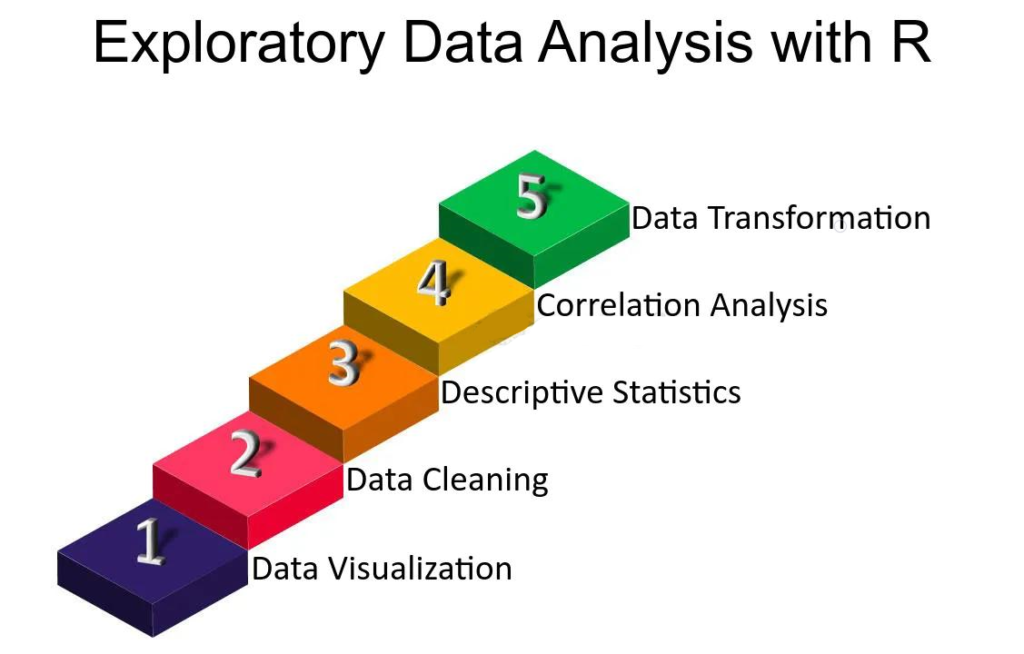


Step 1 — Define the engineering question
Do not start by writing code.
Start by defining the problem.
For example:
“Does operating temperature affect the efficiency of this machine?”
A clearly defined question determines what data is required and what type of analysis is appropriate.
Step 2 — Collect the data
Data can come from:
- Sensors
- Laboratory experiments
- CSV files
- Excel workbooks
- Databases
- Manufacturing systems
- Public datasets
- Simulation software
The quality of the analysis depends heavily on the quality of the input.
Step 3 — Import the data into R
R can work with many common data formats.
A typical engineering dataset might contain columns such as:
| Temperature | Pressure | Flow Rate | Efficiency |
|---|---|---|---|
| Low | Normal | Medium | Moderate |
| Medium | Normal | High | High |
| High | Elevated | High | Reduced |
The exact structure depends on the engineering problem.
Step 4 — Inspect the dataset
Before performing statistical analysis, inspect:
- Column names
- Data types
- Missing observations
- Duplicate records
- Unusual values
- Measurement units
⚠️ Never assume that imported data is automatically ready for analysis.
Step 5 — Clean the data
Data cleaning may involve:
- Removing duplicates
- Handling missing values
- Correcting inconsistent labels
- Converting data types
- Standardizing units
- Identifying suspicious measurements
Step 6 — Explore the data
Exploratory analysis helps reveal patterns.
Engineers can examine:
- Typical values
- Variation
- Trends
- Relationships
- Clusters
- Extreme observations
Step 7 — Apply statistical methods
The appropriate statistical method depends on the question.
For example:
Comparison question → statistical comparison
Relationship question → correlation or regression
Prediction question → predictive modeling
Variation question → distribution analysis
Step 8 — Create visualizations
A good visualization should answer a question rather than simply decorate a report.
For example:
📈 A line chart can reveal a trend.
📊 A box plot can reveal variation between groups.
🔵 A scatter plot can show relationships between measurements.
🔥 A heatmap can reveal patterns across many variables.
Step 9 — Interpret the results
R produces numerical and graphical output.
The engineer must convert that output into an engineering conclusion.
The computer provides evidence.
The engineer provides interpretation.
Step 10 — Document the workflow
Save:
- R scripts
- Input datasets
- Output figures
- Statistical results
- Documentation
This makes the work easier to reproduce and audit.
Comparison: R, Excel, Python, and MATLAB


| Feature | R | Excel | Python | MATLAB |
|---|---|---|---|---|
| Statistical analysis | ⭐⭐⭐⭐⭐ | ⭐⭐⭐ | ⭐⭐⭐⭐ | ⭐⭐⭐⭐ |
| Visualization | ⭐⭐⭐⭐⭐ | ⭐⭐⭐⭐ | ⭐⭐⭐⭐⭐ | ⭐⭐⭐⭐ |
| Beginner accessibility | ⭐⭐⭐⭐ | ⭐⭐⭐⭐⭐ | ⭐⭐⭐⭐ | ⭐⭐⭐ |
| Automation | ⭐⭐⭐⭐⭐ | ⭐⭐⭐ | ⭐⭐⭐⭐⭐ | ⭐⭐⭐⭐⭐ |
| Large datasets | ⭐⭐⭐⭐ | ⭐⭐ | ⭐⭐⭐⭐⭐ | ⭐⭐⭐⭐ |
| Academic statistics | ⭐⭐⭐⭐⭐ | ⭐⭐⭐ | ⭐⭐⭐⭐ | ⭐⭐⭐⭐ |
| Engineering workflows | ⭐⭐⭐⭐ | ⭐⭐⭐⭐ | ⭐⭐⭐⭐⭐ | ⭐⭐⭐⭐⭐ |
R versus Excel
Excel is excellent for quick calculations, tables, and smaller datasets.
R becomes particularly attractive when analysis involves repeated workflows, statistical modeling, larger datasets, or reproducible research.
R versus Python
Python is extremely versatile and widely used for software development, automation, machine learning, and artificial intelligence.
R has a particularly strong identity in statistics, research, exploratory analysis, and statistical visualization.
R versus MATLAB
MATLAB is deeply established in many engineering and scientific fields.
R can be especially attractive when the primary objective is statistical analysis, data exploration, and publication-quality visualization.
Diagrams and Tables for R-Based Engineering Analysis


The three-layer model
┌───────────────────────────┐
│       R BASICS            │
│ Variables • Functions     │
│ Data • Packages • Scripts │
└─────────────┬─────────────┘
              ↓
┌───────────────────────────┐
│     DATA ANALYSIS         │
│ Cleaning • Statistics     │
│ Relationships • Testing   │
└─────────────┬─────────────┘
              ↓
┌───────────────────────────┐
│     VISUALIZATION         │
│ Charts • Trends • Reports │
└─────────────┬─────────────┘
              ↓
      ENGINEERING DECISION
Choosing a visualization
| Engineering objective | Useful visualization |
|---|---|
| Observe a trend | Line chart |
| Compare categories | Bar chart |
| Examine distribution | Histogram |
| Detect outliers | Box plot |
| Examine relationships | Scatter plot |
| Study many variables | Heatmap |
| Compare multiple groups | Faceted plots |
The visualization principle
A visualization should make an important feature easier to see.
If a chart contains unnecessary decoration, excessive colors, unclear labels, or misleading scales, it can reduce understanding instead of improving it.
Examples
Example 1 — Manufacturing quality
Imagine a factory producing metal components.
Engineers collect:
- Component dimensions
- Production line
- Machine identification
- Production time
- Material type
- Inspection result
R can organize the information and identify whether certain machines consistently produce more variation.
A visualization could immediately reveal whether one production line behaves differently from the others.
Example 2 — Structural monitoring
A structural engineering team monitors a bridge.
Sensors collect measurements over time.
Instead of examining thousands of individual records, an R workflow can organize the measurements and create time-series visualizations.
Engineers can then investigate unusual changes.
Example 3 — Energy engineering
Suppose an engineering facility records electricity consumption throughout the year.
R can help identify:
- Peak demand periods
- Seasonal patterns
- Unusual consumption
- Differences between buildings
- Relationships with operating conditions
The final dashboard can provide a much clearer picture than a large spreadsheet.
Example 4 — Environmental engineering
An environmental team collects measurements from multiple monitoring stations.
R can combine observations from different locations and create maps, distributions, and comparative visualizations.
This allows engineers to identify spatial and temporal patterns.
Real-World Applications
Mechanical engineering ⚙️
R can support:
- Machine performance analysis
- Vibration data analysis
- Reliability studies
- Manufacturing quality
- Experimental research
Civil engineering 🏗️
Applications include:
- Structural monitoring
- Construction data analysis
- Material testing
- Transportation studies
- Infrastructure research
Electrical engineering ⚡
R can analyze:
- Energy consumption
- Sensor measurements
- Equipment performance
- Signal-related datasets
- Power system observations
Chemical engineering 🧪
Engineers can use R for:
- Process monitoring
- Experimental design
- Quality control
- Process optimization
- Laboratory analysis
Aerospace engineering ✈️
Possible applications include:
- Flight-test datasets
- Component reliability
- Sensor analysis
- Maintenance analytics
- Performance studies
Industrial engineering 🏭
R can support:
- Quality improvement
- Production analytics
- Process optimization
- Inventory analysis
- Operational research
Common Mistakes
Mistake 1 — Learning syntax without solving problems
Memorizing commands is not the same as learning R.
Solution: Build small engineering projects.
Mistake 2 — Ignoring data quality
Poor-quality data can produce convincing but incorrect results.
Solution: Always inspect and clean the dataset before analysis.
Mistake 3 — Using the wrong statistical method
A sophisticated method is not automatically a better method.
Solution: Start with the engineering question and select a method appropriate to the data.
Mistake 4 — Creating confusing charts
More graphical elements do not necessarily mean more information.
Solution: Keep charts focused and clearly labeled.
Mistake 5 — Ignoring units
Mixing units can create serious engineering errors.
Solution: Standardize units before analysis.
Mistake 6 — Manually repeating analysis
Repeated manual work increases the chance of mistakes.
Solution: Turn recurring tasks into reusable R scripts or functions.
Challenges and Solutions
| Challenge | Practical solution |
|---|---|
| R seems difficult initially | Start with small datasets |
| Errors in scripts | Read error messages carefully |
| Missing data | Establish a documented missing-data strategy |
| Large datasets | Use efficient data-processing tools |
| Confusing charts | Simplify visualization |
| Statistical uncertainty | Combine statistics with engineering knowledge |
| Repetitive work | Automate workflows |
| Reproducibility problems | Save scripts and document datasets |
Moving from beginner to professional
A useful progression is:
Learn → Practice → Analyze → Visualize → Automate → Document
Do not try to master every R package at once.
A strong foundation is more valuable than a huge collection of memorized commands.
Case Study: Manufacturing Process Investigation
The engineering problem
Consider a manufacturing facility producing precision components.
Quality engineers notice that some batches have greater dimensional variation than others.
The company already has production records, but the information is stored in multiple files.
Stage 1 — Data preparation
The team brings the datasets into R.
They inspect:
- Machine identifiers
- Material batches
- Production shifts
- Component measurements
- Inspection results
Stage 2 — Exploration
The engineers visualize component measurements by machine and production period.
The charts reveal that one machine appears to have substantially greater variation during particular operating periods.
Stage 3 — Statistical investigation
The team investigates whether the observed difference is consistent with the available evidence rather than being an isolated observation.
Additional production variables are examined.
Stage 4 — Engineering interpretation
The analysis suggests that the issue is associated with a combination of machine operating conditions and maintenance timing.
The engineering team does not rely solely on the statistical output. They combine it with machine-maintenance records and technical knowledge.
Stage 5 — Corrective action
After maintenance and process adjustments, new measurements are collected.
The same R workflow is reused to compare the updated production behavior.
Lesson
The important achievement is not simply producing a chart.
The real value comes from connecting:
Data → Evidence → Engineering Knowledge → Action
Essential Tips
Build projects instead of memorizing commands
A small project involving real engineering data can teach more than dozens of isolated tutorials.
Learn data structures early
Understanding vectors, data frames, factors, lists, and other structures makes later analysis significantly easier.
Learn visualization alongside statistics
Statistical results become much easier to understand when you can visualize the underlying data.
Keep your scripts organized
Use meaningful names and divide complex workflows into logical stages.
Comment important decisions
Explain why a transformation, filtering step, or analytical method was selected.
Validate your results
Do not assume that an attractive chart means the analysis is correct.
Think like an engineer
R is a tool.
The objective is not to produce R code.
The objective is to solve a technical problem reliably.
FAQs
Is R suitable for engineering students?
Yes. R can be very useful for students working with experimental data, statistics, laboratory measurements, research projects, and engineering datasets.
Is R difficult for beginners?
The fundamentals can be learned progressively. Beginners can start with variables, vectors, data frames, functions, and basic visualization before moving into advanced statistics.
Do I need advanced mathematics to learn R?
No. Basic programming and statistical concepts are enough to begin. More advanced mathematical knowledge becomes useful as you move toward specialized statistical and engineering models.
Is R better than Excel?
Neither tool is universally better. Excel is highly convenient for spreadsheets and quick calculations, while R is particularly powerful for reproducible statistical analysis, automation, and complex data workflows.
Can R analyze engineering datasets?
Absolutely. R can handle many types of engineering data, including experimental measurements, manufacturing records, sensor observations, environmental datasets, and time-series information.
Can R create professional charts?
Yes. R has a powerful visualization ecosystem capable of producing highly customizable technical and publication-quality graphics.
Should engineers learn R or Python?
Learning either can be valuable. R is particularly strong for statistics and data visualization, while Python offers a broader software, automation, AI, and machine-learning ecosystem. Many professionals eventually use both.
What should I learn first?
Start with R fundamentals, then learn data manipulation, exploratory analysis, statistics, and visualization. After that, move toward specialized engineering applications.
Conclusion
R Programming: 3 Books in 1 — R Basics for Beginners, R Data Analysis and Statistics, and R Data Visualization represents a practical learning path from basic programming to professional data-driven engineering.
The first stage develops programming fundamentals. The second transforms raw information into statistical evidence. The third converts that evidence into visual communication.
Together, these skills form a complete analytical workflow:
🧑💻 Program → 🧹 Clean → 🔍 Explore → 📊 Analyze → 📈 Visualize → 🧠 Interpret → ⚙️ Engineer
For students, this approach provides a structured path into computational engineering.
For professionals, it provides a foundation for automating analysis, investigating complex datasets, improving technical reporting, and supporting evidence-based decisions.
The most important lesson is simple: R is not merely a programming language—it is a framework for turning engineering data into understandable information and actionable knowledge.