Python Programming for Beginners and Intermediates: A Practical Guide to Building Real-World Software
Introduction 🐍💻
Python has become one of the most widely used programming languages in engineering, data science, artificial intelligence, automation, web development, scientific computing, and education. Its readable syntax makes it approachable for beginners, while its enormous ecosystem gives intermediate and professional developers powerful tools for building sophisticated systems.


For a beginner, Python can be used to create simple calculators, automation scripts, data-processing programs, and small games. As your skills develop, the same language can support APIs, machine-learning systems, engineering simulations, web applications, databases, and cloud-based software.
The most effective way to learn Python is not simply to memorize commands. Instead, you should understand how programming logic works, how Python represents information, how functions organize software, and how different components communicate with one another.
This article provides a practical path from beginner concepts toward intermediate programming skills. 🚀
Background Theory 🧠
Python is a high-level, general-purpose programming language. It was designed around readability and developer productivity.
Unlike low-level programming, where developers may need to manage many hardware-level details, Python allows programmers to express ideas using relatively simple instructions.
How Python Programs Work
A Python program is generally written in a .py file and executed by the Python interpreter.
A simplified workflow looks like this:
Source Code → Python Interpreter → Instructions Executed → Program Output
The interpreter reads Python instructions and performs the requested operations.
This makes Python particularly useful for rapid development because programmers can write and test ideas quickly.
Why Python Is Popular
Several characteristics contribute to Python’s popularity:
- 🐍 Simple and readable syntax
- ⚡ Rapid development
- 🔧 Large standard library
- 📦 Huge third-party package ecosystem
- 🤖 Strong artificial intelligence support
- 📊 Excellent data-analysis capabilities
- 🌐 Web-development frameworks
- 🛠️ Automation capabilities
- ☁️ Cloud and DevOps integration
- 🎓 Strong educational ecosystem
For engineers and technical professionals, Python can act as a bridge between theoretical knowledge and practical computational tools.
Definition 📘
Python programming is the process of designing software instructions using the Python programming language to manipulate data, automate operations, solve problems, communicate with systems, and create applications.
A Python program can contain several fundamental elements:
Variables
Variables provide names for information used by a program.
temperature = 25
city = "London"
The variable temperature stores a numerical value, while city stores text.
Python determines the type of value dynamically, reducing the amount of type declaration required from the programmer.
Data Types
Common Python data types include:
int— whole numbersfloat— decimal valuesstr— textbool— true or false valueslist— ordered collectionstuple— immutable collectionsdict— key-value dataset— unique collections
Understanding these structures is essential because almost every useful program manipulates data.
Functions
Functions package reusable logic into organized blocks.
def greet(name):
    return f"Hello, {name}!"
The function can then be used repeatedly without rewriting the same logic.
Conditional Statements
Conditional logic allows software to make decisions.
if temperature > 30:
    print("High temperature")
else:
    print("Normal temperature")
Loops
Loops automate repetitive operations.
for number in range(5):
    print(number)
These concepts form the foundation for more advanced programming.
Step-by-Step Python Learning Path 🛠️
Learning Python becomes easier when concepts are introduced in a logical sequence rather than randomly.


Step 1: Install Python
Download and install a current Python version from the official Python ecosystem.
After installation, verify that Python works from your terminal or command prompt.
python --versionDepending on your operating system, the command may also be:
python3 --versionStep 2: Learn Basic Syntax
Start with simple output:
print("Hello, Python!")Then practice variables, strings, numbers, lists, and dictionaries.
Do not rush into advanced frameworks before understanding these fundamentals.
Step 3: Learn Program Logic
The next stage involves:
- Conditions
- Loops
- Functions
- Operators
- Input and output
- Error handling
At this stage, begin creating small programs.
For example, a temperature-conversion program, file organizer, unit converter, or simple command-line application can provide valuable practice.
Step 4: Work With Collections
Intermediate Python programming requires strong knowledge of data structures.
Consider this example:
students = [
    {"name": "Alex", "score": 88},
    {"name": "Maria", "score": 94},
    {"name": "James", "score": 79}
]
A programmer can loop through the collection, filter records, sort them, or transform the information.
Step 5: Learn File Handling
Python can work with text files, CSV files, JSON documents, and many other formats.
with open("data.txt", "r") as file:
    content = file.read()

print(content)
The with statement is important because it helps manage resources safely.
Step 6: Learn Error Handling
Real programs encounter unexpected situations.
try:
    value = int(input("Enter a number: "))
except ValueError:
    print("Please enter a valid number.")
Good error handling prevents minor input problems from terminating an entire application.
Step 7: Explore Modules and Packages
As applications become larger, keeping everything in one file becomes difficult.
Python allows developers to divide programs into modules.
import random

number = random.randint(1, 10)
print(number)
Third-party packages can extend Python into specialized fields such as:
- Data science
- Machine learning
- Engineering
- Computer vision
- Web development
- Automation
- Scientific computing
Step 8: Move Toward Object-Oriented Programming
Intermediate developers should understand classes and objects.
class Sensor:
    def __init__(self, name):
        self.name = name

    def describe(self):
        return f"Sensor: {self.name}"
Object-oriented programming becomes especially useful when applications contain many related entities and behaviors.
Comparison: Beginner vs Intermediate Python 🆚
| Area | Beginner | Intermediate |
|---|---|---|
| Variables | Basic values | Structured data |
| Functions | Simple reusable functions | Modular architectures |
| Collections | Lists and dictionaries | Complex transformations |
| Files | Read/write files | Data pipelines |
| Errors | Basic try/except | Robust exception strategies |
| Modules | Import standard modules | Build reusable packages |
| OOP | Basic classes | Inheritance and composition |
| Testing | Manual testing | Automated tests |
| Projects | Small scripts | Multi-file applications |
| Performance | Basic awareness | Profiling and optimization |
The biggest difference is not the number of Python commands someone knows. It is the ability to design maintainable solutions.
Python Architecture and Data Flow 🔄
A typical Python application can be viewed as several connected layers:


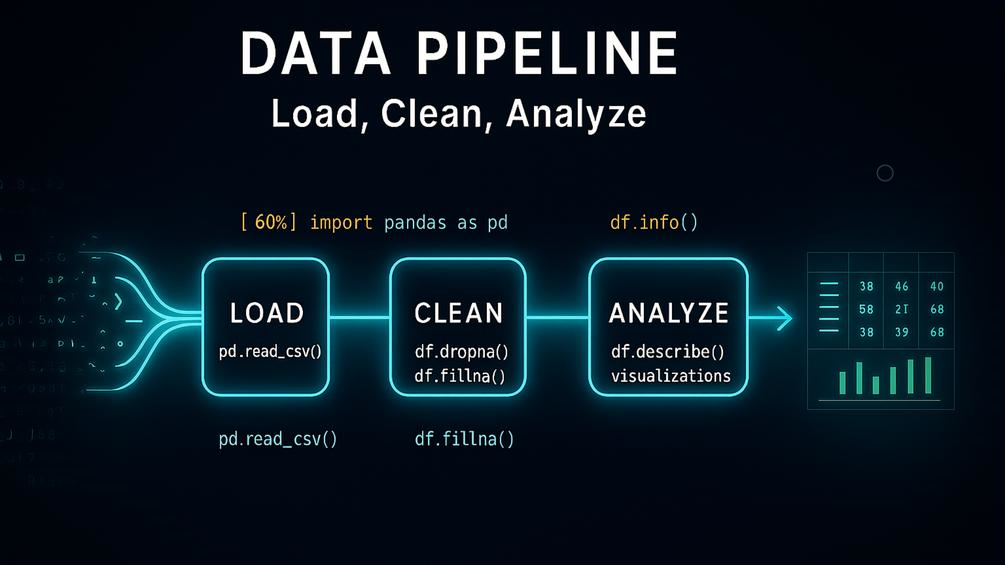
User Input → Validation → Processing → Data Storage → Output
For example, an engineering application might receive sensor information, validate it, process the measurements, store the results, and display a report.
A Simple Architecture
| Component | Purpose | Example |
|---|---|---|
| Input | Receives information | User form |
| Validation | Checks information | Data type validation |
| Processing | Performs operations | Data analysis |
| Storage | Saves information | CSV/database |
| Output | Presents results | Report/dashboard |
| Logging | Records events | Application log |
Separating these responsibilities makes applications easier to test and maintain.
Practical Examples 🔧
Example 1: File Organization
Imagine an engineer receives hundreds of files from different projects.
Instead of manually moving them into folders, Python can inspect filenames and automatically organize them.
A script could identify:
- PDF reports
- Images
- Spreadsheet files
- CAD-related documents
- Text files
and place each category into an appropriate directory.
Example 2: Engineering Data Processing
Suppose an engineer receives a CSV file containing measurements from laboratory equipment.
Python can:
- Open the file.
- Read the records.
- Detect missing values.
- Remove invalid entries.
- Calculate summary statistics.
- Generate charts.
- Export a report.
This can transform hours of repetitive work into an automated workflow.
Example 3: Website Data
A Python application can communicate with an API and retrieve information from an online service.
The application could then process the response and display selected information in a dashboard.
Example 4: Automation
A company may have a repetitive reporting process.
Python can automatically:
- Collect files.
- Rename documents.
- Process data.
- Generate reports.
- Send notifications.
- Store results.
This is one reason Python is valuable in professional environments.
Real-World Applications 🌍
Python is not limited to educational examples.
Engineering
Engineers use Python for:
- Data processing
- Simulation workflows
- Instrument automation
- Numerical analysis
- Optimization
- Technical reporting
- Computer vision
- Research automation
Artificial Intelligence 🤖
Python is heavily used for machine-learning development.
Typical workflows include:
Data Collection → Cleaning → Training → Evaluation → Deployment
Python provides libraries that simplify many of these tasks.
Data Science 📊
Data analysts can use Python to transform large datasets into useful information.
Typical tasks include:
- Data cleaning
- Statistical analysis
- Visualization
- Forecasting
- Reporting
Web Development 🌐
Python can also power web applications through frameworks and supporting libraries.
Applications may include:
- APIs
- Business platforms
- Dashboards
- Content systems
- Internal company tools
Automation ⚙️
Python is particularly effective for repetitive computer tasks.
A well-designed automation script can reduce human effort while improving consistency.
Common Mistakes Beginners Make ⚠️
Trying to Memorize Everything
You do not need to memorize every Python function.
Learn how to understand documentation and search for appropriate solutions.
Writing Extremely Long Functions
A function containing hundreds of lines becomes difficult to understand.
Break complicated operations into smaller logical functions.
Ignoring Error Messages
Error messages are valuable debugging information.
Instead of immediately searching for the entire error online, first identify:
- Error type
- File name
- Line number
- Failing operation
Using Poor Variable Names
Compare:
x = 25with:
room_temperature = 25The second version communicates intent much more clearly.
Copying Code Without Understanding It
Copying examples is useful for learning, but blindly copying code creates fragile software.
Ask yourself:
What does this line do? Why is it necessary? What happens if the input changes?
Challenges & Solutions 🚧
| Challenge | Practical Solution |
|---|---|
| Syntax errors | Read the error message carefully |
| Confusing data structures | Practice small examples |
| Large projects | Divide code into modules |
| Repeated code | Create functions |
| Unexpected input | Validate data |
| Difficult debugging | Use logging and breakpoints |
| Slow programs | Profile before optimizing |
| Dependency problems | Use virtual environments |
| Poor organization | Follow a consistent project structure |
The Debugging Mindset
Debugging is not evidence that you are bad at programming.
Professional developers debug code constantly.
A useful approach is:
Observe → Reproduce → Isolate → Test → Fix → Verify
This mindset is more valuable than memorizing hundreds of syntax rules.
Case Study: Automating an Engineering Report 📑
Consider a hypothetical engineering company that receives measurement files every week.
Previously, an employee manually opened each file, copied important values into a spreadsheet, created charts, and prepared a report.
The process was repetitive and vulnerable to human error.
The company develops a Python workflow.
Stage 1: Data Collection
Python scans a designated folder and identifies new measurement files.
Stage 2: Validation
The program checks whether required columns exist and identifies corrupted or incomplete records.
Stage 3: Processing
The script cleans the information and organizes it into a consistent structure.
Stage 4: Visualization
The processed data is transformed into charts suitable for engineering review.
Stage 5: Reporting
The system generates a structured report and saves it to the company’s reporting directory.
Result
The important improvement is not simply speed.
The workflow also becomes:
- More repeatable
- Easier to audit
- Easier to modify
- Less dependent on manual operations
- More scalable
This illustrates a central engineering principle:
Use software to automate predictable processes so humans can focus on decisions that require expertise.
Essential Tips for Learning Python 🎯
Build Projects Early
Do not spend months studying syntax before creating anything.
Start with small projects such as:
- Calculator
- File organizer
- Password generator
- Expense tracker
- Engineering unit converter
- CSV analyzer
- Weather dashboard
- Simple API client
Practice Every Day
Even short programming sessions can build familiarity.
Consistency matters more than occasional long study sessions.
Learn to Read Documentation
Professional programmers constantly consult documentation.
The ability to understand documentation is a major intermediate-level skill.
Use Version Control
Once your projects become serious, learn Git.
Version control allows you to track changes, experiment safely, and collaborate with other developers.
Write Readable Code
Your future self is one of the people who will have to maintain your code.
Use:
- Clear names
- Small functions
- Logical modules
- Comments where necessary
- Consistent formatting
Learn the Ecosystem Gradually
Do not try to learn every Python library.
Choose tools according to your objective.
For example:
Engineering → Scientific computing and data analysis
AI → Machine learning and deep learning
Web → Web frameworks and APIs
Automation → File, browser, and system automation
FAQs ❓
Is Python easy for beginners?
Yes. Python’s readable syntax makes it one of the more accessible programming languages for beginners. However, becoming a strong programmer still requires practice with algorithms, debugging, data structures, and software design.
How long does it take to learn Python?
The timeline depends on your background and study schedule. A beginner can learn basic syntax relatively quickly, while becoming comfortable with intermediate programming usually requires consistent project-based practice.
Should I learn Python before learning AI?
Python is an excellent starting point for AI because many popular AI and machine-learning tools use it. Learning Python fundamentals first will make AI concepts considerably easier to understand.
Is Python useful for engineers?
Absolutely. Python can automate calculations, process experimental data, analyze measurements, generate reports, interact with APIs, and support scientific and engineering workflows.
Should beginners learn object-oriented programming?
Yes, but not necessarily on the first day. First become comfortable with variables, conditions, loops, functions, and collections. Then gradually introduce classes and objects.
Is Python slower than lower-level programming languages?
Python can be slower for certain computational workloads because it is a high-level interpreted language. However, Python applications can often use optimized libraries or compiled components for performance-critical operations.
What projects should an intermediate Python developer build?
Good intermediate projects include data-processing pipelines, API applications, automation systems, database-backed applications, engineering analysis tools, and command-line utilities.
Is knowing Python syntax enough to become a programmer?
No. Programming involves much more than syntax. You need problem-solving skills, algorithmic thinking, debugging ability, data-structure knowledge, software organization, testing, and the ability to understand requirements.
Conclusion 🚀🐍
Python provides an excellent pathway from programming fundamentals to advanced engineering and software development.
For beginners, the most important concepts are variables, data types, conditions, loops, functions, collections, and basic file handling. Intermediate developers should expand into modules, error handling, object-oriented programming, testing, APIs, databases, and application architecture.
The real power of Python appears when these concepts are combined to solve practical problems.
Whether you are a student learning your first programming language, an engineer automating repetitive work, a data professional analyzing information, or a developer building software, Python can become a highly valuable technical tool.
The best strategy is simple:
Learn → Build → Break → Debug → Improve → Repeat. 🔥
Programming skill develops through practical experience. Instead of trying to become an expert before writing your first project, start with a small problem, build a solution, study your mistakes, and gradually increase the complexity.
With consistent practice, Python can move from a beginner-friendly language on your screen to a powerful engineering instrument for solving real-world problems.