MySQL in a Nutshell 2nd Edition: A Complete Engineering Guide to MySQL Architecture, SQL Techniques, Performance Optimization, and Real-World Database Applicationss.
Introduction 📚🚀
Modern software applications depend on reliable, fast, and scalable database management systems. Whether you’re developing a web application, building enterprise software, analyzing business data, or managing cloud infrastructure, understanding MySQL is an essential engineering skill.
MySQL in a Nutshell (2nd Edition) is one of the most respected practical references for learning MySQL. Rather than focusing only on SQL syntax, it explains the internal architecture, storage engines, optimization strategies, security mechanisms, replication technologies, and best engineering practices required to build professional database systems.
Today, MySQL powers millions of applications worldwide—from small websites to global platforms handling billions of records every day.
This guide explains everything engineers, students, database administrators, software developers, and data professionals need to understand MySQL from both theoretical and practical perspectives.
Whether you are preparing for technical interviews, building production systems, or studying database engineering, this guide will provide a solid foundation.
Background Theory 📖
Relational database management systems (RDBMS) organize information into structured tables linked through relationships.
Unlike flat files, relational databases provide:
- Data consistency
- ACID transactions
- Efficient querying
- Multi-user access
- Security
- Scalability
- Backup and recovery
MySQL was originally developed in 1995 and has evolved into one of the world’s most widely adopted open-source relational database systems.
It supports:
- Structured Query Language (SQL)
- Transaction management
- Stored procedures
- Views
- Triggers
- Replication
- Partitioning
- High availability
- Cloud deployment
Modern applications such as:
- Banking systems
- E-commerce websites
- Learning management systems
- Hospital software
- ERP platforms
- Social media websites
all rely heavily on relational databases like MySQL.
Definition 🗄️
MySQL is an open-source relational database management system (RDBMS) that stores, manages, retrieves, and secures structured data using SQL (Structured Query Language).
Its major components include:
- SQL Query Processor
- Storage Engine
- Buffer Pool
- Transaction Manager
- Optimizer
- Index Manager
- Replication Engine
- Security System
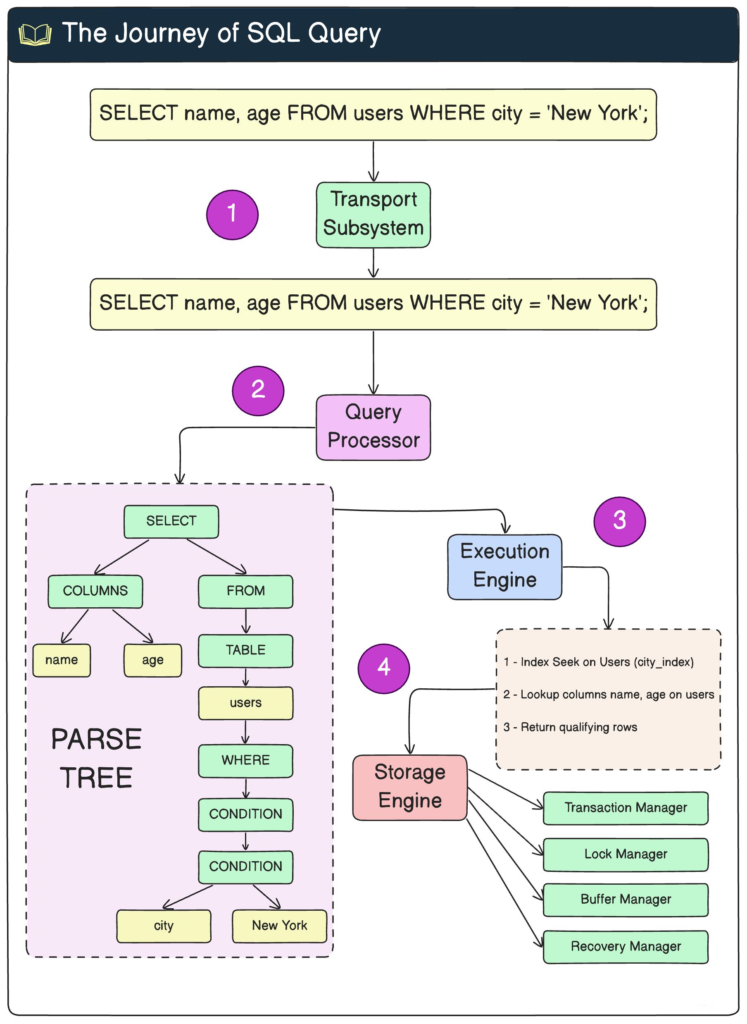
Understanding MySQL Architecture 🏗️
Client Layer
Applications connect using:
- PHP
- Python
- Java
- C#
- Node.js
- Go
- REST APIs
Each client communicates with the MySQL server using SQL statements.
SQL Layer
The SQL layer is responsible for:
- Parsing SQL
- Authentication
- Query optimization
- Permission checking
- Execution planning
Example:
SELECT Name
FROM Employees
WHERE Salary > 60000;
Before execution, MySQL creates an optimized execution plan.
Storage Engine Layer
Storage engines determine how data is stored.
Common engines include:
| Storage Engine | Transaction Support | Speed | Recommended Use |
|---|---|---|---|
| InnoDB | Yes | Excellent | Production systems |
| MyISAM | No | Very Fast Reads | Legacy projects |
| MEMORY | No | Extremely Fast | Temporary tables |
| CSV | No | Moderate | Export data |
| ARCHIVE | Limited | Compression | Historical records |
Physical Storage
Data is stored as:
- Tablespaces
- Data pages
- Index pages
- Redo logs
- Undo logs
- Binary logs
These components improve durability and crash recovery.
Step-by-Step Guide to Working with MySQL 🛠️


Step 1 — Install MySQL
Install:
- MySQL Community Server
- MySQL Workbench
- Command Line Client
Step 2 — Create a Database
CREATE DATABASE CompanyDB;
Step 3 — Select Database
USE CompanyDB;
Step 4 — Create Table
CREATE TABLE Employees(

EmployeeID INT PRIMARY KEY,

Name VARCHAR(100),

Department VARCHAR(50),

Salary DECIMAL(10,2)

);
Step 5 — Insert Records
INSERT INTO Employees

VALUES

(1,'John', 'Engineering',70000),

(2,'Sarah','Marketing',65000);
Step 6 — Retrieve Data
SELECT *

FROM Employees;
Step 7 — Update Data
UPDATE Employees

SET Salary=75000

WHERE EmployeeID=1;
Step 8 — Delete Data
DELETE FROM Employees

WHERE EmployeeID=2;
SQL Techniques Every Engineer Should Know 💡
Filtering
WHERE Salary > 50000
Sorting
ORDER BY Salary DESC
Grouping
GROUP BY Department
Aggregate Functions
- COUNT()
- SUM()
- AVG()
- MIN()
- MAX()
JOIN Operations
Types include:
- INNER JOIN
- LEFT JOIN
- RIGHT JOIN
- FULL JOIN
- CROSS JOIN
Subqueries
Example:
SELECT *

FROM Employees

WHERE Salary >

(SELECT AVG(Salary)

FROM Employees);
Views
Views simplify repeated queries.
Stored Procedures
Stored procedures improve:
- Performance
- Security
- Code reuse
Triggers
Automatically execute SQL after events like:
- INSERT
- UPDATE
- DELETE
MySQL Performance Optimization ⚡
Performance tuning is one of the most valuable database engineering skills.
Key optimization methods include:
Indexing
Indexes dramatically reduce search time.
Common indexes:
- Primary Index
- Secondary Index
- Composite Index
- Unique Index
Query Optimization
Instead of
SELECT *
use
SELECT Name, Salary
to reduce unnecessary data retrieval.
EXPLAIN Statement
EXPLAIN SELECT *
FROM Employees;
This reveals:
- Index usage
- Table scans
- Join order
- Estimated rows
Buffer Pool
Increasing InnoDB buffer pool memory reduces disk access.
Partitioning
Large tables can be divided into manageable partitions.
Benefits include:
- Faster queries
- Easier maintenance
- Better scalability
Replication
Replication distributes workload across multiple servers.
Types:
- Master-Slave
- Master-Master
- Group Replication
MySQL vs Other Database Systems ⚖️
| Feature | MySQL | PostgreSQL | SQL Server | Oracle |
|---|---|---|---|---|
| Open Source | ✅ | ✅ | Limited | No |
| Cost | Free | Free | Paid | Paid |
| Performance | Excellent | Excellent | Excellent | Excellent |
| Learning Curve | Easy | Moderate | Moderate | Advanced |
| Enterprise Features | High | Very High | Very High | Excellent |
| Community Support | Huge | Huge | Large | Large |
Database Architecture Diagrams and Engineering Tables 📊


MySQL Request Flow
| Step | Description |
|---|---|
| Client Request | SQL submitted |
| Parser | Syntax verification |
| Optimizer | Execution plan |
| Storage Engine | Reads data |
| Buffer Pool | Memory access |
| Result Returned | Client receives data |
Storage Engine Comparison
| Feature | InnoDB | MyISAM |
|---|---|---|
| Transactions | Yes | No |
| Foreign Keys | Yes | No |
| Crash Recovery | Excellent | Limited |
| Locking | Row Level | Table Level |
Engineering Examples 💻
Example 1 — University Database
Tables:
- Students
- Courses
- Instructors
- Grades
Relationships ensure referential integrity.
Example 2 — Online Store
Tables:
- Products
- Customers
- Orders
- Payments
- Inventory
MySQL manages millions of transactions daily.
Example 3 — Hospital System
Stores:
- Patients
- Doctors
- Appointments
- Prescriptions
- Laboratory Reports
Reliable transactions prevent data inconsistency.
Real-World Applications 🌍
MySQL supports many industries.
Software Engineering
- SaaS platforms
- CRM systems
- ERP solutions
Banking
- Customer accounts
- Financial transactions
- Fraud detection
Healthcare
- Electronic Medical Records
- Laboratory systems
- Scheduling
Manufacturing
- Inventory
- Production planning
- Equipment monitoring
Education
- Learning Management Systems
- Student portals
- Examination systems
E-commerce
- Shopping carts
- Order processing
- Product catalogs
- Customer analytics
Common Mistakes ❌
Many beginners make avoidable errors.
Missing Indexes
Slow queries occur without indexing.
Using SELECT *
Retrieves unnecessary columns.
Poor Normalization
Duplicate data wastes storage.
Ignoring Transactions
Can leave inconsistent records.
Weak Passwords
Database security should never be neglected.
No Backup Strategy
Hardware failures happen unexpectedly.
Large Unoptimized Queries
Split complex operations into manageable queries.
Challenges and Solutions 🔧
| Challenge | Solution |
|---|---|
| Slow Queries | Add indexes |
| Deadlocks | Optimize transaction order |
| High CPU Usage | Analyze execution plans |
| Storage Growth | Archive old data |
| Security Risks | Least privilege access |
| Replication Delay | Tune network and hardware |
| Lock Contention | Use row-level locking with InnoDB |
Engineering Case Study 🏢
E-Commerce Database Modernization
A growing online retailer experienced slow page loads during peak shopping seasons. Product searches and order processing became increasingly delayed as the customer base expanded.
Initial Problems
- Full table scans on large product tables
- Missing indexes on frequently searched columns
- Long-running reporting queries competing with transactional workloads
- Single database server handling all read and write operations
Engineering Improvements
- Added composite indexes for common search patterns
- Optimized SQL queries using the
EXPLAINcommand - Switched all tables to the InnoDB storage engine
- Implemented read replicas to distribute reporting traffic
- Increased the InnoDB buffer pool to keep more data in memory
- Scheduled maintenance tasks during off-peak hours
Results
| Metric | Before | After |
|---|---|---|
| Average Search Time | 2.8 s | 0.25 s |
| Checkout Response | 1.9 s | 0.4 s |
| Concurrent Users Supported | 3,000 | 12,000 |
| CPU Utilization | 90% | 55% |
| Database Availability | 99.2% | 99.98% |
This case demonstrates how thoughtful database design and tuning can significantly improve both user experience and infrastructure efficiency.
Essential Tips ⭐
- 🎯 Design normalized schemas before writing application code.
- 🚀 Create indexes only on columns that improve query performance.
- 📊 Regularly analyze slow query logs.
- 🔒 Enforce the principle of least privilege for database users.
- 💾 Automate backups and periodically test restoration procedures.
- ⚙️ Use transactions for operations that modify related records.
- 📈 Monitor CPU, memory, disk I/O, and connection counts.
- 🧪 Test schema and query changes in a staging environment first.
- 🌐 Consider replication and partitioning as your data grows.
- 📚 Keep MySQL and client libraries updated with stable releases.
Frequently Asked Questions ❓
What is MySQL primarily used for?
MySQL is used to store, organize, retrieve, and manage structured data for websites, enterprise software, mobile applications, analytics platforms, and cloud services.
Why is InnoDB the default storage engine?
InnoDB supports ACID transactions, row-level locking, foreign keys, and crash recovery, making it ideal for most production applications.
How can I make SQL queries faster?
Use appropriate indexes, avoid unnecessary SELECT * statements, review execution plans with EXPLAIN, optimize joins, and keep statistics up to date.
What is database normalization?
Normalization organizes data into related tables to reduce redundancy, improve consistency, and simplify maintenance.
What is replication in MySQL?
Replication copies data from one database server to one or more additional servers, improving availability, scalability, and disaster recovery.
Is MySQL suitable for enterprise systems?
Yes. MySQL powers many enterprise applications and supports clustering, replication, backup strategies, security features, and high-performance storage engines.
Can MySQL handle large databases?
Yes. With proper schema design, indexing, partitioning, replication, and hardware resources, MySQL can efficiently manage databases containing billions of rows.
Conclusion 🎓
MySQL remains one of the most trusted relational database management systems in modern software engineering. Its combination of performance, reliability, flexibility, and extensive community support makes it an excellent choice for projects ranging from personal websites to mission-critical enterprise platforms.
The concepts presented in MySQL in a Nutshell 2nd Edition—including database architecture, SQL techniques, indexing, transactions, optimization, replication, and security—provide engineers with the knowledge needed to design scalable and maintainable database solutions. By applying sound schema design, writing efficient SQL, monitoring performance, and following industry best practices, students and professionals can build systems that are secure, resilient, and ready to grow with future demands.
Whether your goal is to become a database administrator, backend developer, data engineer, or software architect, mastering MySQL is an investment that will continue to deliver value across countless engineering disciplines.