Mastering Python 3 Programming: The Ultimate Guide to Python Coding Fundamentals and Real-World Applications
Introduction: Why Python 3 Matters in Modern Engineering 🐍⚙️
Python 3 has evolved from a beginner-friendly programming language into one of the most important engineering and technology tools in the world. Its combination of readable syntax, extensive libraries, rapid development capabilities, and cross-platform compatibility makes it useful for students, software engineers, researchers, data scientists, automation specialists, and professionals working across many technical disciplines.
Unlike languages that require large amounts of code for relatively simple operations, Python allows engineers to express complex ideas with comparatively concise programs. This makes it particularly valuable when the objective is not simply to write software but to solve engineering problems efficiently.
Python is used for:
- 🤖 Artificial intelligence and machine learning
- 📊 Data analysis and visualization
- 🌐 Web application development
- ⚙️ Industrial automation
- 🧪 Scientific computing
- 🔬 Engineering simulations
- 🔐 Cybersecurity
- ☁️ Cloud and DevOps automation
- 🗄️ Database applications
- 📡 Internet of Things (IoT)
For beginners, Python provides a gentle introduction to programming logic. For experienced engineers, it provides a powerful ecosystem capable of supporting sophisticated production systems.
This guide explains the fundamental concepts behind Python 3 and gradually connects them to practical engineering applications.


Background Theory: Understanding Programming Through Python 🧠
Programming is essentially the process of transforming a problem into a sequence of instructions that a computer can execute.
A simplified computational model can be expressed as:
Input → Processing → Output
For example, an engineering program might receive measurements from a sensor, process those measurements, and produce a calculated result.
Consider:
temperature = 28
adjusted_temperature = temperature * 1.05

print(adjusted_temperature)
The computer receives the value 28, performs a mathematical operation, and produces an output.
Python sits between the human engineer and the computer’s underlying computational system. The Python interpreter translates Python instructions into operations that the computer can execute.
Why Python Uses an Interpreter
Python is generally described as an interpreted language because programs are executed through an interpreter rather than being compiled directly into a traditional standalone machine-code executable in the same way as languages such as C.
The basic process can be viewed as:
Python Source Code → Python Interpreter → Execution → Result
This model makes development highly interactive.
An engineer can write:
force = 500
area = 0.025

pressure = force / area

print(pressure)
The resulting pressure is:
P = F / A = 500 / 0.025 = 20,000 Pa
This illustrates one of Python’s most important engineering advantages: mathematical concepts can often be translated into readable code with minimal syntactic overhead.
Definition: What Is Python 3 Programming?
Python 3 programming is the practice of designing and executing computer programs using the Python 3 language family.
Python is a high-level, general-purpose programming language with support for procedural, object-oriented, and functional programming techniques.
Several characteristics define Python:
| Characteristic | Engineering Benefit |
|---|---|
| High-level syntax | Easier development |
| Dynamic typing | Faster prototyping |
| Extensive libraries | Less code from scratch |
| Object-oriented programming | Better software organization |
| Cross-platform support | Flexible deployment |
| Automatic memory management | Reduced low-level complexity |
| Interactive interpreter | Rapid experimentation |
| Open-source ecosystem | Large development community |
Python’s philosophy emphasizes readability. This is especially important in engineering environments where programs may need to be reviewed, modified, tested, and maintained by multiple people.
Python 3 Fundamentals: Building the Programming Foundation 🧱
Learning Python effectively requires understanding a relatively small set of fundamental concepts.
Variables and Data Types
A variable stores a value that a program can use.
name = "Engineering"
temperature = 32
pressure = 101325
efficiency = 0.94
Python automatically determines the data type.
Common types include:
int→ integersfloat→ decimal numbersstr→ textbool→TrueorFalselist→ ordered collectiontuple→ immutable collectiondict→ key-value structureset→ unique values
Operators and Mathematical Expressions
Python supports standard mathematical operations:
a = 20
b = 6

print(a + b)
print(a - b)
print(a * b)
print(a / b)
print(a ** b)
The ** operator represents exponentiation.
For engineering calculations, Python can therefore represent equations directly:
mass = 15
acceleration = 9.81

force = mass * acceleration
print(force)
The calculated force is approximately:
F = 147.15 N
Conditional Statements
Engineering programs frequently need to make decisions.
temperature = 85

if temperature > 80:
    print("Warning: High temperature")
else:
    print("Temperature within range")
This structure is useful in monitoring, automation, control systems, and data-processing applications.
Loops
Loops allow a program to repeat operations.
for i in range(5):
    print(i)
A loop can also process engineering measurements:
temperatures = [21.5, 22.1, 23.0, 24.2]

for temperature in temperatures:
    print(temperature)
Functions
Functions package reusable logic into a defined block.
def calculate_pressure(force, area):
    return force / area

pressure = calculate_pressure(1000, 0.05)
print(pressure)
Functions are essential for professional programming because they prevent repetitive code and make complex programs easier to maintain.
Step-by-Step: Building Your First Engineering Python Program 🔧


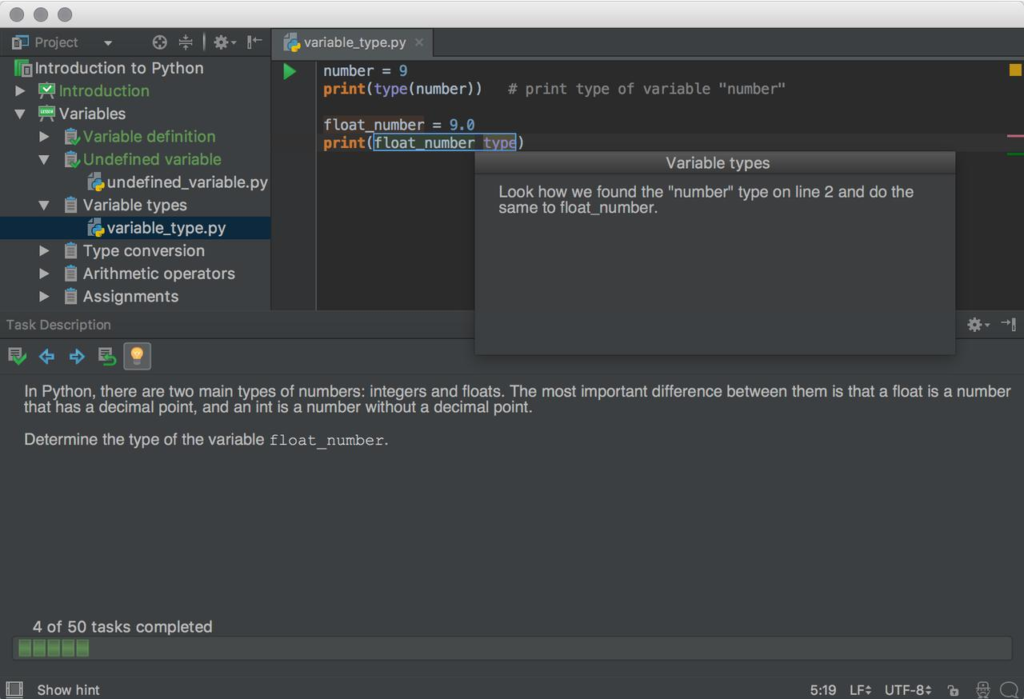
Let’s construct a simple engineering calculation program.
Step 1: Define the Inputs
Suppose an engineer wants to calculate mechanical stress.
The fundamental equation is:
σ = F / A
where:
- σ = stress in Pa
- F = applied force in N
- A = cross-sectional area in m²
We can define:
force = 25000
area = 0.0025
Step 2: Perform the Calculation
stress = force / area
Step 3: Display the Result
print("Stress =", stress, "Pa")
The complete program becomes:
force = 25000
area = 0.0025

stress = force / area

print("Stress =", stress, "Pa")
Step 4: Improve the Program With a Function
A more reusable implementation is:
def calculate_stress(force, area):
    return force / area

force = 25000
area = 0.0025

stress = calculate_stress(force, area)

print(f"Stress = {stress:.2f} Pa")
The f-string makes it possible to format the output cleanly.
Step 5: Add Input Validation
Professional engineering software should not blindly accept invalid values.
def calculate_stress(force, area):
    if area <= 0:
        raise ValueError("Area must be greater than zero")

    return force / area
This is a simple example of transforming a basic script into a more reliable engineering tool.
Comparison: Python vs Other Programming Languages ⚖️
Python is not automatically the best choice for every engineering problem.
| Feature | Python | C/C++ | Java | MATLAB |
|---|---|---|---|---|
| Learning curve | Low | Higher | Moderate | Low–Moderate |
| Development speed | Excellent | Moderate | Moderate | Excellent |
| Numerical computing | Excellent | Excellent | Good | Excellent |
| Low-level hardware control | Limited | Excellent | Limited | Limited |
| AI/ML ecosystem | Excellent | Good | Good | Good |
| Web development | Excellent | Limited | Excellent | Limited |
| Scientific libraries | Excellent | Excellent | Good | Excellent |
| Rapid prototyping | Excellent | Moderate | Moderate | Excellent |
When Python Is the Better Choice
Python is particularly attractive when:
- Development speed is important.
- Data processing is required.
- AI or machine learning is involved.
- Automation is needed.
- The application integrates multiple technologies.
- Engineers need readable and maintainable scripts.
When Another Language May Be Better
C or C++ may be preferable when extremely low-level hardware control or strict performance requirements dominate.
MATLAB may remain attractive for certain numerical engineering workflows, particularly where an existing organization already has a large MATLAB ecosystem.
The important engineering principle is simple:
Choose the tool according to the problem—not according to popularity.
Python Diagrams, Architecture and Data Flow 📐
A typical Python engineering application can be represented conceptually as:
┌─────────────────┐
│ Engineering Data│
│ Sensors / Files │
└────────┬────────┘
         ↓
┌─────────────────┐
│ Python Program  │
│ Validation      │
│ Processing      │
│ Calculations    │
└────────┬────────┘
         ↓
┌─────────────────┐
│ Python Libraries│
│ NumPy / Pandas  │
│ SciPy / Matplotlib│
└────────┬────────┘
         ↓
┌─────────────────┐
│ Results         │
│ Graphs / Reports│
│ Decisions       │
└─────────────────┘
Important Python Libraries
| Library | Primary Application |
|---|---|
| NumPy | Numerical computing |
| pandas | Data analysis |
| Matplotlib | Visualization |
| SciPy | Scientific computing |
| scikit-learn | Machine learning |
| Requests | HTTP communication |
| Flask | Web applications |
| FastAPI | APIs and backend systems |
| OpenCV | Computer vision |


Practical Examples for Engineers 💡
Example 1: Electrical Power Calculation
Electrical power can be calculated using:
P = V × I
voltage = 230
current = 5

power = voltage * current

print(f"Power = {power} W")
The result is:
P = 1150 W
Example 2: Calculating Kinetic Energy
The equation is:
KE = ½mv²
mass = 1200
velocity = 20

kinetic_energy = 0.5 * mass * velocity ** 2

print(f"Kinetic Energy = {kinetic_energy:.2f} J")
Example 3: Processing Multiple Measurements
measurements = [12.4, 13.1, 12.8, 14.2, 13.7]

average = sum(measurements) / len(measurements)

print(f"Average = {average:.2f}")
This basic pattern becomes extremely powerful when combined with pandas and NumPy for large engineering datasets.
Real-World Applications of Python 🌍
Python is now embedded in workflows across many engineering sectors.
Mechanical Engineering
Python can automate:
- Stress calculations
- Thermal calculations
- CAD-related data processing
- Experimental data analysis
- Optimization
- Simulation workflows
Civil Engineering
Engineers can use Python for:
- Structural calculations
- Survey data processing
- GIS workflows
- Statistical analysis
- Construction data management
- Structural optimization
Electrical Engineering
Applications include:
- Circuit analysis
- Signal processing
- Power-system calculations
- Embedded-system support
- Data acquisition
- Control-system development
Data and AI Engineering
Python is one of the dominant tools for:
Data → Processing → Model → Prediction → Decision
This makes it valuable for predictive maintenance, anomaly detection, forecasting, computer vision, and intelligent automation.
Automation and DevOps
Python scripts can automate repetitive activities such as:
- File management
- Database operations
- System monitoring
- Report generation
- API communication
- Testing
- Cloud workflows
Common Mistakes Beginners Make ⚠️
Ignoring Indentation
Python uses indentation to define code blocks.
Incorrect indentation can produce errors or change program behavior.
if temperature > 50:
    print("Warning")
Consistency is essential.
Writing Everything in One Function
A huge function becomes difficult to test and maintain.
Instead, divide functionality into logical components.
Ignoring Exceptions
Programs should anticipate unexpected conditions.
try:
    value = float(input("Enter value: "))
except ValueError:
    print("Invalid numerical input.")
Using Poor Variable Names
Compare:
x = 25
with:
operating_temperature = 25
The second version communicates engineering intent much more clearly.
Failing to Test Engineering Calculations
A program can execute successfully while producing incorrect engineering results.
Always compare critical calculations against:
- Hand calculations
- Known reference values
- Experimental measurements
- Independent software
- Established equations
Challenges and Solutions 🚧
| Challenge | Practical Solution |
|---|---|
| Syntax errors | Use an IDE and read error messages |
| Large programs | Divide code into modules |
| Slow processing | Optimize algorithms and use NumPy |
| Incorrect results | Build automated tests |
| Dependency problems | Use virtual environments |
| Poor maintainability | Follow coding standards |
| Large datasets | Use pandas/NumPy efficiently |
| Security risks | Validate inputs and manage dependencies |
One of the most important professional habits is learning to interpret Python’s error messages.
An exception is not merely a failure—it is diagnostic information.
Case Study: Python for Predictive Equipment Maintenance 🏭
Imagine a manufacturing facility monitoring an industrial motor.
Sensors provide:
- Temperature
- Vibration
- Current
- Rotational speed
Every minute, measurements are collected.
A Python system can process this information using a workflow such as:
Sensors
   ↓
Data Collection
   ↓
Python Processing
   ↓
Data Cleaning
   ↓
Statistical Analysis
   ↓
Anomaly Detection
   ↓
Maintenance Alert
Suppose vibration normally remains between 2.0 and 3.5 mm/s.
Python can identify unusual measurements:
vibration = 5.8

if vibration > 3.5:
    print("Maintenance inspection recommended")
A production system could go considerably further by analyzing historical patterns with machine-learning models.
The engineering benefit is potentially significant: instead of waiting for equipment to fail, organizations can use data to identify abnormal behavior earlier.
This demonstrates an important principle:
Python is not the engineering solution by itself; it is a tool that connects engineering knowledge, mathematics, data, and automation.
Essential Tips for Mastering Python 3 🚀
Start With Fundamentals
Do not rush immediately into artificial intelligence.
Master:
- Variables
- Data types
- Operators
- Conditions
- Loops
- Functions
- Lists and dictionaries
- Modules
- Exceptions
- Object-oriented programming
Build Projects Instead of Only Watching Tutorials
A strong learning progression could be:
Calculator → Engineering Calculator → Data Analyzer → Automation Script → API → Engineering Application
Each project should introduce a new concept.
Learn to Read Documentation
Professional programmers do not memorize every function.
They know how to find reliable information and understand documentation.
Combine Programming With Engineering Knowledge
For engineering students and professionals, the most powerful combination is:
Engineering Theory + Mathematics + Python + Data
This combination can transform theoretical equations into reusable computational tools.
Test Your Calculations
For safety-critical engineering work, never assume that a program is correct simply because it runs without errors.
Use independent verification.
FAQs About Mastering Python 3
Is Python 3 suitable for engineering students?
Yes. Python is an excellent starting language because its syntax is relatively readable while its ecosystem supports mathematics, scientific computing, data analysis, automation, and AI.
How long does it take to learn Python?
Basic programming concepts can be learned relatively quickly, but professional proficiency requires continuous practice. A student who practices consistently through projects will generally progress much faster than someone who only reads theoretical material.
Is Python difficult for beginners?
Python is considered one of the more accessible general-purpose programming languages. The difficult part is usually not Python syntax itself but learning programming logic and problem-solving.
Can Python be used for mechanical engineering?
Absolutely. It can support numerical calculations, simulation workflows, optimization, experimental data processing, automation, and visualization.
Can Python replace MATLAB?
Not universally. Python can perform many tasks traditionally associated with MATLAB, but the best choice depends on the project, existing tools, available libraries, licensing requirements, and team expertise.
Is Python useful for electrical engineering?
Yes. Electrical engineers can use Python for signal processing, circuit calculations, data analysis, automation, power-system studies, and research.
Should I learn object-oriented programming?
Yes, particularly if you intend to build larger applications. Object-oriented programming provides techniques for organizing complex software into reusable components.
What should I learn after Python fundamentals?
A strong next step depends on your objective. Engineers working with data can explore NumPy, pandas, SciPy, and Matplotlib. Those interested in AI can move toward machine learning. Web developers can explore frameworks such as Flask or FastAPI.
Conclusion: From Python Beginner to Engineering Programmer 🐍⚙️
Mastering Python 3 is not simply about memorizing commands. It is about learning how to convert a real-world problem into a structured computational solution.
The fundamental journey begins with:
Variables → Logic → Loops → Functions → Data Structures → Modules → Libraries → Projects
From there, Python can connect directly to engineering disciplines through numerical computation, automation, simulation, data analysis, visualization, artificial intelligence, and system integration.
For beginners, the most effective strategy is to start small and build continuously. For experienced engineers, Python becomes even more valuable when combined with established engineering equations, experimental data, simulation techniques, and domain expertise.
Ultimately, the strongest Python programmer is not the person who knows the most syntax.
It is the engineer who can take a difficult problem, model it correctly, write reliable code, verify the result, and turn the result into a useful engineering decision. 🚀
That is the real objective of mastering Python 3.