
Learning the Pandas Library: Python Tools for Data Munging, Analysis, and Visualization
Introduction
Data is everywhere: engineering measurements, financial records, laboratory experiments, IoT sensors, business transactions, scientific observations, and machine-learning datasets. However, raw data is rarely ready for immediate analysis. It may contain missing values, duplicate records, inconsistent formats, incorrect data types, or information arranged in an inconvenient structure. 🐍📊
This is where the Pandas library becomes one of the most useful tools in the Python ecosystem. Pandas provides a practical environment for loading, cleaning, transforming, exploring, analyzing, and visualizing structured data.


For beginners, Pandas offers a relatively approachable way to work with tables without requiring advanced database knowledge. For professionals, it provides a powerful collection of operations for data preparation, exploratory analysis, reporting, and research.
The central idea is simple:
Raw Data → Cleaning → Transformation → Analysis → Visualization → Decision 🔄
Whether you are an engineering student examining experimental measurements or a professional processing thousands of business records, understanding Pandas can significantly improve your Python data workflow.
Background Theory
Before learning specific Pandas operations, it helps to understand the type of problem the library solves.
Traditional spreadsheets represent information as rows and columns. Databases use tables and structured queries. Programming languages use objects, lists, dictionaries, and other data structures.
Pandas brings several of these concepts together inside Python.
Structured Data
Structured data is information organized according to a recognizable pattern.
Examples include:
- Customer transaction records
- Temperature measurements
- Engineering test results
- Sensor readings
- Employee information
- Stock-price records
- Experimental observations
- Machine-learning datasets
A table might contain columns such as:
| Date | Sensor | Temperature | Status |
|---|---|---|---|
| Monday | S01 | 24.5 | Normal |
| Tuesday | S02 | 26.1 | Normal |
| Wednesday | S01 | — | Missing |
A human can understand this table quickly. Pandas allows Python programs to manipulate the same information systematically.
Why Data Munging Matters
Data munging, also called data wrangling, is the process of converting messy information into a useful analytical format.
Typical operations include:
- Loading data
- Inspecting its structure
- Identifying problems
- Cleaning invalid records
- Handling missing values
- Converting data types
- Filtering records
- Combining datasets
- Grouping information
- Producing summaries
- Visualizing results
These activities often consume more practical data-science time than the final statistical analysis itself.
Definition
Pandas is an open-source Python library designed for data manipulation and analysis, particularly for structured and tabular datasets.
Its two fundamental data structures are the Series and DataFrame.
Series
A Series can be thought of as a labeled one-dimensional collection of values.
For example, a temperature column can be represented as a Series containing multiple measurements.
The labels associated with the values make it possible to work with data more intelligently than with a simple Python list.
DataFrame
A DataFrame is a two-dimensional table consisting of rows and columns.
It is the structure most users associate with Pandas.
A DataFrame can represent:
- CSV files
- Excel worksheets
- Database query results
- Experimental datasets
- Machine-learning datasets
- Financial records
- Sensor data
The Pandas Ecosystem
Pandas works particularly well with other Python technologies, including:
- NumPy for numerical computing
- Matplotlib for visualization
- Seaborn for statistical graphics
- SciPy for scientific computing
- Scikit-learn for machine learning
- Jupyter for interactive analysis
This makes Pandas an important bridge between raw information and advanced analytical systems.
Step-by-Step Explanation: A Practical Pandas Workflow
Learning Pandas is easier when you think about it as a complete workflow rather than a collection of unrelated commands. 🔧🐍


Step 1: Import Pandas
A typical Python project begins by importing the library.
import pandas as pdThe pd abbreviation is widely used in Python projects and makes Pandas functions easier to access.
Step 2: Load the Dataset
Pandas can read information from numerous sources.
Common formats include:
- CSV
- Excel
- JSON
- SQL databases
- Parquet
- Clipboard data
For example, a CSV dataset can be loaded into a DataFrame.
data = pd.read_csv("engineering_data.csv")At this point, the raw file becomes a Python object that can be explored programmatically.
Step 3: Inspect the Data
Never begin transforming a dataset blindly.
First determine:
- How many rows exist?
- How many columns exist?
- What are the column names?
- Which data types are being used?
- Are values missing?
- Are there obvious errors?
Useful inspection operations include:
data.head()
data.tail()
data.info()
data.describe()
These simple commands can reveal major problems within seconds.
Step 4: Clean the Dataset
Real datasets frequently contain incomplete or inconsistent information.
You may need to:
- Remove duplicates
- Replace missing values
- Correct column names
- Convert data types
- Standardize text
- Remove invalid observations
For example, a temperature column might accidentally contain numbers, blank values, and text descriptions.
Before analysis, these inconsistencies should be resolved.
Step 5: Select Relevant Information
Large datasets often contain hundreds of columns, but a particular investigation may require only a few.
Pandas makes it possible to select individual columns or subsets of records.
You can also filter data based on conditions.
For example, an engineer could isolate measurements associated with a particular machine, location, or operating condition.
Step 6: Transform the Data
Transformation is one of Pandas’ strongest features.
You can:
- Create new columns
- Rename existing columns
- Sort records
- Convert units
- Extract dates
- Categorize observations
- Combine information
- Aggregate measurements
This allows raw data to become an analytical dataset.
Step 7: Group and Summarize
Suppose a company records equipment performance across several factories.
Instead of examining every individual measurement, Pandas can group observations by:
- Factory
- Machine
- Product
- Month
- Engineer
- Operating condition
The resulting summaries can reveal patterns that are difficult to see in raw records.
Step 8: Visualize the Results
Numbers alone do not always communicate patterns effectively.
Pandas can work with visualization libraries to create:
📈 Line charts
📊 Bar charts
🔵 Scatter plots
📦 Box plots
🔥 Heatmaps
Visualization can expose trends, outliers, relationships, and unexpected behavior.
Step 9: Export the Results
After cleaning and analyzing the dataset, the final information can be exported.
Common destinations include:
- CSV
- Excel
- JSON
- Database systems
- Reports
- Machine-learning pipelines
This completes the basic data workflow.
Comparison: Pandas vs Other Data Tools
Pandas is powerful, but it is not the only technology available for data processing.


| Tool | Main Strength | Suitable For |
|---|---|---|
| Pandas | Flexible Python data manipulation | Data analysis and preparation |
| Excel | Interactive spreadsheet work | Small to medium datasets |
| SQL | Database querying | Large structured databases |
| NumPy | Numerical arrays and computation | Scientific and numerical workloads |
| Polars | High-performance DataFrame processing | Larger and performance-sensitive workloads |
| MATLAB | Engineering and numerical analysis | Scientific and engineering applications |
Pandas vs Excel
Excel is excellent for interactive exploration and manual reporting.
Pandas becomes particularly attractive when the workflow needs to be:
- Automated
- Reproducible
- Integrated with Python
- Applied repeatedly
- Connected to machine-learning systems
Pandas vs SQL
SQL is designed primarily for working with databases.
Pandas is especially useful after information has been retrieved into Python, where more flexible transformations, statistical operations, and visualization can be performed.
In many professional workflows, the two technologies complement each other rather than compete.
Diagrams and Tables: Understanding the Pandas Data Model
The basic DataFrame model can be visualized conceptually as:
                 DataFrame
                     │
        ┌────────────┴────────────┐
        │                         │
      Rows                     Columns
        │                         │
   Observations              Variables
        │                         │
        └────────────┬────────────┘
                     │
               Data Analysis
                     │
       ┌─────────────┼─────────────┐
       ▼             ▼             ▼
    Cleaning     Transforming   Visualization
Another useful mental model is:
CSV / Excel / SQL
       ↓
   Pandas
       ↓
DataFrame
       ↓
 ┌─────┼─────┐
 ↓     ↓     ↓
Clean Filter Group
 │     │     │
 └─────┼─────┘
       ↓
    Analysis
       ↓
 Visualization
       ↓
   Decision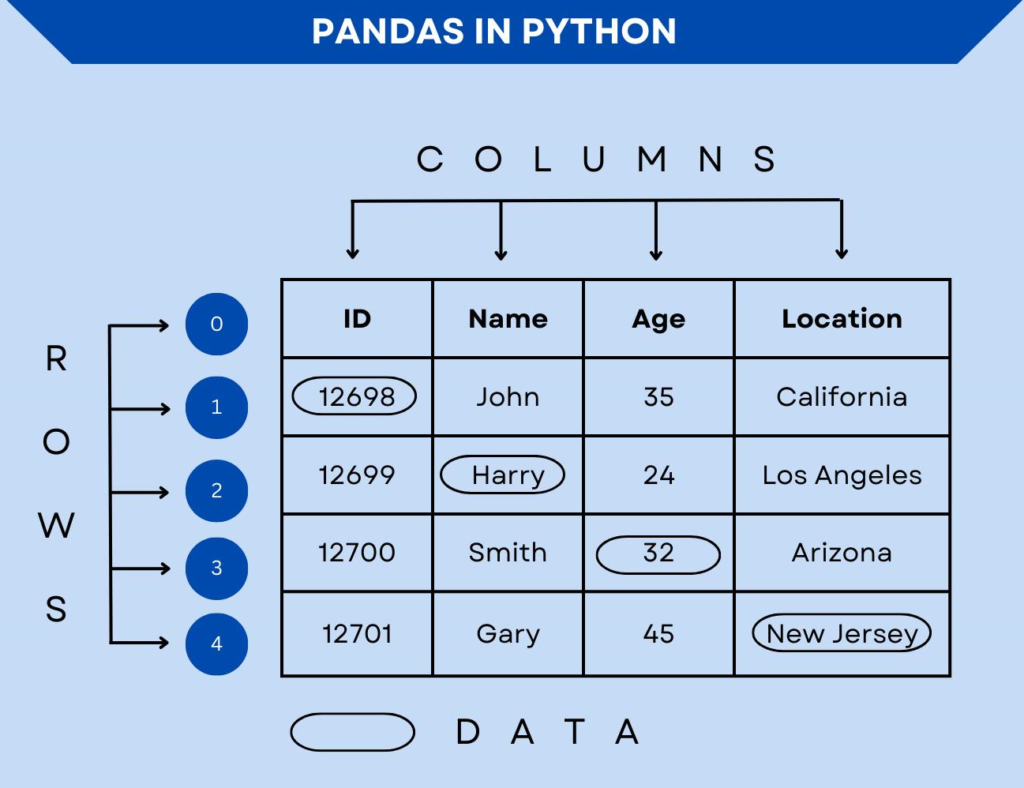


Frequently Used Pandas Operations
| Task | Typical Pandas Capability |
|---|---|
| Load CSV | read_csv() |
| Load Excel | read_excel() |
| Inspect rows | head() / tail() |
| Inspect structure | info() |
| Statistical summary | describe() |
| Filter records | Boolean conditions |
| Sort data | sort_values() |
| Group records | groupby() |
| Combine tables | merge() / join() |
| Remove duplicates | drop_duplicates() |
| Handle missing data | dropna() / fillna() |
| Export CSV | to_csv() |
| Export Excel | to_excel() |
Examples
Example 1: Engineering Sensor Data
Imagine an industrial facility collecting temperature readings from multiple machines.
The dataset contains:
- Timestamp
- Machine ID
- Temperature
- Pressure
- Operating status
Pandas can identify missing readings, separate machines, organize observations by day, and summarize performance.
An engineer can then visualize temperature changes and investigate machines behaving differently from the rest.
Example 2: Student Performance
A university might maintain a dataset containing:
- Student identifier
- Course
- Attendance
- Assignment status
- Examination result
Pandas can organize the records, identify incomplete information, and produce summaries by course or semester.
The resulting analysis could help educators identify subjects requiring additional support.
Example 3: Sales Analysis
A business might have millions of transaction records.
Pandas can help explore:
- Product categories
- Sales regions
- Monthly activity
- Customer segments
- Product performance
Instead of manually inspecting thousands of rows, analysts can create grouped summaries and visual reports.
Real-World Applications
Pandas is used across many technical and professional domains. 🌍
Engineering
Engineers can use Pandas to process:
- Structural monitoring data
- Laboratory measurements
- Manufacturing records
- Sensor outputs
- Energy consumption
- Equipment maintenance information
For example, civil engineers can organize inspection records and identify recurring patterns across structures.
Data Science
Data scientists frequently use Pandas during exploratory data analysis and data preparation.
Before a machine-learning model can be trained, datasets often require substantial cleaning and restructuring.
Finance
Financial analysts can process:
- Transactions
- Market records
- Portfolio information
- Financial reports
- Risk datasets
Artificial Intelligence
Machine-learning pipelines often begin with structured data preparation.
Pandas can help transform source datasets into cleaner inputs for algorithms.
Scientific Research
Researchers can use Pandas to organize experimental observations, combine datasets, inspect missing measurements, and prepare information for statistical analysis.
Common Mistakes
Ignoring Data Types
A column that looks numerical may actually be stored as text.
This can cause unexpected behavior during sorting, filtering, or analysis.
Treating Missing Values as Zero
A missing observation does not necessarily mean the measured quantity was zero.
Replacing missing values without understanding their meaning can introduce misleading results.
Modifying Data Without a Backup
During experimentation, it is easy to accidentally alter a DataFrame.
Keeping a clean source dataset is a valuable professional habit.
Using Loops for Everything
Beginners often process every row individually using Python loops.
Pandas provides many vectorized and column-oriented operations that are often clearer and more efficient.
Forgetting to Validate Results
A transformation may execute successfully while still producing incorrect results.
Always inspect the resulting data.
Challenges & Solutions
Large Datasets
Very large datasets can consume significant memory.
Solution: Process data in chunks, select only required columns, use efficient file formats, or consider tools designed for larger-scale workloads.
Messy Data
Real-world data may contain inconsistent names, dates, categories, and missing values.
Solution: Establish a repeatable cleaning pipeline instead of fixing records manually.
Complex Transformations
Advanced transformations can become difficult to read.
Solution: Break complicated workflows into logical stages and use meaningful variable names.
Performance Problems
A poorly designed workflow can become slow when datasets grow.
Solution: Avoid unnecessary copies, use efficient Pandas operations, and profile the workflow before optimizing it.
Case Study: Monitoring an Industrial Cooling System
Consider a manufacturing facility monitoring several cooling units.
Each unit generates records containing:
- Time
- Unit identifier
- Temperature
- Flow status
- Maintenance status
Initially, the dataset is difficult to analyze because measurements arrive at different intervals. Some records are incomplete, while several machine identifiers use inconsistent naming.
Stage 1: Data Collection
The monitoring system exports raw records periodically.
Stage 2: Data Cleaning
Pandas can standardize machine identifiers, identify incomplete records, and prepare timestamp information.
Stage 3: Data Organization
Records can be grouped according to individual cooling units.
Stage 4: Exploration
The engineering team can examine temperature trends and compare units.
Stage 5: Visualization
Charts make unusual temperature behavior easier to recognize.
Stage 6: Maintenance Decision
If one cooling unit consistently behaves differently from comparable equipment, engineers can investigate it before a major failure occurs.
The important point is that Pandas does not replace engineering judgment. Instead, it transforms large quantities of raw information into a format that engineers can understand and evaluate more effectively. ⚙️📊
Essential Tips
Start With Small Datasets
Do not begin with a massive industrial dataset.
Practice with a small CSV containing a few hundred records.
Learn DataFrame Thinking
Instead of thinking only in terms of individual values, learn to think in terms of:
columns → rows → groups → transformations → summaries
This mental model makes Pandas much easier to understand.
Inspect Before Transforming
A useful habit is:
Load → Inspect → Clean → Validate → Transform → Analyze
Do not skip the inspection stage.
Keep Your Workflow Reproducible
Write transformations as Python code instead of relying entirely on manual spreadsheet modifications.
A reproducible script can be executed again when new data arrives.
Combine Pandas With Visualization
Analysis becomes much more powerful when numerical summaries are combined with appropriate charts.
Learn Related Python Tools
Once comfortable with Pandas, consider learning:
- NumPy
- Matplotlib
- Seaborn
- Scikit-learn
- SQL
- Jupyter
Together, these tools create a strong foundation for modern data analysis.
FAQs
What is Pandas used for in Python?
Pandas is primarily used for working with structured data. It provides tools for loading, cleaning, transforming, analyzing, grouping, and exporting datasets.
Is Pandas difficult for beginners?
Pandas can be learned progressively. Beginners should first understand DataFrames, columns, rows, filtering, sorting, and basic data cleaning before moving into advanced transformations.
What is a Pandas DataFrame?
A DataFrame is a two-dimensional labeled data structure consisting of rows and columns. It is similar conceptually to a spreadsheet table but can be manipulated programmatically.
Can Pandas handle large datasets?
Yes, but its practical limits depend on available memory and the structure of the dataset. For very large workloads, techniques such as chunk processing or alternative high-performance data-processing systems may be appropriate.
Is Pandas useful for engineering?
Absolutely. Engineers can use it for sensor data, laboratory measurements, experimental results, maintenance records, manufacturing data, structural monitoring, and many other applications.
Can Pandas create graphs?
Pandas integrates with Python visualization libraries and also provides convenient plotting interfaces. For more advanced visualization, Matplotlib and Seaborn are commonly used.
Should I learn SQL before Pandas?
Not necessarily. Beginners can learn Pandas first. However, SQL becomes extremely valuable when working with data stored in relational databases, and professional data workflows often use both.
Is Pandas useful for machine learning?
Yes. Pandas is frequently used for dataset exploration and preprocessing before data is passed to machine-learning algorithms. It can help organize and prepare the information required by a model.
Conclusion
Learning Pandas is one of the most valuable steps for anyone interested in Python-based data analysis. 🐍🚀
The library transforms Python from a general-purpose programming language into a highly practical environment for working with structured information.
Its importance comes from the complete workflow it supports:
Import → Inspect → Clean → Transform → Analyze → Visualize → Export
For beginners, the best approach is to start with small datasets and gradually learn DataFrames, filtering, missing-value handling, grouping, merging, and visualization.
For students and professionals, the real power of Pandas appears when it is connected to real problems: engineering measurements, scientific experiments, business records, machine-learning datasets, financial information, and industrial monitoring.
Ultimately, Pandas is not simply a collection of Python commands. It is a data-thinking framework that helps transform messy information into useful knowledge. 📊⚙️
As datasets become increasingly important across engineering, science, artificial intelligence, and business, the ability to manipulate and understand data programmatically is becoming an essential technical skill. Learning Pandas provides a strong foundation for that journey.




