
Data Analysis Using SQL and Excel 2nd Edition: The Complete Beginner-to-Professional Guide for Modern Data Analytics 📊🚀
Introduction 📈
Data has become one of the world’s most valuable resources. Every business, healthcare organization, financial institution, engineering company, government agency, and research laboratory generates enormous amounts of information every day. The challenge is no longer collecting data—it is transforming raw information into meaningful insights.
Among the most powerful tools available for data analysis are SQL (Structured Query Language) and Microsoft Excel. Together, they form a practical and efficient combination that allows engineers, analysts, researchers, students, and business professionals to extract, organize, analyze, and visualize data with remarkable efficiency.
Whether you are managing millions of database records or analyzing engineering measurements, SQL retrieves the data while Excel transforms it into charts, dashboards, forecasts, and reports.
This guide explains the principles behind Data Analysis Using SQL and Excel (2nd Edition), covering both beginner concepts and advanced analytical techniques suitable for modern engineering and business environments.


Modern industries increasingly expect graduates and professionals to possess both SQL and Excel skills. Together, these tools improve decision-making, reduce manual work, and enable organizations to identify trends hidden within massive datasets.
Background Theory 📚
Data analysis is the systematic process of collecting, cleaning, transforming, and interpreting data to support informed decision-making.
Historically:
- 📄 Data was stored on paper records.
- 💾 Databases replaced paper systems.
- ☁ Cloud databases now manage billions of records.
- 🤖 Artificial Intelligence increasingly depends on well-structured datasets.
SQL became the standard language for relational databases, while Excel evolved into one of the world’s most widely used analytical applications.
Together they cover:
- Data extraction
- Data cleaning
- Statistical analysis
- Visualization
- Reporting
- Forecasting
- Automation
Definition 🧠
Data Analysis Using SQL and Excel is the process of retrieving structured data from relational databases using SQL and then analyzing, visualizing, cleaning, and presenting that information inside Microsoft Excel.
This workflow combines the strengths of both technologies:
| SQL | Excel |
|---|---|
| Retrieves data | Visualizes data |
| Filters millions of rows | Creates charts |
| Joins multiple tables | Performs calculations |
| Aggregates information | Builds dashboards |
| Handles databases | Generates reports |
Understanding SQL Fundamentals 💻
What is SQL?
SQL stands for Structured Query Language.
It is the international standard language used to communicate with relational databases.
Common database systems include:
- MySQL
- SQL Server
- PostgreSQL
- Oracle Database
- SQLite
SQL allows users to:
- Search records
- Insert information
- Delete data
- Update records
- Create databases
- Manage permissions
Basic SQL Commands
The most frequently used SQL commands include:
| Command | Purpose |
|---|---|
| SELECT | Retrieve data |
| FROM | Specify table |
| WHERE | Filter rows |
| ORDER BY | Sort results |
| GROUP BY | Create summaries |
| HAVING | Filter grouped data |
| JOIN | Combine tables |
| INSERT | Add records |
| UPDATE | Modify records |
| DELETE | Remove records |
Understanding Excel for Data Analysis 📊
Excel offers a complete environment for exploring datasets.
Popular analytical features include:
- Sorting
- Filtering
- Conditional Formatting
- Pivot Tables
- Power Query
- Power Pivot
- Charts
- Lookup functions
- Statistical functions
- Forecast sheets
Engineers often combine Excel with SQL exports to perform quick exploratory analysis before preparing reports.
Step-by-Step Data Analysis Workflow 🛠️
Step 1 — Define the Problem 🎯
Every project begins with a question.
Examples:
- 📈 Which products sell best?
- 📈 Which machine fails most often?
- Which customers generate the highest revenue?
- Which production line has the greatest efficiency?
Step 2 — Retrieve Data Using SQL
Typical workflow:
- Connect to database
- Write SQL query
- Filter unnecessary records
- Join required tables
- Aggregate results
Step 3 — Export Results to Excel
After SQL retrieves the required dataset:
- Save as CSV
- Export directly to Excel
- Connect using Power Query
Step 4 — Clean the Data
Tasks include:
✔ Remove duplicates
✔ Handle missing values
📈 Correct formatting
✔ Standardize dates
✔ Remove unnecessary columns


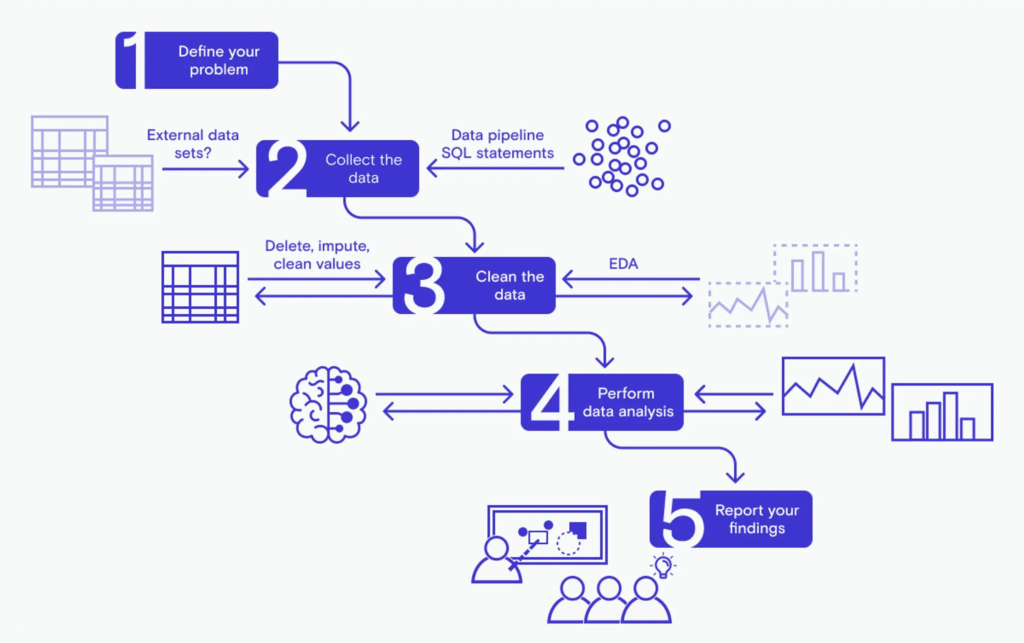
Step 5 — Analyze the Dataset
Popular Excel tools include:
- SUMIFS
- COUNTIFS
- AVERAGEIFS
- Pivot Tables
- Charts
- Slicers
- Trendlines
Step 6 — Build Dashboards 📈
Dashboards allow decision makers to monitor:
- Sales
- Costs
- Inventory
- Equipment performance
- Project progress
- Financial indicators
SQL vs Excel Comparison ⚖️
| Feature | SQL | Excel |
|---|---|---|
| Large datasets | ⭐⭐⭐⭐⭐ | ⭐⭐⭐ |
| Visualization | ⭐⭐ | ⭐⭐⭐⭐⭐ |
| Database management | Excellent | Limited |
| Statistical analysis | Moderate | Excellent |
| Dashboards | Limited | Excellent |
| Automation | Excellent | Excellent |
| Learning curve | Medium | Easy |
| Scalability | Very High | Moderate |
SQL Query Process Diagram 🗂️
| Stage | Description |
|---|---|
| Database | Stores raw data |
| SQL Query | Extracts information |
| Cleaning | Removes errors |
| Excel | Performs calculations |
| Charts | Visualizes results |
| Dashboard | Supports decisions |
Types of Data Analysis 📊
Descriptive Analysis
Answers:
“What happened?”
Example:
Monthly sales reports.
Diagnostic Analysis
Answers:
“Why did it happen?”
Example:
Investigating production delays.
Predictive Analysis
Uses historical data to estimate future outcomes.
Examples:
- Demand forecasting
- Failure prediction
- Maintenance scheduling
Prescriptive Analysis
Recommends actions.
Examples:
- Inventory optimization
- Route optimization
- Resource planning
Practical Examples 💡
Example 1 — Sales Analysis
SQL retrieves:
- Customer names
- Products
- Quantities
- Revenue
Excel creates:
- Revenue dashboard
- Sales charts
- Monthly comparison
Example 2 — Manufacturing Quality
Database stores:
- Machine IDs
- Production times
- Defects
- Maintenance history
Excel identifies:
- Defect trends
- Machine efficiency
- Downtime statistics
Example 3 — University Student Records
SQL extracts:
- Student grades
- Attendance
- Courses
Excel produces:
- GPA reports
- Performance charts
- Graduation statistics
Real-World Applications 🌍
SQL and Excel are widely used in numerous industries.
Engineering
- Predictive maintenance
- Equipment monitoring
- Failure analysis
Finance
- Budget analysis
- Investment reporting
- Risk management
Healthcare
- Patient records
- Hospital performance
- Medical research
Manufacturing
- Inventory control
- Production planning
- Supply chain optimization
Government
- Census analysis
- Infrastructure planning
- Public transportation
Education
- Student performance
- Academic research
- Enrollment analysis
Common SQL Functions 🔍
Useful functions include:
- COUNT()
- SUM()
- AVG()
- MIN()
- MAX()
- ROUND()
- CONCAT()
- DATE()
Common Excel Functions 📑
Frequently used formulas:
- IF()
- XLOOKUP()
- INDEX()
- MATCH()
- SUMIFS()
- COUNTIFS()
- TEXT()
- FILTER()
- UNIQUE()
Charts Frequently Used in Excel 📊
| Chart | Best Use |
|---|---|
| Column Chart | Comparison |
| Line Chart | Trends |
| Pie Chart | Percentages |
| Scatter Plot | Correlation |
| Histogram | Distribution |
| Area Chart | Growth |
| Waterfall Chart | Financial analysis |


Common Mistakes ❌
Many beginners encounter similar problems.
Retrieving Too Much Data
Large datasets slow performance.
Solution:
Filter records inside SQL before exporting.
Ignoring Data Cleaning
Dirty data creates misleading reports.
Always validate:
- Missing values
- Duplicates
- Formatting errors
Using Excel Instead of SQL
Avoid importing millions of rows unnecessarily.
SQL should perform heavy filtering first.
Hardcoding Values
Instead, use:
- Named ranges
- Dynamic formulas
- Database parameters
Not Documenting Queries
Maintain readable SQL using comments and consistent formatting.
Challenges and Solutions ⚙️
| Challenge | Solution |
|---|---|
| Huge datasets | SQL filtering |
| Duplicate records | DISTINCT keyword |
| Slow Excel files | Power Query |
| Manual reporting | Automation |
| Complex calculations | Pivot Tables |
| Multiple data sources | Power Query connections |
Case Study 🏭
Manufacturing Plant Performance Analysis
An automotive manufacturer collected data from:
- Production machines
- Sensors
- Maintenance logs
- Inventory systems
Objective
Reduce machine downtime.
Process
SQL:
- Extracted one year of production records.
Excel:
- Created Pivot Tables.
- Generated downtime charts.
- Compared machine performance.
Results
✅ 18% reduction in downtime
✅ Faster maintenance scheduling
📈 Improved productivity
✅ Better inventory planning
Best Practices ⭐
Write Efficient SQL
Avoid:
SELECT *
Instead, retrieve only required columns.
Normalize Data
Well-designed databases improve query performance.
Use Pivot Tables
Pivot Tables summarize thousands of rows in seconds.
Automate Reports
Power Query refreshes data automatically.
Backup Data
Always maintain secure database backups.
Validate Results
Compare reports with original database values.
Learn Keyboard Shortcuts
They dramatically improve productivity.
Examples:
- Ctrl + Shift + L
- Ctrl + T
- Alt + N + V
Essential Tips 💡
✅ Learn SQL before advanced Excel.
✅ Practice with real datasets.
📈 Master Pivot Tables.
✅ Understand relational databases.
✅ Learn Power Query.
📈 Build dashboards regularly.
✅ Use meaningful column names.
✅ Keep formulas simple.
📈 Document every project.
✅ Continue practicing every week.
Frequently Asked Questions ❓
Is SQL difficult for beginners?
No. Basic SQL can be learned quickly because it uses readable commands such as SELECT, FROM, and WHERE. Consistent practice with real datasets helps learners become comfortable writing queries.
Should I learn SQL or Excel first?
Excel is often easier to start with because of its graphical interface, but learning SQL early provides a strong foundation for working with databases. Ideally, study both together.
Can Excel replace SQL?
No. Excel is excellent for analysis and visualization, while SQL is designed for efficiently storing, retrieving, and managing large volumes of structured data. They complement each other rather than replace one another.
Is SQL still relevant in the age of AI?
Yes. Artificial intelligence systems rely on clean, structured data, and SQL remains one of the primary tools for accessing and preparing that data for machine learning and analytics.
Which industries use SQL and Excel?
Almost every data-driven industry uses them, including engineering, finance, healthcare, education, manufacturing, retail, logistics, telecommunications, and government.
Can I analyze millions of records?
SQL databases can efficiently manage millions of records. Excel is best used after filtering or aggregating the data to a manageable size.
What additional tools should I learn after SQL and Excel?
After mastering these tools, consider learning Power BI, Tableau, Python (Pandas), R, and cloud-based database platforms to expand your analytics capabilities.
Conclusion 🎯
SQL and Microsoft Excel remain two of the most valuable tools in modern data analysis. SQL excels at managing and retrieving structured information from large databases, while Excel provides an intuitive environment for cleaning, exploring, visualizing, and communicating insights. Together, they create a powerful workflow that supports engineers, analysts, students, researchers, and business professionals across industries.
By mastering SQL queries, data preparation techniques, Pivot Tables, charts, Power Query, and dashboard creation, you can transform raw datasets into meaningful information that drives better decisions. Whether your goal is improving manufacturing processes, optimizing business operations, conducting scientific research, or building a career in data analytics, combining SQL and Excel provides a strong foundation for success in today’s data-driven world. Consistent practice with real-world projects, attention to data quality, and a commitment to continuous learning will help you become a confident and effective data analyst.




