Clean Python: Elegant Coding in Python — Principles, Techniques, and Best Practices
Introduction
Python is famous for its simplicity, but writing Python code that merely works is not the same as writing clean Python. 🐍✨
Clean Python is code that communicates its purpose clearly, minimizes unnecessary complexity, follows consistent conventions, and remains easy to modify as a project grows. Whether you are a university student learning programming, a software engineer maintaining a production application, or a data scientist developing analytical tools, clean coding practices can dramatically improve your productivity.



A clean codebase is easier to understand, test, debug, review, and extend. It also reduces the mental effort required when another developer—or your future self—returns to the project months later.
Clean Python does not mean making every program unnecessarily sophisticated. In fact, the goal is usually the opposite:
Use the simplest design that clearly expresses the intended behavior.
This article explores the foundations of elegant Python programming, from naming and organization to functions, error handling, documentation, testing, and maintainability.


Background Theory
Python was designed with readability as one of its central characteristics. Its syntax intentionally avoids much of the visual complexity found in some programming languages.
This philosophy is closely connected with the broader idea that code is communication.
A program is read far more often than it is written. A developer might write a function once but read it dozens of times while debugging, testing, reviewing, or extending the application.
Therefore, good Python code should communicate:
- What the program does
- Why a particular operation exists
- What data a function expects
- What a function returns
- How errors should be handled
- Where responsibilities are separated
The famous Python philosophy emphasizes ideas such as readability, simplicity, explicitness, and avoiding unnecessary complexity.
Clean coding builds on these concepts.
Readability Over Cleverness
Consider two approaches to programming.
One developer tries to write the shortest possible code.
Another developer writes code that a colleague can immediately understand.
The second approach is generally more valuable in professional software engineering.
A clever one-line expression may look impressive, but if understanding it requires several minutes of investigation, it can become technical debt.
Simplicity as an Engineering Principle
Simple code is not necessarily simplistic code.
Good simplicity means that the design contains only the complexity required by the problem.
For example, introducing several classes, abstractions, and helper layers for a tiny operation can make a program harder—not easier—to understand.
A useful question is:
“Does this abstraction make the code clearer?”
If the answer is no, reconsider it. 🧠
Definition
Clean Python is the practice of designing and implementing Python programs so that they are readable, understandable, consistent, testable, maintainable, and appropriately simple.
Clean Python commonly includes:
- Clear naming
- Small and focused functions
- Consistent formatting
- Appropriate type hints
- Useful documentation
- Sensible project organization
- Explicit error handling
- Limited duplication
- Meaningful tests
- Appropriate abstraction
- Separation of responsibilities
Clean coding is not a single library or framework. It is an engineering discipline.
What Makes Python Code Elegant?
Elegant Python usually has several characteristics.
Readable: Another developer can understand it quickly.
Predictable: Functions behave in ways that match their names and documentation.
Focused: Each component has a clear responsibility.
Maintainable: Changes can be made without unexpectedly breaking unrelated features.
Testable: Important behavior can be verified automatically.
Pythonic: The implementation uses Python’s strengths without forcing patterns from unrelated programming languages.
Step-by-Step Explanation
Creating clean Python code can be approached systematically.
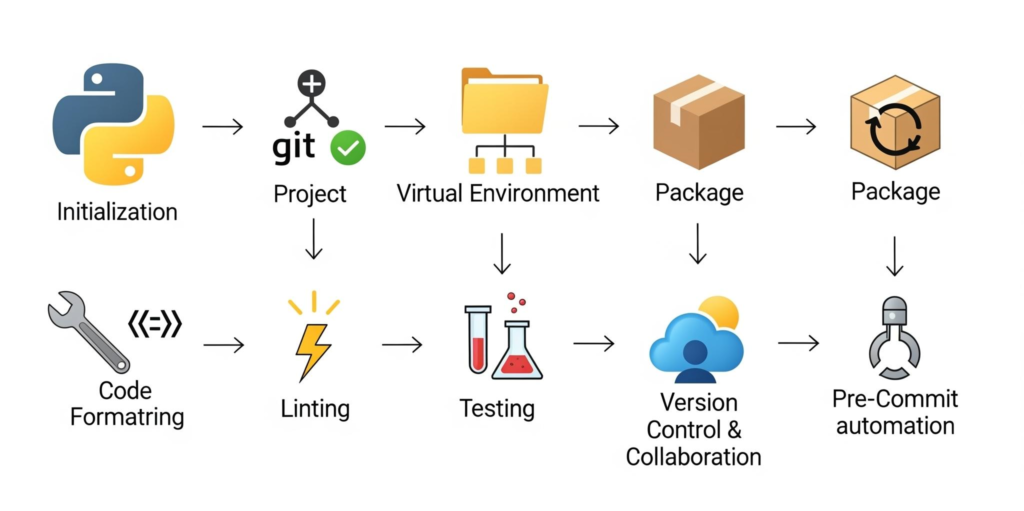


Step 1: Understand the Problem Before Coding
Avoid immediately opening the editor and writing dozens of lines.
First determine:
- 📚 What is the input?
- 📚 What is the desired output?
- What rules must be followed?
- What could go wrong?
- Which components are required?
A few minutes of planning can prevent hours of refactoring.
Step 2: Choose Meaningful Names
Names should explain purpose.
Poor naming:
x = 25Better:
maximum_retries = 25The second version communicates intent without requiring a comment.
Good names reduce the amount of explanation required elsewhere.
Step 3: Keep Functions Focused
A function should generally have a clear responsibility.
Instead of creating one huge function that:
- Reads a file
- Validates data
- Processes records
- Saves results
- Sends notifications
consider separating these responsibilities.
For example:
def load_records():
    ...


def validate_records():
    ...


📚 def process_records():
    ...


def save_results():
    ...
This makes each component easier to test and modify.
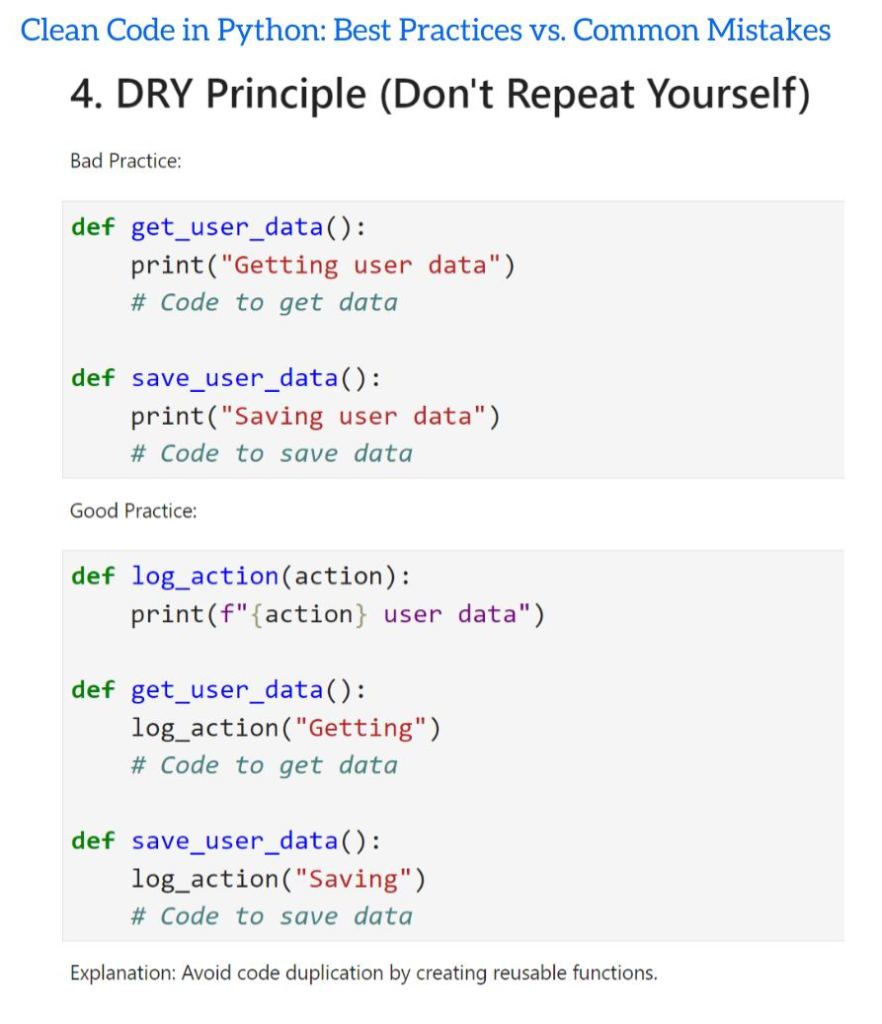
Step 4: Remove Unnecessary Duplication
Repeated logic creates maintenance problems.
If the same business rule appears in several places, changing the rule requires multiple edits.
A reusable function can centralize the behavior.
However, avoid eliminating duplication too aggressively. Two pieces of code may look similar while representing different business concepts.
Step 5: Handle Errors Intentionally
Exception handling should communicate what the program can reasonably recover from.
Instead of catching everything:
try:
    process_data()
except Exception:
    pass
handle expected failures explicitly.
Silently ignoring errors can transform a small problem into a difficult debugging session.
Step 6: Add Type Hints Where They Help
Type hints improve readability and tooling.
def calculate_total(prices: list[float]) -> float:
    ...
The function signature now communicates that it expects a collection of floating-point values and returns a floating-point result.
Type hints are particularly useful in large projects and team environments.
Step 7: Test Important Behavior
Clean code should be verifiable.
Tests can check:
- Normal behavior
- Invalid inputs
- Boundary conditions
- Expected exceptions
- Integration between components
Testing also makes refactoring safer.
Step 8: Refactor Regularly
Do not wait until the project becomes unmanageable.
After a feature works, inspect the implementation.
Ask:
- Can this be simplified?
- Are names clear?
- Is there duplicated logic?
- Is the function too large?
- Are comments explaining confusing code rather than obvious operations?
Small refactoring sessions prevent large cleanup projects later. 🔧
Comparison
Clean Python and messy Python can produce the same output, but their long-term engineering characteristics are very different.
| Area | Clean Python | Poorly Maintained Python |
|---|---|---|
| Naming | Descriptive | Ambiguous |
| Functions | Focused | Very large |
| Errors | Explicitly handled | Frequently ignored |
| Structure | Logical | Difficult to navigate |
| Documentation | Useful | Missing or excessive |
| Testing | Automated | Limited |
| Duplication | Controlled | Frequent |
| Readability | High | Low |
| Maintenance | Easier | Expensive |
| Collaboration | Smooth | Difficult |
Clean Code vs. Short Code
Shorter code is not automatically better code.
For example, compressing complicated logic into one expression may reduce the number of lines while increasing cognitive complexity.
The goal should be clarity per line, not minimum line count.
Diagrams & Tables
A useful mental model for clean Python is:


                 Clean Python
                      │
        ┌─────────────┼─────────────┐
        │             │             │
   Readability    Maintainability  Testing
        │             │             │
        ├──────┐      ├──────┐      ├──────┐
        │      │      │      │      │      │
     Naming  Style  Structure DRY  Unit   Errors
Another useful model is the development cycle:
Problem
   ↓
Design
   ↓
Implementation
   ↓
Testing
   ↓
Review
   ↓
Refactoring
   ↓
Maintenance
   ↺
Practical Quality Checklist
| Question | Good Sign |
|---|---|
| Can I understand this function quickly? | ✅ |
| Does the function have one clear purpose? | ✅ |
| Are variable names descriptive? | ✅ |
| Are errors handled deliberately? | ✅ |
| Can important behavior be tested? | ✅ |
| Is the project structure logical? | ✅ |
| Is the abstraction actually useful? | ✅ |
Examples Without Equation and Math
Example 1: Descriptive Variables
Less clear:
a = get_users()
b = filter_users(a)
c = save_users(b)
More readable:
users = get_users()
active_users = filter_active_users(users)
save_users(active_users)
The second implementation requires less mental interpretation.
Example 2: Clear Functions
Instead of:
def process():
    # hundreds of lines
    ...
prefer meaningful operations:
def generate_report():
    data = collect_data()
    validated_data = validate_data(data)
    return format_report(validated_data)
The high-level function reads almost like a description of the workflow.
Example 3: Avoiding Magic Values
Instead of:
if attempts > 5:
    stop()
consider:
MAX_RETRIES = 5

if attempts > MAX_RETRIES:
    stop()
The constant provides context.
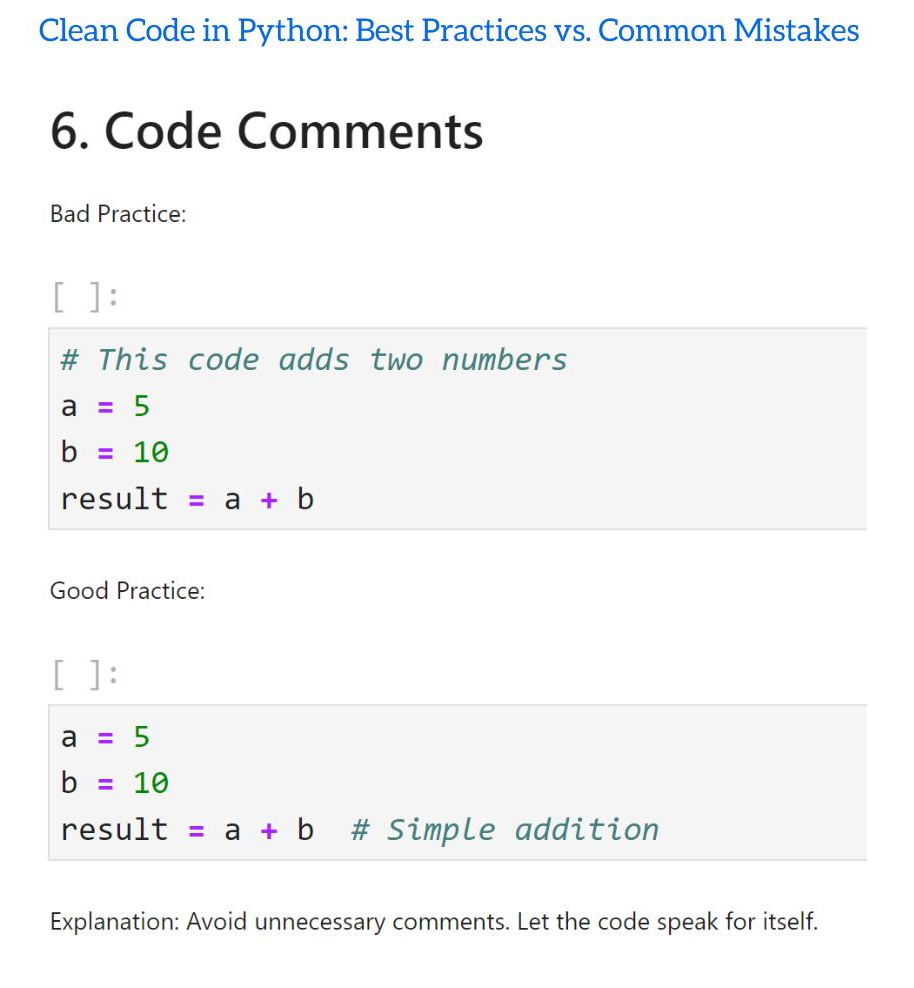
Example 4: Useful Comments
Bad comments simply repeat the code:
count += 1 # Increase count by oneA useful comment explains why unusual behavior exists.
# The external service occasionally returns duplicate events,
# so repeated identifiers are intentionally ignored.
That type of comment preserves engineering knowledge.
Real World Application
Clean Python is especially valuable in professional environments where applications evolve over years rather than days.
Web Development
Python frameworks such as Django and Flask are often used in applications containing authentication, databases, APIs, and business logic.
Clean separation between these responsibilities helps development teams maintain the application.
Data Science
Data science projects frequently begin as notebooks and later become production pipelines.
Clear functions and reusable modules make it easier to move experimental code into maintainable software.
Artificial Intelligence
Machine learning systems contain data preparation, training, evaluation, model serving, and monitoring components.
Poor organization can make experiments difficult to reproduce.
Clean Python helps separate these stages.
Automation
Python is widely used for:
- File processing
- System administration
- Reporting
- Data extraction
- Testing
- Deployment automation
Readable scripts are particularly important when automation affects production systems.
Engineering and Scientific Computing
Engineers use Python for simulation, numerical analysis, optimization, visualization, and data processing.
Clear code allows technical teams to validate assumptions and modify models more safely.
Common Mistakes
Writing Extremely Long Functions
Large functions are difficult to understand and test.
Solution: Break them into smaller functions with meaningful responsibilities.
Using Cryptic Names
Names such as x, tmp, d, and val may be acceptable in very small contexts but become problematic in larger programs.
Solution: Prefer names that communicate intent.
Excessive Comments
Comments should not compensate for unclear code.
Solution: Improve the code first, then document the reasoning that cannot be expressed clearly through code alone.
Overengineering
Creating complicated architectures for simple problems introduces unnecessary maintenance.
Solution: Start simple and introduce abstractions when genuine requirements justify them.
Ignoring Exceptions
A program that hides failures can appear functional while producing incorrect results.
Solution: Handle expected errors and allow unexpected failures to remain visible during development.
Copying Code Everywhere
Duplicated business logic eventually becomes inconsistent.
Solution: Identify genuinely shared behavior and centralize it appropriately.
Challenges & Solutions
| Challenge | Solution |
|---|---|
| Large legacy codebase | Refactor gradually |
| Inconsistent style | Use automated formatting and linting |
| Difficult testing | Introduce smaller functions |
| Excessive duplication | Identify reusable domain logic |
| Poor documentation | Document public interfaces and important decisions |
| Complex dependencies | Improve module boundaries |
| Fear of refactoring | Build tests before major changes |
Balancing Cleanliness and Delivery Speed
Professional engineering involves deadlines.
You do not need to make every line perfect before shipping.
Instead, aim for code that is clear enough, tested enough, and maintainable enough for its current importance.
Clean coding is a continuous process rather than a final state.
Case Study
Imagine an engineering company building a Python application that processes equipment inspection reports.
The initial prototype is written quickly. One large script:
- Reads uploaded files
- Extracts measurements
- Validates records
- Generates reports
- Stores results
- Sends email notifications
At first, the program works.
Several months later, the company needs to support a new report format.
Because everything is inside one large workflow, modifying the file parser unexpectedly affects report generation.
The engineering team refactors the application.
The new design separates responsibilities:
Input Layer
     ↓
Parser
     ↓
Validator
     ↓
Processing Service
     ↓
Report Generator
     ↓
Storage
     ↓
Notification
Now a new file format primarily requires changes to the parser.
The important lesson is not that every Python application needs a complex architecture. The lesson is that clear boundaries reduce the cost of change.
Essential Tips
1. Write for the Next Developer
Even if you are working alone, imagine that another engineer will inherit your code.
2. Prefer Explicit Code
When behavior matters, make it obvious.
3. Use Automation
Formatting, linting, static analysis, and testing tools can catch many problems automatically.
4. Keep Dependencies Under Control
Every dependency introduces maintenance and security considerations.
Use libraries because they provide meaningful value—not simply because they are available.
5. Treat Tests as Documentation
A good test can demonstrate exactly how a function is expected to behave.
6. Refactor in Small Steps
Small changes are easier to review and less likely to introduce hidden problems.
7. Follow Consistent Style
Consistency allows developers to focus on behavior instead of formatting disagreements.
8. Learn Python Idioms
Understanding generators, comprehensions, context managers, iterators, decorators, and standard-library tools can help you write expressive Python.
However, use these features when they improve clarity—not simply to demonstrate advanced knowledge.
9. Measure Before Optimizing
Do not make code complicated solely because you assume something is slow.
Profile real bottlenecks first.
⚡ Readable + Correct + Tested + Appropriately Simple = Strong Python Engineering
FAQs
What is Clean Python?
Clean Python is an approach to writing Python software that emphasizes readability, simplicity, maintainability, consistency, testing, and clear responsibility boundaries.
Is clean code always shorter?
No. Clean code prioritizes clarity rather than minimum line count. Sometimes a few additional lines make complicated behavior significantly easier to understand.
Should every Python function be very small?
Not necessarily. Functions should be appropriately sized and have a coherent responsibility. Splitting code excessively can also reduce readability.
Are comments necessary in clean Python?
Yes, but comments should provide valuable context. They are particularly useful for explaining business decisions, unusual behavior, constraints, or reasons behind implementation choices.
Should I use type hints in every Python project?
Type hints are especially useful in larger projects, shared codebases, libraries, and applications where static analysis improves reliability. They can also be valuable in smaller projects when they improve clarity.
What is the biggest clean-code mistake beginners make?
One common mistake is focusing on sophisticated techniques before learning the fundamentals of naming, functions, control flow, testing, and program structure.
Can clean Python improve performance?
Clean code does not automatically mean faster code. However, clear architecture can make performance bottlenecks easier to identify, measure, and optimize.
How do I start learning clean coding?
Start with meaningful names, focused functions, consistent formatting, deliberate exception handling, basic automated tests, and regular refactoring. Then gradually learn more advanced design techniques.
Conclusion
Clean Python is much more than following a formatting style. It is a way of thinking about software engineering.
The strongest Python programs are not necessarily the programs containing the most advanced language features. They are programs where intent is easy to discover, responsibilities are clear, failures are visible, and changes can be made safely. 🐍💡
For beginners, clean coding provides a strong foundation for learning professional software development. For experienced engineers, it provides a disciplined approach to managing complexity.
The most important principles are straightforward:
- Choose meaningful names.
- Keep responsibilities clear.
- Prefer simple solutions.
- Avoid unnecessary duplication.
- Handle errors intentionally.
- Use type hints where they add value.
- Write useful tests.
- Document important decisions.
- Refactor continuously.
- Optimize only when evidence justifies it.
Ultimately, elegant Python is not about writing code that looks clever.
It is about writing code that makes sense.
That is the real power of clean engineering: fewer surprises, easier collaboration, safer changes, and software that remains understandable long after its original author has moved on. 🚀🐍