SQL in 7 Days: A Quick Crash Course in Data Manipulation, Database Operations, Analytical Queries, and Server-Side Programming
Introduction 🚀
SQL, or Structured Query Language, is one of the most important technologies for working with structured data. Whether you are an engineering student analyzing laboratory results, a software developer building an application, or a professional working with business intelligence, SQL provides a direct way to communicate with databases.
Modern engineering systems generate enormous amounts of information. Manufacturing equipment produces sensor readings, websites collect user activity, financial systems record transactions, and scientific applications continuously store experimental results. A database provides an organized environment for storing this information, while SQL provides the language used to retrieve, modify, analyze, and manage it.


The good news is that learning the fundamentals of SQL does not require years of study. A focused seven-day crash course can establish a strong foundation if each day combines concepts with practical exercises.
This guide progresses from basic data retrieval to advanced analytical queries and server-side database programming. It is designed for beginners but also includes concepts that professionals can use when improving their database skills.


Background Theory 🧠
Understanding Databases
A database is an organized collection of information that can be stored, searched, updated, and managed efficiently.
In a relational database, information is generally organized into tables. A table contains rows and columns. For example, an engineering company might maintain separate tables for projects, employees, equipment, inspections, and maintenance records.
SQL provides commands that allow applications and users to interact with these tables.
Relational Database Concepts
A relational database connects related pieces of information through defined relationships.
Important concepts include:
- Table: Stores a particular category of information.
- Row: Represents one record.
- Column: Represents an attribute.
- Primary key: Uniquely identifies a record.
- Foreign key: Connects records between tables.
- Constraint: Controls what data can be stored.
- Index: Helps the database locate information efficiently.
SQL and Database Engines
SQL is a language rather than a single database product. Different database management systems implement SQL with their own features and syntax extensions.
Common systems include:
- PostgreSQL
- MySQL
- Microsoft SQL Server
- Oracle Database
- SQLite
The core concepts are highly transferable between these platforms.
Definition 📘
What Is SQL?
SQL is a declarative programming language used to communicate with relational database management systems.
Instead of describing every internal step the computer must perform, SQL generally describes the information you want or the operation you want to perform.
For example, a query can request all employees working in a particular engineering department. The database engine determines an efficient method for locating the requested records.
Major SQL Categories
SQL operations can be broadly organized into several groups.
| Category | Purpose | Typical Operations |
|---|---|---|
| DQL | Retrieve information | SELECT |
| DML | Manipulate data | INSERT, UPDATE, DELETE |
| DDL | Define database structures | CREATE, ALTER, DROP |
| DCL | Manage permissions | GRANT, REVOKE |
| TCL | Manage transactions | COMMIT, ROLLBACK |
Understanding these categories makes SQL easier to organize mentally.
Step-by-Step SQL Learning Plan 🛠️
Day 1 — Learn Tables and Basic Queries
Start by understanding database structure.
Your first objective is learning how to retrieve information using SELECT.
You should become comfortable with:
- Selecting columns
- Selecting multiple columns
- Filtering records
- Sorting results
- Removing duplicate results
- Giving columns readable aliases
- Limiting returned records
A beginner might work with an employee database and retrieve employee names, departments, and job roles.
The important lesson on Day 1 is that SQL queries should clearly communicate what information is required.
Day 2 — Manipulate Data
Once retrieval becomes comfortable, learn how to change database contents.
The fundamental operations are:
INSERT — adds records.
UPDATE — modifies existing records.
DELETE — removes records.


These operations form the foundation of CRUD systems:
Create → Read → Update → Delete
For example, an equipment-management application might create a new machine record, retrieve its details, update its maintenance status, or remove an obsolete record.
Day 3 — Work with Multiple Tables
Real databases rarely store everything in one table.
Suppose an engineering company has:
- Employees
- Projects
- Departments
- Work assignments
These tables can be connected through keys.
Understanding JOIN Operations
JOIN operations allow SQL to combine information from related tables.
The most important joins are:
- INNER JOIN
- LEFT JOIN
- RIGHT JOIN
- FULL OUTER JOIN
An INNER JOIN returns matching records from related tables.
A LEFT JOIN preserves records from the left table even when a matching record does not exist in the other table.


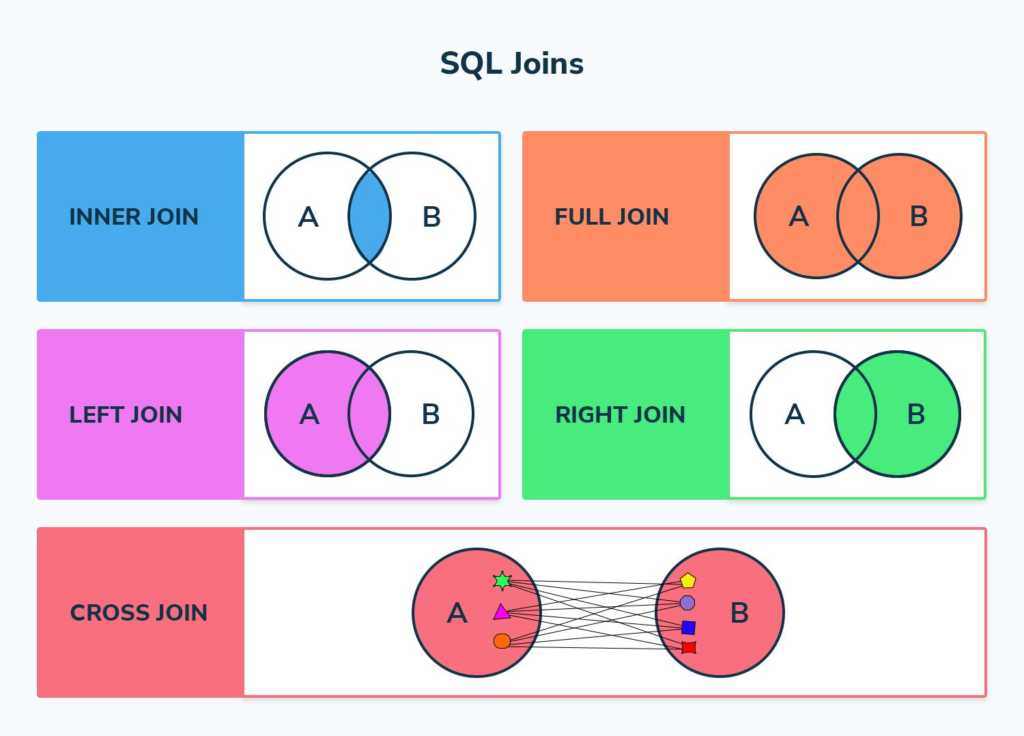
Understanding joins is one of the biggest milestones in becoming productive with SQL.
Day 4 — Analyze Data
SQL is not only for retrieving individual records. It is also a powerful analytical tool.
Learn to group records and calculate useful summaries.
Important concepts include:
- COUNT
- SUM
- AVG
- MIN
- MAX
- GROUP BY
- HAVING
For example, an engineering manager could analyze how many maintenance activities each facility completed during a particular period.
Day 5 — Master Analytical Queries
Day 5 introduces more advanced querying techniques.
Subqueries
A subquery allows one query to use the result of another query.
This is useful when a problem naturally consists of multiple logical stages.
Common Table Expressions
Common Table Expressions, commonly called CTEs, allow complicated queries to be organized into logical sections.
They can make analytical SQL easier to read and maintain.
Window Functions
Window functions are particularly valuable for data analysis.
They can help answer questions such as:
- Which employee ranked highest?
- How does each measurement compare with its group?
- What is the running total?
- What is the previous recorded value?
- Which record is the most recent?
These capabilities make SQL highly useful for engineering analytics and reporting.
Day 6 — Database Operations and Performance
SQL skills become more valuable when you understand how databases behave internally.
Study:
- Primary keys
- Foreign keys
- Constraints
- Indexes
- Transactions
- Views
- Database normalization
- Query execution concepts
Why Indexes Matter
An index can significantly improve the speed of searches involving frequently queried columns.
However, indexes are not free. They consume storage and can increase the work required when records are inserted or modified.
Therefore, professional database design requires balancing read performance with write performance.
Day 7 — Server-Side Programming
The final day connects SQL with application development.
A web application might use:
User Interface → Server Application → Database
For example:
- A user submits an equipment ID.
- The server receives the request.
- The application validates the input.
- A parameterized SQL query is executed.
- The database returns the requested information.
- The server processes the result.
- The application displays the information.
This architecture is common in web applications, engineering management systems, analytics platforms, and enterprise software.
Comparison: SQL Approaches ⚖️
Different SQL techniques solve different problems.
| Technique | Best Use | Difficulty |
|---|---|---|
| Basic SELECT | Simple retrieval | Beginner |
| Filtering | Finding specific records | Beginner |
| JOIN | Combining tables | Intermediate |
| GROUP BY | Summarizing data | Intermediate |
| Subquery | Multi-stage logic | Intermediate |
| CTE | Organizing complex queries | Intermediate |
| Window function | Advanced analysis | Advanced |
| Stored procedure | Server-side database logic | Advanced |
| Transaction | Reliable multi-step operations | Intermediate |
SQL Versus Spreadsheet Analysis
Spreadsheets are excellent for smaller datasets and interactive calculations. SQL becomes particularly useful when information is stored centrally, datasets are large, multiple users require access, or analysis needs to be automated.
SQL Versus General-Purpose Programming
Python, Java, C#, and similar languages can perform sophisticated computations. SQL specializes in communicating with databases.
In many professional systems, they work together rather than compete.
Diagrams and Database Architecture 🏗️
Typical Application Architecture
A simple database-driven system can be visualized as:
┌──────────────────────┐
│    User Interface    │
└──────────┬───────────┘
           ↓
┌──────────────────────┐
│   Server Application │
└──────────┬───────────┘
           ↓
┌──────────────────────┐
│     SQL Database     │
├──────────────────────┤
│ Users                │
│ Projects             │
│ Equipment            │
│ Measurements         │
│ Maintenance          │
└──────────────────────┘
Data Flow
A typical analytical workflow looks like:
Raw Data
   ↓
Database Storage
   ↓
SQL Filtering
   ↓
JOIN Operations
   ↓
Aggregation
   ↓
Analytical Query
   ↓
Report / Dashboard
CRUD Model
CREATE → INSERT
READ   → SELECT
UPDATE → UPDATE
DELETE → DELETE
This simple model is fundamental to application development.
Examples 🔧
Engineering Project Database
Imagine a civil engineering company managing several construction projects.
A database could contain project names, locations, engineers, contractors, inspection records, and completion statuses.
SQL could answer questions such as:
- Which projects are currently active?
- Which engineer is assigned to each project?
- How many inspections have been completed?
- Which projects require additional documentation?
Manufacturing Example
A factory could store equipment information and maintenance records.
SQL could identify machines that have not received maintenance recently, compare maintenance activity between facilities, and produce summaries for managers.
Software Development Example
A software company could maintain customer accounts, subscriptions, support tickets, and product usage.
SQL could help analysts determine which customers have the highest support activity or which product features are used most frequently.
Real-World Applications 🌍
Engineering
SQL supports:
- Equipment databases
- Asset management
- Laboratory data
- Quality-control systems
- Project management
- Sensor-data analysis
Finance
Financial organizations use databases to manage transactions, accounts, reporting systems, and analytical workloads.
Healthcare
Database systems can organize operational and administrative information while access controls help protect sensitive records.
Manufacturing
Manufacturers can use SQL for production tracking, inventory management, machine monitoring, and quality analysis.
Web Applications
Almost every data-driven application requires some method of persistent data storage. SQL databases are commonly integrated with server-side applications to create dynamic systems.
Common SQL Mistakes ⚠️
Forgetting the WHERE Clause
An UPDATE or DELETE operation without an appropriate filter can affect many records.
Always verify the target records before modifying production data.
Using SELECT *
Selecting every column can retrieve unnecessary information and make applications less efficient.
Explicitly selecting required columns is usually clearer.
Ignoring NULL
NULL does not simply mean zero or an empty string.
It represents missing or unknown information and requires appropriate SQL handling.
Poor JOIN Conditions
An incorrect JOIN condition can create duplicate or misleading results.
Always understand how the keys connect the tables.
Ignoring Transactions
Operations involving multiple related changes should often be protected by transaction logic so that partial updates do not leave the database inconsistent.
Challenges and Solutions 💡
| Challenge | Solution |
|---|---|
| SQL syntax feels confusing | Practice small queries frequently |
| JOINs seem difficult | Draw table relationships |
| Queries become too long | Use CTEs and meaningful aliases |
| Slow queries | Examine indexes and execution plans |
| Duplicate results | Review JOIN relationships |
| Data inconsistency | Use constraints and transactions |
| Security problems | Use parameterized queries |
| Difficult maintenance | Format and document SQL clearly |
The Biggest Beginner Challenge
The biggest obstacle is often trying to memorize syntax instead of understanding data relationships.
Think about the question first:
What information do I need?
Then identify:
Where is that information stored?
Finally determine:
How are the relevant tables connected?
This approach makes complex SQL considerably easier.
Case Study: Equipment Maintenance System 🏭
Consider a manufacturing company operating hundreds of machines.
Initially, maintenance information is stored across spreadsheets maintained by different departments.
This creates several problems:
- Duplicate records
- Inconsistent equipment names
- Difficult reporting
- Slow searches
- Limited historical analysis
The company moves the information into a relational database.
Database Design
Separate tables are created for:
- Equipment
- Locations
- Maintenance events
- Technicians
- Maintenance types
Relationships connect maintenance records to the appropriate equipment and technician.
SQL-Based Workflow
A maintenance application allows technicians to enter completed work.
The server validates the information before storing it.
Managers can then use SQL queries to determine:
- Which machines have experienced frequent failures
- Which facilities require more maintenance resources
- Which equipment has overdue inspections
- How maintenance activity changes over time
Result
The database becomes more than a storage system. It becomes an analytical foundation for operational decision-making.
This illustrates an important engineering principle:
Good data structure enables better analysis.
Essential Tips for Learning SQL ⭐
Practice With Realistic Data
Instead of repeatedly querying tiny example tables, create datasets that resemble real engineering or business scenarios.
Learn Relationships
Spend time understanding primary keys and foreign keys. Strong relational thinking makes JOIN operations much easier.
Write Readable SQL
Use consistent indentation, meaningful aliases, and logical query structure.
Readable SQL is easier to debug and safer to maintain.
Learn One Database Platform
Beginners should choose one platform and practice consistently before attempting to master multiple systems.
Test Before Modifying
Before executing a large UPDATE or DELETE, run a SELECT using the same filtering conditions to verify which records will be affected.
Study Query Performance
As your skills improve, learn how indexes and query execution plans influence performance.
Think Like an Analyst
Do not simply ask, “How do I write this SQL?”
Ask:
“What decision will this data help someone make?”
That mindset transforms SQL from a syntax exercise into an engineering tool.
FAQs ❓
Is SQL difficult for beginners?
SQL is generally approachable because its basic commands closely resemble natural-language concepts. The difficulty increases when you work with multiple tables, complex analytics, optimization, and database architecture.
Can I really learn SQL in seven days?
You can learn the fundamentals in seven focused days, but becoming highly proficient requires continued practice. The seven-day approach should be viewed as a launchpad rather than a finish line.
Do engineers need SQL?
Many engineers benefit from SQL because modern engineering systems generate and store large quantities of structured data. SQL can be useful in manufacturing, civil engineering, software, research, automation, and analytics.
Should I learn SQL before Python?
Not necessarily. They serve different purposes. SQL specializes in database operations, while Python is a general-purpose programming language. Learning both provides a powerful combination.
What SQL command should beginners learn first?
Start with SELECT, then learn filtering and sorting. After that, move toward INSERT, UPDATE, DELETE, JOIN, aggregation, and analytical functions.
Are SQL joins important?
Yes. JOIN operations are essential when information is distributed across related tables, which is common in properly designed relational databases.
What is the difference between SQL and a database?
SQL is the language used to communicate with a database system. A database is the organized collection of information, while a database management system provides the software that stores and manages it.
Can SQL be used for big data?
SQL is widely used for analytical workloads involving large datasets. The appropriate database or data platform depends on the workload, scale, architecture, and performance requirements.
Conclusion 🚀
Learning SQL in seven days is an ambitious but realistic way to build a strong foundation in database technology.
The journey begins with basic SELECT queries and progresses through data manipulation, table relationships, JOIN operations, aggregation, analytical queries, database design, performance concepts, transactions, and server-side programming.
The most important lesson is that SQL is not simply a collection of commands. It is a way of thinking about structured information.
For beginners, the best strategy is simple:
Learn → Practice → Analyze → Build → Optimize.
For professionals, SQL provides a bridge between raw data and useful engineering intelligence. Whether you are developing a web application, analyzing equipment performance, managing project information, or building an analytical platform, strong SQL skills can make your work faster, more reliable, and more data-driven. 🔍💻📊
A focused seven-day crash course can open the door—but continuous practice is what turns SQL knowledge into professional expertise.