Discovering SQL: A Hands-On Guide for Beginners
Introduction
SQL, short for Structured Query Language, is one of the most important technologies for working with structured data. Whether you are studying engineering, computer science, business analytics, software development, or data science, understanding SQL can give you a practical way to explore and manage information.
Imagine a university storing thousands of student records, an engineering company tracking construction projects, or an online retailer managing millions of orders. All of these organizations need reliable ways to store, retrieve, organize, and analyze data.
That is where SQL becomes extremely useful. 🗄️⚙️
Unlike a programming language designed primarily for building applications, SQL is specifically designed to communicate with databases. It allows users to ask questions about data, filter information, combine records, update stored information, and produce useful reports.
This hands-on guide introduces SQL from the ground up while gradually connecting fundamental concepts with professional applications.


Background Theory
Understanding Databases
Before learning SQL commands, it is useful to understand what a database actually is.
A database is an organized collection of information that can be stored, searched, modified, and analyzed efficiently.
A relational database generally organizes information into tables. A table resembles a spreadsheet, containing rows and columns.
For example, an engineering company might maintain a table containing:
| Project ID | Project Name | Location | Status |
|---|---|---|---|
| 101 | Bridge Project | London | Active |
| 102 | Office Tower | Toronto | Completed |
| 103 | Solar Plant | Sydney | Planning |
Each row represents one record, while each column describes a particular characteristic of that record.
Relational Database Concepts
Relational databases connect multiple tables using relationships.
For example, a company could have:
- Customers
- Projects
- Employees
- Invoices
- Equipment
- Suppliers
Instead of putting everything into one enormous table, related information can be distributed across several tables.
This approach reduces duplication and makes data easier to maintain.
What SQL Actually Does
SQL provides instructions for interacting with the database.
A user can ask questions such as:
- Which projects are currently active?
- Which customers placed orders this month?
- Which products have the highest sales?
- Which employees belong to a particular department?
- Which machines require maintenance?
The database management system processes the SQL request and returns the appropriate information.
Definition
What Is SQL?
SQL is a standardized language used to communicate with relational database management systems.
SQL can be used to:
- Retrieve information
- Insert new records
- Modify existing records
- Delete records
- Create tables
- Define relationships
- Filter information
- Sort results
- Combine information from multiple tables
- Generate analytical reports
Popular database systems that support SQL include PostgreSQL, MySQL, Microsoft SQL Server, Oracle Database, and SQLite.
SQL Versus a Database Management System
These concepts are related but not identical.
SQL is the language.
A database management system, or DBMS, is the software that stores and manages the database.
For example:
SQL → communication language
PostgreSQL → database management system
Think of SQL as the language you use to communicate with a database engine.
Step-by-Step Explanation
Step 1: Understand the Table Structure
Start by identifying the information stored in your table.
Suppose you have an Employees table.
It could contain:
- Employee ID
- Name
- Department
- Job Title
- Location
The first thing to understand is what each column represents.
Step 2: Retrieve Information
The SQL SELECT command is one of the first commands beginners should learn.
A basic query can request information from a table.
SELECT Name, Department
FROM Employees;
This tells the database to return the employee names and departments.
Step 3: Filter Results
The WHERE clause allows you to retrieve records matching a condition.
SELECT Name, Department
FROM Employees
WHERE Department = 'Engineering';
Instead of displaying every employee, the database returns employees belonging to the Engineering department.
Step 4: Sort the Results
The ORDER BY clause organizes results.
SELECT Name, Department
FROM Employees
ORDER BY Name;
You can sort data in ascending or descending order.
SELECT Name, Department
FROM Employees
ORDER BY Name DESC;
Step 5: Insert New Data
The INSERT command adds a new record.
INSERT INTO Employees
(Name, Department, JobTitle)
VALUES
('Alex Morgan', 'Engineering', 'Design Engineer');
This creates a new employee record.
Step 6: Modify Existing Data
The UPDATE command changes existing information.
UPDATE Employees
SET Department = 'Research'
WHERE Name = 'Alex Morgan';
The WHERE condition is extremely important because it identifies which record should be changed.
Step 7: Delete Data
The DELETE command removes records.
DELETE FROM Employees
WHERE Name = 'Alex Morgan';
Deletion should always be handled carefully because removing the wrong records can cause data loss.


Step 8: Combine Information
Real databases often contain multiple related tables.
For example:
Customers
| Customer ID | Name |
|---|---|
| 1 | GreenTech |
| 2 | BuildPro |
Projects
| Project ID | Customer ID | Project |
|---|---|---|
| 501 | 1 | Solar Facility |
| 502 | 2 | Office Complex |
A SQL JOIN can combine related information.
SELECT Customers.Name, Projects.Project
FROM Customers
JOIN Projects
ON Customers.CustomerID = Projects.CustomerID;
This is where SQL becomes especially powerful.
Comparison
SQL Compared With Spreadsheets
Spreadsheets are excellent for small datasets and interactive calculations.
SQL becomes increasingly useful when data becomes large, interconnected, frequently updated, or shared among many users.
| Feature | SQL Database | Spreadsheet |
|---|---|---|
| Large datasets | Excellent | Limited |
| Relationships | Excellent | Moderate |
| Multi-user access | Strong | Variable |
| Automation | Excellent | Good |
| Complex queries | Excellent | Moderate |
| Data integrity | Strong | More manual |
| Visualization | Usually external | Excellent |
SQL Compared With NoSQL
SQL databases generally organize information into structured relational tables.
NoSQL systems can use models such as documents, key-value structures, graphs, or wide-column stores.
SQL is particularly useful when:
- Data relationships are important.
- Structure is relatively well defined.
- Consistency is critical.
- Complex queries are required.
NoSQL can be useful when:
- Data structures change frequently.
- Extremely large distributed systems are involved.
- Flexible document-oriented storage is desirable.
Neither approach is universally superior. The correct choice depends on the application.
Diagrams & Tables
A Simple SQL Database Architecture


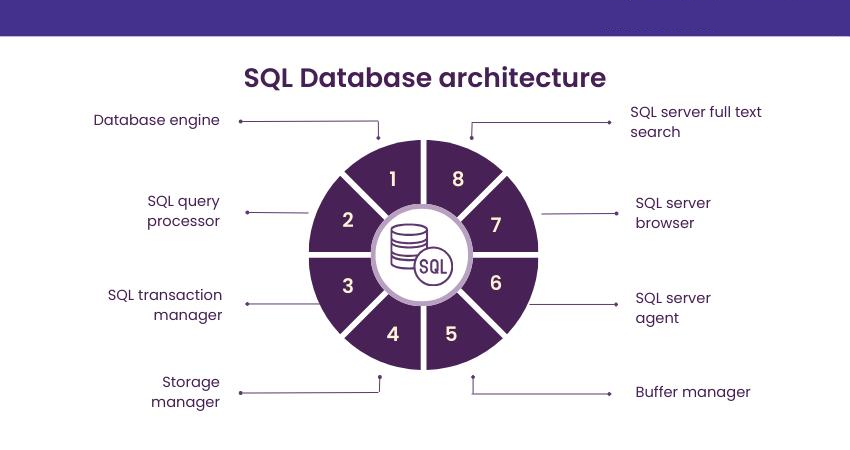


A simplified workflow looks like this:
User / Application
        ↓
     SQL Query
        ↓
 Database Management System
        ↓
   Database Tables
        ↓
    Query Result
This simple architecture explains why SQL is so useful: applications can communicate with databases through structured commands.
Important SQL Commands
| SQL Command | Main Purpose |
|---|---|
| SELECT | Retrieve data |
| INSERT | Add data |
| UPDATE | Modify data |
| DELETE | Remove data |
| CREATE | Create database objects |
| ALTER | Modify database structures |
| DROP | Remove database objects |
| JOIN | Combine related data |
| GROUP BY | Organize records into groups |
| ORDER BY | Sort results |
Primary Keys and Foreign Keys
A primary key uniquely identifies a record.
For example:
EmployeeID
101
102
103
A foreign key connects one table to another.
Customers
   ↓
CustomerID
   ↓
Projects
These relationships are fundamental to relational database design.
Examples
Example 1: University Database
A university could use SQL to manage:
- Student records
- Courses
- Professors
- Enrollments
- Examination results
An administrator could retrieve all students enrolled in a particular course.
Example 2: Engineering Company
An engineering organization might store information about:
- Construction projects
- Engineers
- Contractors
- Materials
- Equipment
- Project schedules
SQL could help managers locate all active projects associated with a particular region.
Example 3: Online Store
An e-commerce company could use SQL to identify:
- Recent orders
- Customer information
- Popular products
- Inventory levels
- Unprocessed orders
This transforms raw database records into useful business information.
Example 4: Manufacturing
A manufacturing facility could store machine maintenance records.
SQL could help identify machines requiring inspection, components nearing replacement, or maintenance records associated with particular production lines.
Real-World Application
Engineering and Construction
SQL can support project management systems containing thousands of records.
Engineers may need to connect:
Projects → Employees → Materials → Suppliers → Inspections
Instead of manually searching multiple spreadsheets, SQL can retrieve connected information quickly.
Data Analytics
SQL is one of the fundamental tools used by data analysts.
Analysts frequently use SQL to:
- Clean datasets
- Filter records
- Combine tables
- Prepare reports
- Identify trends
- Build datasets for visualization
SQL is often used alongside Python, R, Power BI, and other analytical tools.
Software Development
Modern applications frequently depend on databases.
A web application might use SQL to manage:
- User accounts
- Orders
- Product information
- Messages
- Permissions
- Application settings
The application sends requests to the database and receives structured results.
Cloud Computing ☁️
Cloud platforms provide managed database services that can support SQL-based systems.
This allows organizations to build applications without maintaining every component of the physical database infrastructure themselves.
SQL therefore remains highly relevant in modern cloud-based engineering and software environments.
Common Mistakes
Forgetting the WHERE Clause
One of the most dangerous beginner mistakes is running an UPDATE or DELETE command without a suitable condition.
For example:
UPDATE Employees
SET Department = 'Engineering';
This may modify every employee record.
Always carefully verify the target records before changing production data.
Using SELECT *
Beginners often use:
SELECT *
FROM Employees;
This is convenient while learning, but professional queries often specify only the required columns.
This can reduce unnecessary data retrieval and make queries easier to understand.
Ignoring NULL Values
NULL does not simply mean zero or an empty string.
It generally represents missing or unknown information.
Understanding NULL becomes important when filtering and analyzing real datasets.
Poor Naming
Names such as:
table1
data2
test_final_new
make databases difficult to maintain.
Clear names improve readability and collaboration.
Overlooking Data Types
Choosing inappropriate data types can cause problems with storage, performance, validation, and application behavior.
Always consider whether a field represents text, a date, an integer, a decimal value, or another type.
Challenges & Solutions
Challenge: Large Datasets
A query that works quickly on a small dataset may become slow as the database grows.
Solution: Learn about indexing, query optimization, execution plans, and efficient filtering.
Challenge: Complex Relationships
Multiple joins can become difficult to understand.
Solution: Draw the relationships between tables before writing complex queries.
Challenge: Duplicate Data
Poor database design can produce unnecessary duplication.
Solution: Learn basic database normalization and organize related information into appropriate tables.
Challenge: Security
SQL systems can contain sensitive business or customer information.
Solution: Use authentication, authorization, secure coding practices, parameterized queries, and appropriate access controls.
Challenge: SQL Injection
SQL injection occurs when unsafe user input is incorporated into database commands.
Solution: Applications should use parameterized queries or prepared statements rather than directly constructing SQL commands from untrusted input.
Case Study
Managing an Engineering Project Database
Consider a fictional engineering company called NorthBridge Engineering.
The organization manages infrastructure projects across several countries.
Initially, the company stores project information in multiple spreadsheets.
One spreadsheet contains project details.
Another contains employees.
A third contains suppliers.
A fourth contains equipment.
As the organization grows, employees begin encountering problems:
- Duplicate records
- Outdated information
- Difficult searches
- Conflicting versions
- Manual reporting
- Slow data analysis
The company decides to move its information into a relational database.
Database Design
The database contains tables for:
Projects
Employees
Suppliers
Equipment
Inspections
Materials
Each table has appropriate identifiers and relationships.
Employees can be connected to projects, suppliers can be connected to materials, and inspections can be associated with projects.
Using SQL
Project managers can query active projects.
Engineers can retrieve inspection information.
Procurement teams can identify suppliers connected to specific materials.
Management can generate reports based on project status.
The major benefit is not simply storing information—it is connecting information.
SQL turns separate records into a structured information system.
Essential Tips
Build Queries Gradually
Do not immediately attempt complicated SQL.
Start with:
SELECT
FROM
WHERE
Then introduce:
ORDER BY
GROUP BY
JOIN
After that, explore subqueries, common table expressions, window functions, and advanced optimization.
Practice With Realistic Data
Toy examples are useful, but realistic datasets teach you more.
Try building databases around:
- Students
- Books
- Engineering projects
- Inventory
- Employees
- Online orders
Learn Database Design
Learning SQL syntax alone is not enough for professional work.
Understand:
- Primary keys
- Foreign keys
- Relationships
- Normalization
- Constraints
- Indexes
- Transactions
Read Your Queries Aloud
A useful learning technique is to translate a query into plain English.
For example:
SELECT Name
FROM Employees
WHERE Department = 'Engineering';
Read it as:
“Select the names from employees where the department is Engineering.”
This helps beginners understand what each SQL component actually does.
Use SQL With Other Tools
SQL becomes even more powerful when combined with other technologies.
A common data workflow might look like:
SQL Database
      ↓
     SQL
      ↓
Python / R
      ↓
Data Analysis
      ↓
Visualization
      ↓
Business Decision
For modern data professionals, SQL is therefore not an isolated skill—it is part of a larger technical ecosystem.
FAQs
Is SQL difficult for beginners?
SQL is generally approachable because its basic commands resemble natural-language instructions. The difficulty increases when working with complex joins, optimization, database architecture, and large datasets.
Do I need programming experience to learn SQL?
No. You can learn fundamental SQL without first learning Python, Java, C++, or another programming language. Programming knowledge becomes useful later, especially when integrating SQL into applications or data-analysis workflows.
What should I learn first in SQL?
Start with tables and relationships, then learn SELECT, FROM, WHERE, ORDER BY, INSERT, UPDATE, and DELETE. After that, focus on joins, grouping, aggregation, and database design.
Is SQL still useful in modern technology?
Absolutely. SQL remains widely used in software development, data analytics, business intelligence, engineering systems, enterprise applications, and cloud database environments.
Should I learn SQL or Python first?
It depends on your goal. If your primary interest is databases and data retrieval, SQL is an excellent starting point. If you want broader programming capabilities, Python is also valuable. Learning both eventually provides a powerful combination.
What is a JOIN in SQL?
A JOIN combines related information from multiple tables based on a relationship between their columns.
Can SQL be used for big data?
SQL can work with very large datasets, although the underlying database architecture and technology matter. Modern analytical platforms often provide SQL interfaces for large-scale data processing.
Is SQL useful for engineers?
Yes. Engineers can use SQL for project databases, laboratory records, equipment information, inventory, sensor datasets, asset management, quality control, and technical reporting.
Conclusion
SQL is much more than a collection of database commands. It is a practical language for transforming structured data into useful information. 🗄️🔍
For beginners, the best approach is to build knowledge progressively: understand tables, learn basic queries, practice filtering and sorting, then move toward joins, aggregation, database design, and optimization.
For professionals, SQL becomes even more powerful when integrated with Python, R, business intelligence platforms, cloud services, and enterprise applications.
The key lesson is simple:
Don’t try to memorize SQL—learn how to ask useful questions of data.
Once you understand how databases organize information and how SQL retrieves relationships between records, you can begin solving real engineering, business, scientific, and software problems.
🚀 Learn one query, build one database, solve one real problem—and keep going.