100 Skills to Better Python: 50 Programs, 30 Tips and Tricks, and 20 Essential Modules
Introduction
Python is more than a beginner-friendly programming language. It is a versatile engineering tool used for automation, data analysis, artificial intelligence, scientific computing, web development, testing, cybersecurity, and many other technical applications. 🐍⚙️
The fastest way to become comfortable with Python is not simply to memorize syntax. Real progress comes from developing practical programming skills, solving increasingly difficult problems, understanding reusable techniques, and learning the standard modules that make Python powerful.
This guide presents 100 practical Python skills organized into three learning paths:
- 🧩 50 programs arranged from beginner to advanced.
- 💡 30 useful tips and tricks for writing cleaner and more efficient Python.
- 🛠️ 20 important Python modules explained through practical engineering applications.
Whether you are a student learning programming for the first time or a professional developing technical software, these skills provide a structured path from basic programming concepts to more advanced Python development.

Python is particularly valuable because the same language can support a small classroom exercise and a large professional application. A student might use it to process experimental measurements, while an engineer could use the same programming concepts to automate reports, analyze sensor data, or build a simulation workflow.


Background Theory
Why Python Skills Matter
Programming proficiency develops progressively. Beginners first learn how to store information and control program execution. Later, they learn how to structure software, work with external data, use libraries, handle errors, and design reusable systems.
Python supports this progression because its syntax is relatively readable while its ecosystem contains tools for advanced professional work.
The Four Levels of Python Development
Level 1: Fundamental Logic
The first stage includes variables, strings, numbers, lists, conditions, loops, and functions.
Level 2: Practical Programming
The second stage introduces files, dictionaries, modules, exceptions, data processing, and object-oriented programming.
Level 3: Engineering Automation
At this level, Python becomes a productivity tool. Programs can manipulate files, communicate with APIs, process datasets, create reports, and automate repetitive tasks.
Level 4: Advanced Development
Advanced users work with packages, concurrency, databases, testing, numerical computing, machine learning, web services, and larger software architectures.
Definition
What Does “100 Python Skills” Mean?
A Python skill is a practical ability that allows you to solve a programming problem or use Python more effectively.
The 100 skills in this guide are divided into:
| Category | Number of Skills | Main Purpose |
|---|---|---|
| Practical programs | 50 | Build programming ability |
| Tips and tricks | 30 | Improve coding efficiency |
| Python modules | 20 | Expand technical capabilities |
| Total | 100 | Complete skill-building path |
The important point is that these are not isolated facts. Each skill should reinforce another skill.
Step-by-Step Explanation
Part 1: Build 50 Python Programs
The best learning strategy is to start with very small programs and gradually increase complexity.
Beginner Programs: Skills 1–10
- Print a personal introduction — practice basic output.
- Create a simple calculator — work with arithmetic and input.
- Convert temperature units — practice variables and functions.
- Check whether a number is positive or negative — use conditions.
- Determine whether a number is even or odd — develop decision logic.
- Find the largest of three values — compare multiple inputs.
- Create a multiplication table — practice loops.
- Count characters in a word — work with strings.
- Reverse a string — learn sequence operations.
- Build a basic number-guessing game — combine input, loops, and conditions. 🎯
These programs teach the fundamental building blocks required for almost every Python application.
Intermediate Programs: Skills 11–25
- Create a simple password generator.
- Count words in a text document.
- Find duplicate values in a list.
- Remove duplicate elements from data.
- Sort a collection of records.
- Create a student-grade manager.
- Build a contact book.
- Create a simple expense tracker.
- Read and process a CSV file.
- Generate a text-based report.
- Create a unit-conversion utility.
- Build a basic quiz application.
- Search for files in a directory.
- Rename multiple files automatically.
- Create a simple log analyzer.
At this stage, learners begin solving problems that resemble actual office and engineering tasks.


Advanced Programs: Skills 26–40
- Build a JSON data processor.
- Create a command-line application.
- Build a database-backed contact system.
- Create an automated file-organizing tool.
- Develop a website data collector.
- Build a REST API client.
- Create an image-processing utility.
- Develop a data-cleaning pipeline.
- Create a statistical summary tool.
- Build a sensor-data processor.
- Create an automated report generator.
- Build a simple recommendation system.
- Create a machine-learning prediction workflow.
- Develop a multithreaded processing utility.
- Build a small web application.
These projects teach developers how individual Python concepts work together.
Professional-Level Programs: Skills 41–50
- Build an ETL data pipeline.
- Create an API monitoring service.
- Develop a database synchronization tool.
- Build an automated engineering report system.
- Create a batch-processing framework.
- Develop a data-quality validation system.
- Build a machine-learning data preparation pipeline.
- Create an asynchronous task processor.
- Develop a modular Python application.
- Build a complete end-to-end engineering data application. 🚀
The final projects should combine multiple skills instead of relying on one programming concept.
Comparison
Beginner vs Advanced Python Skills
| Feature | Beginner | Advanced |
|---|---|---|
| Programs | Small scripts | Complete applications |
| Data | Lists and strings | Databases and pipelines |
| Functions | Simple reusable functions | Modular architectures |
| Errors | Basic exception handling | Robust error-management systems |
| Files | Read/write documents | Automated data workflows |
| Performance | Basic execution | Optimization and concurrency |
| Libraries | Standard modules | Specialized ecosystems |
| Testing | Manual testing | Automated test suites |
Scripts vs Professional Applications
A short Python script might solve one immediate problem. A professional application must additionally consider maintainability, testing, security, documentation, performance, and scalability.
That difference is one of the most important transitions in a developer’s career.
30 Python Tips and Tricks
Skills 51–60: Cleaner Code
- Use descriptive variable names.
- Keep functions focused on one responsibility.
- Avoid unnecessarily long functions.
- Use comments to explain why, not obvious what.
- Follow consistent indentation.
- Use meaningful function names.
- Prefer readable code over clever code.
- Keep related functionality together.
- Remove unused variables and imports.
- Format code consistently.
Skills 61–70: Faster Development
- 🚀 Use list comprehensions when they improve readability.
- Use dictionary comprehensions for simple transformations.
- Use
enumerate()when you need indexes and values. - 🚀 Use
zip()to process related sequences together. - Use
sorted()when you need a new ordered collection. - Use
any()andall()for logical collection tests. - 🚀 Use
get()when safely retrieving dictionary values. - Use
setfor efficient membership checks. - Use unpacking to simplify assignments.
- 🚀 Use f-strings for readable string formatting.
Skills 71–80: Professional Habits
- Handle expected exceptions explicitly.
- Validate external input.
- Separate configuration from application logic.
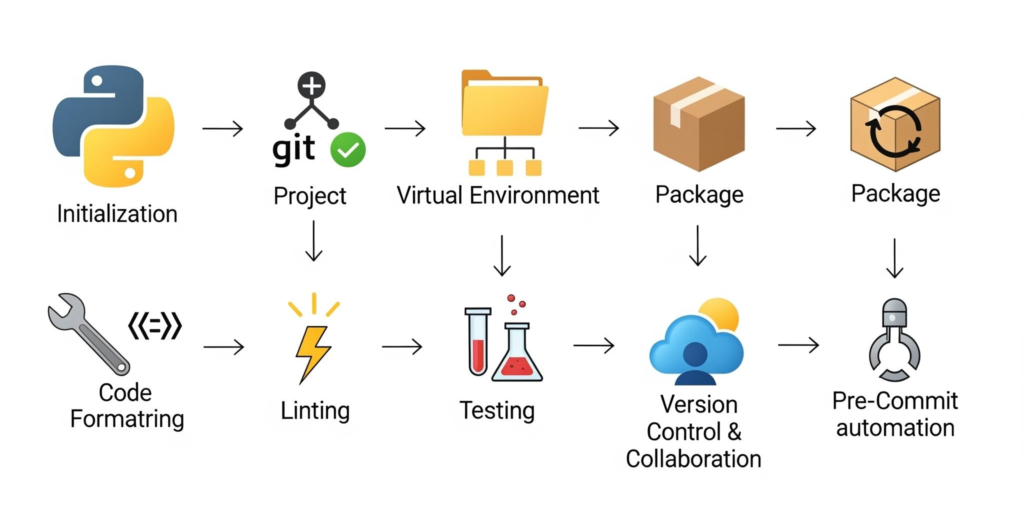
- Use virtual environments for projects.
- Keep dependencies documented.
- Write reusable functions.
- Test important functionality automatically.
- Use version control.
- Document public functions and modules.
- Break large applications into logical modules. 🧠


20 Essential Python Modules
Skills 81–90: Core and Practical Modules
- os — interact with operating-system functionality.
- pathlib — manage file and directory paths more cleanly.
- sys — interact with the Python runtime environment.
- math — perform common mathematical operations.
- statistics — calculate descriptive statistical values.
- datetime — work with dates and times.
- json — process JSON data.
- csv — read and write CSV datasets.
- re — search and manipulate text using regular expressions.
- collections — provides specialized collection types.
Skills 91–100: Powerful Development Modules
- itertools — create efficient iteration workflows.
- functools — support higher-order functions and reusable functional techniques.
- random — generate pseudo-random values for simulations and applications.
- logging — create structured application logs.
- sqlite3 — work with lightweight relational databases.
- subprocess — communicate with external system processes.
- threading — execute tasks using threads.
- asyncio — develop asynchronous applications.
- unittest — create automated software tests.
- argparse — build professional command-line interfaces. 🎓
These modules are especially useful because they introduce capabilities that would otherwise require substantial amounts of custom code.
Diagrams and Tables
The Python Skill Development Pipeline
Python Fundamentals
        ↓
Small Programs
        ↓
Data Structures
        ↓
Functions & Modules
        ↓
File & Data Processing
        ↓
Automation
        ↓
Databases & APIs
        ↓
Testing & Optimization
        ↓
Professional Applications
Skill-to-Application Map
| Skill Group | Example Application |
|---|---|
| Conditions and loops | Engineering calculations |
| Strings | Document processing |
| Lists and dictionaries | Data organization |
| Functions | Reusable engineering tools |
| Files | Automated reports |
| JSON and APIs | Data integration |
| Databases | Record management |
| Threads and async | Large workloads |
| Testing | Reliable software |
| Modules | Professional applications |
Examples Without Equations
Example 1: Engineering Data
Imagine an engineer receives thousands of temperature measurements from a monitoring system. Instead of opening every record manually, Python can read the dataset, identify invalid readings, organize measurements by date, and produce a summary report.
Example 2: Student Management
A university department could use Python to process student records, identify missing information, calculate grade summaries, and produce organized reports.
Example 3: Automated File Management
An engineering company may receive hundreds of drawings and reports every week. A Python program can inspect file names and automatically organize documents into appropriate folders.
Real World Application
Engineering and Scientific Work
Python is widely useful for engineering workflows involving data processing, simulation, automation, visualization, and research.
Data Science
Python provides a practical environment for cleaning datasets, exploring information, preparing machine-learning inputs, and generating analytical reports.
Automation
Repetitive administrative or technical tasks are excellent candidates for Python automation. This can reduce manual work and make processes more consistent.
Web and API Development
Python can communicate with web services, retrieve information from APIs, process responses, and integrate different software systems.
Artificial Intelligence
Python is also central to many AI workflows because developers can combine core programming knowledge with specialized scientific and machine-learning libraries.
Common Mistakes
Trying to Learn Everything at Once
Python contains a huge ecosystem. Beginners often become overwhelmed by libraries before mastering basic programming.
Better approach: learn one concept, build a small project, and then move forward.
Copying Code Without Understanding It
A program that works is not necessarily a program that has been learned.
Better approach: change the program, test different inputs, and explain every important section in your own words.
Ignoring Error Messages
Error messages are valuable debugging information.
Better approach: read the final line first, identify the error type, and trace backward to the relevant code.
Writing Extremely Complex Code
Advanced syntax is not automatically better.
Better approach: prioritize clarity, maintainability, and predictable behavior.
Challenges & Solutions
| Challenge | Practical Solution |
|---|---|
| Syntax errors | Use an editor with Python support |
| Difficulty understanding loops | Draw the execution flow |
| Large projects become confusing | Divide code into modules |
| Repeated code | Create reusable functions |
| Slow processing | Profile before optimizing |
| Data-quality problems | Validate input early |
| Difficult debugging | Use logging and controlled tests |
| Dependency problems | Use virtual environments |
| Poor maintainability | Follow consistent project structure |
Case Study
Automating an Engineering Reporting Workflow
Consider a consulting engineering team that receives measurement files from multiple projects.
Previously, engineers manually opened files, checked values, copied information into spreadsheets, organized folders, and prepared summary documents.
The team develops a Python workflow containing several of the 100 skills:
pathlibidentifies incoming files.- CSV processing reads measurement data.
- Validation routines identify incomplete records.
- Dictionaries organize project information.
- Functions separate individual processing tasks.
- Logging records processing events.
- Statistics summarize the collected information.
- Automated reporting produces standardized results.
- Testing verifies important processing functions.
The important lesson is not that Python eliminates engineering judgment. Instead, Python handles repetitive information processing while engineers concentrate on interpretation, design decisions, and quality control.
Essential Tips
Build Before You Memorize
Do not attempt to memorize every Python feature. Build programs and allow practical repetition to reinforce knowledge.
Increase Difficulty Gradually
A good learning sequence is:
10 tiny programs → 15 practical scripts → 15 intermediate projects → 10 advanced applications.
Rebuild Projects
After finishing a project, rebuild it without looking at the original solution. This exposes gaps in understanding.
Read Other People’s Code
Reading well-structured Python exposes you to techniques that may not appear in beginner tutorials.
Learn the Standard Library
Before searching for an external package, check whether Python already provides a suitable standard module.
Think Like an Engineer
The strongest Python developers do not simply ask, “How can I write this code?”
They ask:
“What is the most reliable, maintainable, and efficient way to solve this problem?” ⚙️
FAQs
Is Python difficult for beginners?
Python is generally approachable because its syntax is relatively readable. However, becoming proficient requires consistent practice with problems rather than simply reading tutorials.
How many Python programs should I build?
There is no universal number, but building dozens of progressively harder programs is highly effective. The 50-program sequence in this guide provides a structured starting point.
Can Python be used for engineering?
Yes. Python is useful for automation, data processing, numerical work, scientific computing, testing, visualization, APIs, and many engineering workflows.
Should I learn Python modules before learning programming fundamentals?
No. Beginners should first understand variables, conditions, loops, functions, and data structures. Modules become much easier once these foundations are established.
Are Python tips and tricks necessary?
They are not required to write your first programs, but they can substantially improve readability, productivity, and maintainability as your experience grows.
What is more important: syntax or problem-solving?
Problem-solving is more important. Syntax can be looked up, but understanding how to break a complex problem into manageable steps is a fundamental programming skill.
Can these skills help professionals?
Absolutely. File automation, data processing, APIs, databases, testing, logging, and modular programming are directly relevant to many professional workflows.
How long does it take to become good at Python?
The timeline varies considerably. Consistent practice, progressively harder projects, and solving real problems generally produce better results than focusing only on the number of hours studied.
Conclusion
Learning Python effectively is a progression rather than a single course. The 100 skills presented here create a practical roadmap from basic programming to professional development.
The 50 programs provide hands-on experience. The 30 tips and tricks improve coding habits and productivity. The 20 modules introduce the standard Python capabilities that can transform simple scripts into useful engineering tools.
🚀 For beginners, the priority should be fundamentals and small programs. For intermediate developers, automation, data processing, files, APIs, and databases provide valuable next steps. For professionals, testing, modular design, asynchronous programming, logging, performance, and maintainability become increasingly important.
Most importantly, don’t try to master all 100 skills in a single week. 🐍
Start with one program. Understand it. Modify it. Break it. Fix it. Then build something slightly more difficult.
That cycle—learn → build → test → debug → improve—is one of the most reliable ways to turn Python knowledge into genuine engineering capability. 🚀