100 Electronic Projects with Circuit Diagrams: The Ultimate Guide for Students, Makers, and Professional Engineers
Introduction 🚀
Electronics is one of the most exciting branches of engineering because it combines creativity, mathematics, programming, and practical problem-solving. Whether you’re building a simple LED flasher or designing an IoT-based smart home system, every project improves your understanding of electronic components, circuit design, troubleshooting, and innovation.
This comprehensive guide introduces 100 electronic project ideas with circuit diagrams, explains the engineering principles behind them, and provides valuable insights for beginners, engineering students, hobbyists, and experienced professionals.
💡 Throughout this article, you’ll learn:
- Basic electronic concepts
- Circuit design principles
- Beginner, intermediate, and advanced electronic projects
- Practical engineering applications
- Common mistakes and troubleshooting techniques
- Professional engineering tips


Background Theory 📚
Electronic engineering is built upon the controlled movement of electrical current through various components.
Every electronic circuit consists of several fundamental building blocks:
- Power Supply
- Conductors
- Resistors
- Capacitors
- Inductors
- Diodes
- Transistors
- Integrated Circuits (ICs)
- Sensors
- Actuators
Modern electronics rely heavily on semiconductor technology, microcontrollers, embedded systems, wireless communication, and digital signal processing.
Understanding circuit diagrams is the first step toward becoming an electronics engineer.
Definition ⚡
An electronic project is a practical implementation of an electrical or electronic circuit designed to perform a specific task using components such as resistors, capacitors, transistors, sensors, integrated circuits, and microcontrollers.
Circuit diagrams provide a graphical representation showing how each component connects electrically.
They serve as the blueprint for building, testing, repairing, and improving electronic systems.
Understanding Circuit Diagrams Step by Step 🔧


Step 1 — Read the Power Supply
Every circuit begins with identifying:
- Battery
- DC Adapter
- USB Power
- AC Source
Always check:
- Voltage
- Current rating
- Polarity
Step 2 — Identify Components
Common symbols include:
| Symbol | Component | Function |
|---|---|---|
| R | Resistor | Limits current |
| C | Capacitor | Stores charge |
| D | Diode | One-way current |
| LED | Light Emitting Diode | Indicator |
| Q | Transistor | Amplifier/Switch |
| IC | Integrated Circuit | Logic/Processing |
| L | Inductor | Magnetic storage |
| SW | Switch | Opens/Closes circuit |
Step 3 — Follow Current Flow
Current normally travels:
Positive Supply
↓
Protection Circuit
↓
Control Circuit
↓
Load
↓
Ground
Step 4 — Build on Breadboard
Before soldering:
✅ Verify polarity
🚀 Double-check values
✅ Measure continuity
✅ Test voltage
Step 5 — Troubleshoot
If the circuit doesn’t work:
- Check loose wires
- Verify resistor values
- Confirm transistor orientation
- Measure voltage
- Replace damaged components
100 Electronic Project Ideas 💡
Beginner Projects (1–25)
- LED Blinker
- LED Chaser
- Traffic Light
- Electronic Dice
- Automatic Night Lamp
- Touch Switch
- Rain Alarm
- Water Level Indicator
- Door Bell
- Burglar Alarm
- Temperature Indicator
- Battery Tester
- Continuity Tester
- Fan Speed Controller
- Light Sensor
- Fire Alarm
- Clap Switch
- Police Siren
- Digital Clock
- Timer Circuit
- Electronic Candle
- Solar Charger
- Morse Code Generator
- Voltage Monitor
- Mobile Charger Indicator
Intermediate Projects (26–60)
- Line Follower Robot
- Metal Detector
- Digital Voltmeter
- Automatic Street Light
- Home Security Alarm
- Water Pump Controller
- RGB LED Controller
- Servo Motor Controller
- PWM Speed Controller
- Automatic Fan Controller
- Soil Moisture Monitor
- Electronic Voting Machine
- Digital Counter
- LCD Display System
- Bluetooth Robot
- Ultrasonic Distance Meter
- Obstacle Avoiding Robot
- RFID Door Lock
- Password Lock
- DC Motor Driver
- Battery Management Circuit
- Audio Amplifier
- FM Transmitter
- FM Receiver
- Wireless Door Bell
- Smart Parking Sensor
- Power Supply Unit
- IR Remote Control
- Automatic Irrigation
- Gesture Controlled Robot
- Arduino Calculator
- Gas Leakage Detector
- Earthquake Alarm
- Digital Thermometer
- ECG Monitor
Advanced Projects (61–100)
- Smart Home Automation
- IoT Weather Station
- Smart Energy Meter
- Face Recognition Door Lock
- Voice Controlled Home
- Solar MPPT Charger
- Automatic Power Factor Controller
- CNC Controller
- Robotic Arm
- Smart Greenhouse
- Drone Flight Controller
- Electric Vehicle Battery Monitor
- Industrial PLC Trainer
- Digital Oscilloscope
- Smart Attendance System
- AI Vision Robot
- Autonomous Delivery Robot
- ECG Analysis System
- Smart Traffic Controller
- IoT Water Quality Monitor
- Smart Helmet
- GSM Home Automation
- Remote Health Monitoring
- Smart Farming System
- Wireless Power Transfer
- Bluetooth Speaker
- Wi-Fi Energy Monitor
- Smart Wheelchair
- Voice Assistant Device
- Smart Mirror
- Automated Warehouse Robot
- Smart Dustbin
- Digital Power Analyzer
- Robot Vacuum Cleaner
- Environmental Monitoring Station
- Automatic Solar Tracker
- EV Charging Controller
- AI Security Camera
- Smart Factory Monitoring
- Industrial IoT Gateway
Comparing Different Project Categories 📊
| Category | Difficulty | Cost | Learning Value | Suitable For |
|---|---|---|---|---|
| LED Projects | Easy | Low | Excellent | Beginners |
| Sensor Projects | Easy | Low | High | Students |
| Arduino Projects | Medium | Medium | Excellent | Engineering Students |
| Robotics | Medium | Medium | Very High | Hobbyists |
| IoT Systems | Advanced | Medium | Excellent | Professionals |
| AI Electronics | Advanced | High | Outstanding | Researchers |
Circuit Diagrams and Engineering Examples 📐


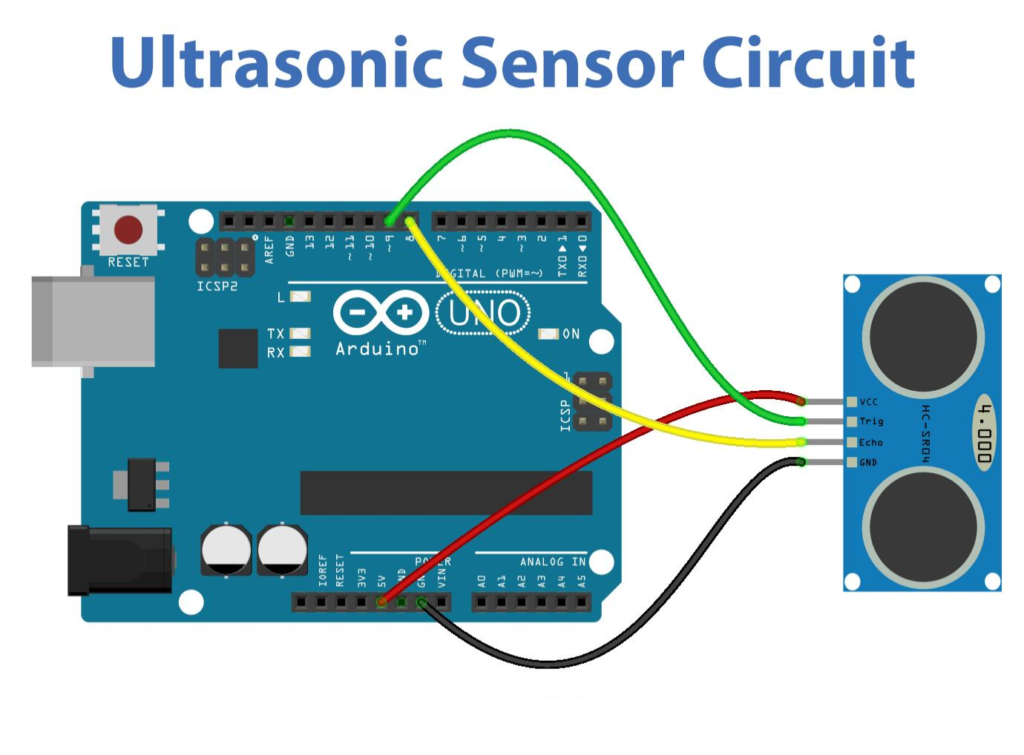
Common Circuit Types
| Circuit | Main Components | Application |
|---|---|---|
| LED Flasher | 555 Timer | Lighting |
| Power Supply | Transformer, Diodes | Electronics Lab |
| Amplifier | Transistors | Audio |
| Sensor Circuit | Sensors + MCU | Automation |
| Motor Driver | MOSFET | Robotics |
| Relay Driver | Transistor + Relay | Home Automation |
Practical Engineering Examples 🔍
Example 1: Automatic Street Light
Uses:
- LDR
- Relay
- Transistor
- Power Supply
When darkness increases, the relay automatically switches on the street light.
Example 2: Water Level Indicator
Components:
- LEDs
- Transistors
- Conductive Probes
The LEDs indicate the tank’s water level.
Example 3: Smart Irrigation System
Uses:
- Soil Moisture Sensor
- Arduino
- Relay
- Water Pump
The system waters plants only when required.
Real-World Applications 🌍
Electronic projects form the foundation of many modern technologies:
🏭 Industrial automation
🚗 Electric vehicles
🏥 Medical equipment
🚁 Drones
🏠 Smart homes
🌱 Precision agriculture
🚦 Intelligent transportation
🛰 Satellite communication
🤖 Robotics
📡 Wireless communication
Engineers often prototype these systems using simplified educational projects before scaling them into commercial products.
Common Mistakes ❌
Many beginners encounter similar issues while assembling electronic circuits:
- Reversing LED polarity
- Incorrect resistor values
- Loose breadboard connections
- Poor solder joints
- Wrong transistor orientation
- Power supply mismatch
- Short circuits
- Ignoring component datasheets
- Missing ground connections
- Overheating sensitive components
Avoiding these mistakes saves time and protects components from damage.
Challenges and Solutions 🛠️
| Challenge | Solution |
|---|---|
| Circuit not working | Verify wiring step by step |
| Components heating | Check voltage and current |
| Sensor noise | Add filtering capacitors |
| Wrong readings | Calibrate sensors |
| Motor interference | Use flyback diode |
| PCB errors | Review schematic before fabrication |
| Unstable power | Use voltage regulators |
| Communication failure | Verify protocols and baud rate |
Case Study 🏆
Building a Smart Home Lighting System
A team of engineering students designed an automated lighting system using:
- Arduino
- PIR motion sensor
- LDR
- Relay module
- Wi-Fi module
Objectives
- Reduce electricity consumption
- Improve user comfort
- Enable remote control
Results
✔ Reduced energy consumption by approximately 35%
🚀 Reliable automatic operation
✔ Remote smartphone monitoring
Engineering Lessons
- Sensor calibration is essential.
- Stable power supplies improve reliability.
- Modular circuit design simplifies maintenance and future upgrades.
Essential Tips ⭐
- 📖 Learn schematic symbols before building.
- 🔋 Always use regulated power supplies.
- 📐 Simulate circuits before assembling them.
- 🔍 Read component datasheets carefully.
- 🧪 Test each module individually.
- 📦 Organize electronic components by type and value.
- ⚡ Measure voltages with a multimeter frequently.
- 🔥 Use heat sinks for high-power devices.
- 🧰 Keep a clean and organized workspace.
- 💾 Document every project for future improvements.
Frequently Asked Questions ❓
Which electronic project should beginners start with?
LED blinkers, continuity testers, and traffic light projects are excellent starting points because they use few components and teach essential circuit concepts.
Do I need programming knowledge?
Not for basic analog circuits. However, projects involving Arduino, ESP32, Raspberry Pi, or other microcontrollers require programming.
What software is best for designing circuits?
Popular options include KiCad, EasyEDA, Proteus, LTspice, and Autodesk Eagle.
What tools should every electronics student own?
A soldering station, digital multimeter, breadboard, jumper wires, wire cutters, precision screwdrivers, and a regulated DC power supply.
Why should I use a breadboard first?
Breadboards allow rapid prototyping, making it easy to modify circuits without soldering.
Are electronic projects useful for engineering careers?
Absolutely. Practical projects demonstrate problem-solving skills, reinforce theoretical knowledge, and strengthen engineering portfolios for internships and jobs.
Can these projects be expanded into commercial products?
Yes. Many commercial devices began as simple prototypes before evolving through testing, PCB design, and product engineering.
Conclusion 🎯
Electronic projects are one of the most effective ways to transform engineering theory into practical skills. From simple LED circuits to advanced IoT systems and AI-powered automation, every project enhances your understanding of electronics, circuit analysis, troubleshooting, and system design.
Working through a diverse collection of projects builds confidence in reading schematics, selecting components, and designing reliable hardware. Whether you’re a student preparing for engineering courses, a hobbyist exploring embedded systems, or a professional developing innovative products, mastering electronic projects lays a strong foundation for future success.
Start with basic circuits, gradually tackle more complex designs, document your progress, and continuously refine your techniques. With persistence and curiosity, today’s small breadboard experiment can become tomorrow’s breakthrough engineering solution. 🚀